
The best call center software for small business isn't about having the most features—it's about finding the right balance between power and affordability. The goal is to turn your standard business phone into a professional hub that manages customer communication efficiently, letting your small team deliver an experience that rivals much larger competitors.
Why Your Business Needs Call Center Software
It’s easy to think of call center software as something reserved for huge corporations with massive support teams, but that’s a common myth. In reality, it's a game-changer for any small business ready to punch above its weight class.
Think of it this way: you could try to run a restaurant out of your home kitchen, but a professional kitchen is built for efficiency, consistency, and scale. Relying on personal cell phones or a single landline for your business is the same thing—it creates disorganization and gets overwhelmed fast.
The right software elevates your customer experience from the very first ring. It provides the structure and tools to manage every call professionally, ensuring no customer ever falls through the cracks. It's less about the technology itself and more about perception. It sends a clear message to your customers: you're a serious, professional operation.
Top 5 Reasons Small Businesses Adopt Call Center Software
When a small business decides to invest in this technology, it's usually driven by a few key pain points. The right software doesn't just add features; it solves real, everyday problems that hold back growth and frustrate customers.
| Benefit | Impact on Your Small Business |
|---|---|
| Professional Image | Instantly sound more established with auto-attendants and custom greetings. |
| Improved Efficiency | Route calls to the right person automatically, slashing wait times and frustration. |
| Better Customer Service | Never miss a call again. Track every interaction to provide consistent, quality support. |
| Actionable Insights | Use call data and analytics to understand what customers want and how to improve. |
| Scalability for Growth | Easily add new team members and phone lines as your business expands, without the headache. |
Ultimately, these benefits combine to create a system that grows with you, helping your team focus on what really matters—building strong customer relationships.
Moving Beyond Basic Phone Lines
Using personal cell phones or a single business line just doesn't work once you start to grow. It quickly leads to chaos. Calls get dropped, voicemails pile up in a single inbox, and you have zero visibility into how your team is performing or what your customers are actually saying. This setup doesn't just look unprofessional; it actively holds your business back.
The alternative is a system built specifically for professional communication. Modern call center software gives you:
- A Polished First Impression: Features like custom greetings and automated menus (known as IVR, or Interactive Voice Response) make your small business sound like a well-established company.
- Smarter Organization: Automatic Call Distribution (ACD) is a game-changer. It intelligently routes callers to the right person or department, which means less confusion and shorter wait times.
- Powerful Performance Insights: With access to call recordings and analytics, you can finally understand customer needs on a deeper level and coach your team to improve service. To see how this extends to other channels, exploring the benefits of live chat for customer service shows how integrated tools can really boost satisfaction.
This shift isn't just a hunch; it's part of a huge trend. The global call center software market is projected to hit US$225.06 billion by 2032, largely because small businesses are embracing cloud-based tools to cut costs and gain a competitive edge.
At the end of the day, this software gives your team the tools they need to manage every conversation effectively. By organizing both inbound and outbound calls, you can focus on the activities that drive revenue, like converting new leads and keeping your existing customers happy.
For example, a well-managed call system directly impacts your ability to turn inquiries into sales. This is a core idea we cover in our guide with appointment setting tips—great tools are the foundation for great results. Choosing the right software isn't just an expense; it's a foundational step toward building a business that can grow and deliver amazing service.
What Features Actually Matter in Call Center Software?

Diving into call center software can feel like you’re trying to learn a whole new language. You'll hear terms like IVR, ACD, and analytics thrown around constantly, but what do they really mean for a small business? Let's cut through the jargon and talk about what these features actually do for you.
Think of these features less like complicated tech and more like a team of super-efficient digital assistants working around the clock. Once you understand what each one brings to the table, picking the best call center software for your small business becomes much clearer. You’ll know you're investing in tools that solve actual problems, not just adding buzzwords to your tech stack.
Each feature is designed to tackle a specific challenge, from making sure every call gets answered instantly to connecting customers with the one person who can solve their problem.
The Digital Receptionist and Smart Traffic Cop
Interactive Voice Response (IVR) is basically your automated digital receptionist. It’s that professional, recorded voice that greets callers with a menu: "For sales, press 1. For support, press 2." Just having this in place makes a small business sound bigger and more organized from the very first second.
For your customers, it’s a direct path to the right help, saving them the headache of being bounced from person to person. For your team, it acts as a filter, sorting and directing calls before their phones even ring. That's a huge time-saver.
Once a caller picks an option, Automatic Call Distribution (ACD) jumps in. The best way to think of ACD is as a smart traffic cop for your phone lines. It looks at the incoming call and sends it to the best person available based on rules you’ve set up.
Those rules can be pretty straightforward or surprisingly sophisticated:
- Skills-Based Routing: Got a tough technical question? The ACD sends it straight to your most knowledgeable agent, bypassing everyone else.
- Round-Robin: This ensures calls are passed out evenly, so no single team member gets overloaded. It’s a simple way to keep things fair and prevent burnout.
- Time-Based Routing: You can set it to send calls to your team during business hours and then automatically switch over to voicemail or an on-call number after hours.
The growth in this space tells a story. The market for Automatic Call Distribution is on track to jump from $1.02 billion in 2022 to an estimated $5.1 billion by 2032. This isn't just a trend for big corporations anymore; it shows that efficient, automated call handling is becoming standard for businesses of all sizes. You can dig into more stats and see how CCaaS functions are evolving at market.us.
Tools That Help You Train and Get Better
Great software doesn’t just manage live calls—it gives you the tools to see what’s working, what isn't, and how to improve. These features are all about quality control and smart planning.
Call recording is a non-negotiable feature for any business serious about service. It’s not about spying on your team; it’s about having a record you can use for a few critical reasons:
- Training New Staff: You can pull up real-world examples of great calls (and not-so-great ones) to help new hires get up to speed faster.
- Keeping Quality High: Reviewing calls helps you ensure everyone on the team is delivering the same high standard of service.
- Clearing Up Disputes: If a customer dispute comes up, having a recording of the conversation is the best way to get to the truth quickly and fairly.
Finally, analytics and reporting dashboards are where all your call data comes together to tell a story. This is your command center, giving you a clear view of key numbers like average wait times, how many calls you’re getting, and how often problems are solved on the first try. By keeping an eye on these metrics, you can spot patterns, fix small problems before they become big ones, and make decisions based on real data, not just guesswork.
How to Choose the Right Call Center Software

Knowing what features are out there is one thing, but actually picking the right software is where the rubber meets the road. The best call center software for small business isn't just a list of bells and whistles; it’s the one that fits your team, your budget, and where you plan to be a year from now. Getting this choice right means you're investing in a partner for your growth, not just buying a tool for today.
Think about it like buying a vehicle for your business. You wouldn't get a massive semi-truck just to make a few local deliveries. You'd get something that fits the job. The same logic applies here—you need software that solves your specific problems without weighing you down with complicated extras you’ll never touch.
Let's walk through how to evaluate your options so you can compare providers with confidence and ask the questions that really matter.
Evaluate Scalability and Usability
Your business is going to grow, and your software needs to be able to keep up. That's what scalability is all about. Can you add new agents, phone lines, or features just as easily when you have ten people on your team as you did when you had two? A good system grows with you, so you aren't forced to jump ship right when you're hitting your stride.
Just as important is usability. The most powerful system in the world is worthless if your team can't figure out how to use it. Look for a clean, intuitive interface that feels natural. Your team should be making calls, not reading a manual.
Key Insight: A fast, simple setup is usually a great sign. If a vendor is talking about a long, complicated onboarding process, it might be a warning that the software is too clunky for a small, fast-moving team.
As you look at different solutions, think about how they support strategies to improve call center efficiency. The right tool should make your operations smoother, not more complicated.
Understand Integrations and Pricing Models
Your call center software has to play nicely with the other tools you use every day, especially your Customer Relationship Management (CRM) system. Built-in integrations are a must-have. They automatically sync customer information, giving your agents the full story on every caller without making them jump between five different tabs. It's a huge time-saver and cuts down on mistakes.
Finally, you need to get a handle on the pricing. Hidden fees can turn a good deal sour, so it’s important to know what you’re signing up for. Most companies use one of two models:
- Per-User Pricing: You pay a predictable flat fee every month for each agent. This is straightforward and makes budgeting a breeze.
- Usage-Based Pricing: Your bill is based on how many minutes you use or calls you make. This can be a great deal if your call volume is low or unpredictable, but watch out for surprise charges if you have a busy month.
Always ask for a clear breakdown of what's included in each plan. Some vendors will hide essential features like call recording in their more expensive tiers. The goal is to find that sweet spot—a plan that gives you everything you need without breaking the bank.
Comparing the Top Solutions for Small Business
Alright, you've got the basics down—you know what features to look for and how to evaluate them. Now for the fun part: seeing how the top players in the game actually stack up.
Here’s the thing: there's no single "best" call center software for every small business. The right choice for a bustling e-commerce shop is going to be completely different from what a local home service company needs. It all comes down to your specific operations, budget, and what you're trying to achieve with your customer service.
To make this really practical, we’re not just going to list features. We’ll look at a few leading platforms from the perspective of a small business owner, focusing on what they do best, how they charge for it, and who they’re a perfect fit for. This way, you can actually picture how each one would work for you.
This chart gives you a quick visual on how pricing tiers usually work. You'll see how the monthly cost per person lines up with the features and support you get.
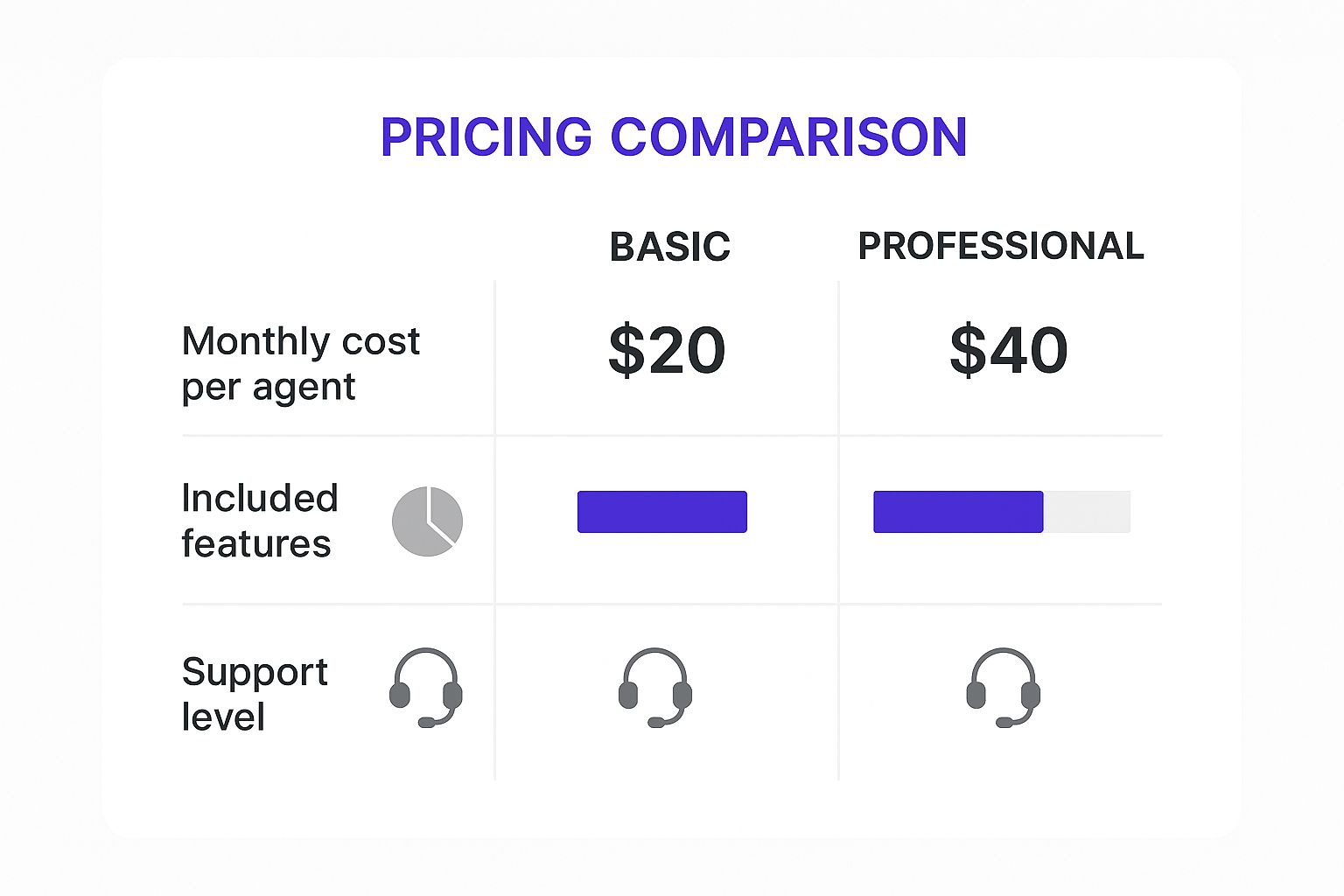
The main takeaway? As you invest a bit more per agent, you unlock more powerful tools and better support. That might not be necessary on day one, but it can be a lifesaver when you start to grow.
Feature and Pricing Comparison of Leading Small Business Call Center Software
As you begin your search, a few names will pop up over and over. Each has made a name for itself by being exceptionally good at something, whether that's being incredibly easy to use, packing in smart AI features, or just offering a fantastic price. The table below gives you a bird's-eye view of how some of the top contenders compare, specifically on the things that matter most to a small business.
| Software | Key Feature Highlight | Pricing Model | Best For |
|---|---|---|---|
| RingCentral | All-in-one platform with over 20 communication channels. | Per user, per month. Very cost-effective entry point. | Businesses needing an affordable, omnichannel solution from day one. |
| Dialpad | Advanced AI tools like real-time agent assist and automated call scoring. | Per user, per month. AI features are a core part of all plans. | Teams focused on high call volumes and agent performance coaching. |
| Nextiva | Built-in CRM and workflow automation to orchestrate the customer journey. | Per user, per month. Higher starting price but feature-rich. | Businesses wanting deep customer insights and process automation. |
| Vonage | Highly customizable call routing and queuing with a drag-and-drop designer. | Per user, per month, with many features as add-ons. | Service-based businesses with complex call handling needs. |
This side-by-side look makes one thing crystal clear: the "best" software is all about your priorities. If your main goal is to handle a flood of inbound support calls without missing a beat, Dialpad's AI coaching tools are a game-changer. But if you're on a tight budget and just need a solid system to manage calls, chats, and emails, RingCentral's low starting price is tough to argue with.
A Closer Look at Specific Use Cases
Let's ground this in a few real-world scenarios. It’s a lot easier to see which platform fits when you can imagine it in action.
-
For the Growing E-commerce Store: An online shop is constantly juggling sales questions, order tracking requests, and returns. This calls for an omnichannel solution. RingCentral is a powerhouse here, letting you handle web chat, email, and social media messages right alongside your phone calls, all from one clean inbox.
-
For the Local Service Provider: Think of a plumber or an HVAC company that needs to route emergency calls and schedule appointments flawlessly. Vonage shines with its incredibly detailed call-handling rules. You could, for instance, set it up so that any call after 9 PM goes straight to the on-call tech’s cell, while routine appointment requests get sent to the queue for the next morning.
-
For the Sales-Focused Team: A small crew that lives on outbound calls needs to be fast and efficient. Nextiva is built for this. Its auto-dialer and integrated CRM mean your team can make more calls and log every single conversation without ever having to jump between different apps.
Key Takeaway: Don't get mesmerized by the platform with the longest feature list. Instead, zoom in on the one whose main strengths solve your biggest business headache. You're not just buying technology; you're buying a solution to a problem.
How AI Is Changing the Game for Small Business Support

Let's clear something up: artificial intelligence and automation aren't just for massive corporations with bottomless budgets anymore. These tools are now surprisingly accessible and affordable, giving small business support teams what feels like a set of superpowers. They help you create a much better customer experience and make your team more efficient—all without needing a crew of data scientists.
Think of AI as the ultimate assistant for your agents. It’s always working in the background, quietly taking care of the tedious, repetitive tasks. This frees up your team to focus on what they do best: handling the complex, nuanced conversations where a human touch really matters. Suddenly, you're not just keeping up; you're competing with the big guys.
The money flowing into this space tells the whole story. The global contact center software market is expected to balloon from US$72.62 billion in 2025 to a staggering US$172.64 billion by 2030. What’s driving this explosion? Things like flexible cloud pricing and no-code AI assistants are making it easy for small businesses to get in on the action. You can dig into the numbers yourself in the full research about the contact center software market on mordorintelligence.com.
Smart Tools That Actually Help Your Team
So, what does this look like day-to-day? It’s not about robots taking over. It's about making your people smarter, faster, and more effective at their jobs.
Here are a few ways AI can lend a hand:
- AI-Powered Chatbots: These aren't just clunky auto-replies. Modern chatbots can offer real help 24/7, answering common questions like "Where's my order?" or "What are your hours?" This keeps customers happy and lets your human agents focus on the tougher problems.
- Sentiment Analysis: This is like giving your team an emotional radar. The software analyzes a customer's tone of voice or the words they use in a chat. If someone is getting frustrated, it can automatically flag the conversation for a supervisor to step in and smooth things over before it's too late.
- Automated Summaries: Imagine finishing a long, detailed call and having a perfect summary instantly appear. That's what this does. AI generates a quick recap of the conversation, saving your agents a ton of time on manual note-taking and making sure nothing important gets lost.
Finally, Effortless Data-Driven Decisions
One of the biggest wins with AI is its knack for turning a mountain of raw call data into simple, actionable advice. Forget spending hours listening to call recordings to figure out what’s going on. AI analytics spots the important trends for you.
Key Insight: AI can tell you the top reasons customers are calling, pinpoint where they're getting stuck, and even score agent performance against your quality standards. This is the kind of information that helps you make smart, confident decisions to improve your entire operation.
This move toward automation isn't just happening in customer support, either. To see how these ideas are being applied elsewhere, check out this guide to automated recruitment software and AI recruiting tools. It's a great look at how similar tech is helping businesses find and hire the right people, proving just how widespread AI's impact has become.
A Simple Guide to a Smooth Software Rollout
Picking the right call center software is a huge step, but the real work starts when it’s time to launch. A smooth rollout is the difference between a team that feels confident and customers who don't notice a single hiccup. Honestly, this is your chance to turn a big technical change into a really positive moment for your brand.
It doesn’t have to be a nightmare. With a solid plan, you can sidestep all the common frustrations and get your new system humming from day one. And it all begins with your people.
Set Your Team Up for Success
You absolutely cannot skimp on training. I mean it. You need to block out dedicated time for your staff to get their hands on the new platform before it ever touches a real customer call. Think hands-on practice, not just making them sit through a bunch of training videos.
Make sure every single person is comfortable with the basics: answering, transferring, and logging calls in the new system.
Key Takeaway: A well-prepared team is your greatest asset during a transition. When agents are confident with the new tools, they can focus on delivering excellent customer service instead of wrestling with technology.
Finally, you have to tackle the technical nuts and bolts. Porting your existing phone numbers can sometimes take a while, so get that process started as early as you can. At the same time, you'll want to be configuring your IVR menus and call flows to make sure your customers are guided effortlessly to the right person.
Still Have Questions? Let's Clear Things Up.
Diving into call center software can feel a bit overwhelming, and it's natural to have a few questions floating around. Getting the right answers is the final step before you can confidently pick the right tool for your business.
Let's tackle some of the most common things we hear from small business owners trying to navigate this decision.
Can I Keep My Current Business Phone Number?
Absolutely. In nearly every case, the answer is yes.
The process is called number porting, and it's a standard procedure for any good provider. They'll walk you through the steps to move your existing number over to their service. This is a huge plus because your customers already know and trust that number, so you don't have to worry about confusing them or losing calls during the switch.
What's the Typical Cost for This Kind of Software?
The price tag can swing quite a bit depending on the provider, the features you need, and how many people on your team will be using it. Most modern platforms operate on a subscription basis, usually a monthly fee for each user.
You can expect to see prices starting around $20 per user and going up to $100 or more per user for more advanced systems.
A Quick Tip: Always look for plans that let you scale up (or down) as your business changes. I'd strongly recommend avoiding any long-term contracts until you've had a solid trial run and you're positive it's the right fit for your team.
Do I Need an IT Department to Run This?
Nope, and that’s a game-changer for most small businesses. Modern cloud-based call center software is built for people who aren't IT experts.
The company that provides the software takes care of all the heavy lifting—the servers, the security, the maintenance, and all the updates. You're left with a simple, web-based dashboard where you or an office manager can handle everything. Adding a new team member, changing how calls get routed, or recording a new welcome message is usually just a few clicks. It's designed to make your life easier, not give you another technical problem to solve.
At Phone Staffer, we know that great software is only part of the puzzle. Whether you need a team to handle your cold calling and book appointments straight to your calendar, or you’re looking for expertly trained remote CSRs to manage your customer calls, we build the systems that help your home service business grow. Learn how we can help you convert more leads and manage your customer communications.