
Ever had a customer tell you they called, but the line was busy so they went with your competitor? It's a painful, all-too-common story for home service businesses. Customer callback software is designed to stop that from happening.
At its core, it's an automated system that catches calls you would otherwise miss. When a customer calls and can't get through, instead of being sent to voicemail (which they'll probably ignore), the software offers them the choice to get a call back. This simple option can be the difference between a lost lead and a booked job.
Stop Losing Leads to Voicemail
Let's be honest: in the home service world, voicemail is where leads go to die. If a customer has a burst pipe or a dead furnace, they're not going to patiently leave a message and hope for the best. They're going to hang up and immediately call the next company on their list.
This is where callback software becomes an absolute game-changer. It's not just a nice feature; it's a vital tool for survival and growth.
Think of it as the perfect digital receptionist—one who works 24/7 and never gets overwhelmed. When your lines are swamped or a call comes in after hours, the system kicks in instantly. It greets the caller with a simple, powerful option: "Press 1 to hold your place in line and receive a call back."
Suddenly, a frustrating experience becomes a positive one. You’ve secured that lead before they even had a chance to Google your competition.
Before we go deeper, here’s a quick look at how this technology stacks up against the old way of doing things.
Callback Software vs Traditional Answering Methods
| Feature | Traditional Method (Voicemail/Manual) | Customer Callback Software |
|---|---|---|
| Lead Capture | Passive and unreliable; relies on customers leaving a message. | Proactive; automatically offers a callback, securing the lead instantly. |
| Customer Experience | Often frustrating; customers feel ignored or forced to wait. | Positive and convenient; empowers customers with a choice. |
| Response Time | Slow and manual; depends on staff availability to check messages. | Immediate engagement, with callbacks often triggered within minutes. |
| Efficiency | Inefficient; requires staff to manually listen and return calls. | Automated workflow; frees up staff to handle active conversations. |
| Business Hours | Limited to when staff are available to answer the phone. | 24/7 coverage; captures leads even after hours and on weekends. |
As you can see, the software provides a much more robust and customer-friendly solution, turning missed opportunities into tangible revenue.
Why Speed Is Non-Negotiable
The need for speed in this business can't be overstated. Research consistently shows that calling a lead back within 5 minutes can boost your conversion rates by a staggering 9 times compared to waiting just 30 minutes. The difference is massive.
This technology is a key component of the global contact center software market, an industry projected to hit USD 184.24 billion by 2031. These systems are built for one thing: managing high call volumes so that opportunities never slip through the cracks. For a deeper dive, exploring the full capabilities of modern inbound call center software can reveal just how powerful these tools are.
Beyond Software: The Human Connection
Now, the software is brilliant at capturing the lead, but it's the human touch that actually closes the deal. The system can secure the callback opportunity, but it takes a skilled, empathetic person on the other end of the line to build trust and schedule the job. This is where technology and people work best together.
The most effective strategy combines smart technology with a skilled human response. The software ensures you never miss the opportunity, and a trained professional ensures that opportunity turns into revenue.
By integrating this two-part approach, you create a seamless system that not only captures every single lead but also delivers an amazing customer experience from the very first call. If you're serious about boosting your booking rates, pairing this tech with a professional missed call service to handle those crucial callbacks is the way to go.
The Core Features That Actually Book More Jobs
It’s one thing to know that callback software can save leads, but understanding how it works is where you’ll see the real money. We’re not talking about a bunch of generic bells and whistles here. We’re talking about specific tools designed to turn a chaotic missed call into a scheduled, profitable job for your home service business.
Think of it as an expert dispatcher for your phone lines. The software automatically catches, sorts, and prioritizes every incoming call so your team can tackle them efficiently.
Instant Callbacks for Urgent Jobs
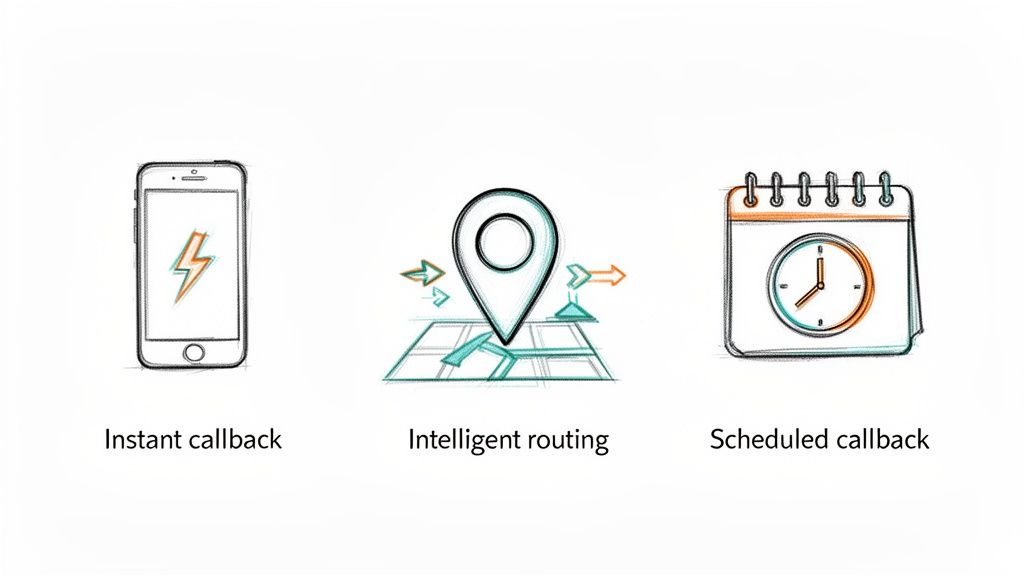
The most powerful feature, hands down, is the instant callback request. Picture this: a homeowner has a burst pipe and is frantically Googling plumbers. They call you, but your line is busy. Instead of a dead end, the software immediately offers to call them right back, often within a minute or two.
That simple offer is a game-changer. It stops that desperate customer from hanging up and dialing your competitor down the street. You’ve effectively secured a hot lead that would have been gone forever. For emergency calls, this isn’t just a nice-to-have; it’s the feature that saves your most valuable jobs.
Intelligent Call Routing and IVR
Good callback software does more than just hold a caller's spot. The best systems use intelligent call routing to get customers to the right person from the get-go. Someone calling about an HVAC repair can be automatically routed to a service tech’s queue, while a question about an invoice gets sent straight to the office manager.
This is usually handled by an Interactive Voice Response (IVR) system, which uses simple prompts or even speech recognition to figure out what the customer needs before a human ever gets involved. This kind of tech is a huge piece of the growing workforce optimization market because it makes your whole operation run smoother. If you're interested, you can discover more insights about this trend and its impact on customer service.
A well-configured callback system doesn't just hold a caller's place in line. It actively works to understand their intent and prepares your team to solve their problem on the very first return call.
Scheduled Callbacks for Future Business
Of course, not every call is a five-alarm fire. What about the customer who’s planning a kitchen remodel in three months? Or the one who wants a quote for a new roof next season? For these non-urgent inquiries, the scheduled callback feature is perfect.
Instead of keeping them on hold or hoping they remember to call back, the software lets them pick a specific date and time for your team to connect. This immediately creates a professional, organized impression. It shows you value their time and are serious about earning their business, locking in those high-value, long-term projects without disrupting your daily flow of urgent jobs.
Choosing the Right Callback System for Your Business
Picking the right customer callback software isn’t about getting mesmerized by the flashiest features. It's about finding a solid, practical tool that solves your real-world operational headaches. For any home service business, there are three things that are absolutely non-negotiable: it has to integrate smoothly into your current workflow, it must be able to handle your busiest seasons, and it needs to be dead simple for your entire team to use.
Making the right choice here is a real investment—one that pays for itself over and over in booked jobs and time saved.
Before you start digging into specific options, it’s smart to get a bird's-eye view of the market. Comparison sites can give you a quick lay of the land.
Platforms like these are great for seeing user ratings and core features at a glance. They can help you quickly narrow down your research and pinpoint the top contenders in the call center software space.
Integration with Your Core Systems
This is the big one. How well does the software play with the tools your team already lives in every day? Your customer relationship management (CRM) and scheduling software, like ServiceTitan or Jobber, are the heartbeat of your operation. A callback system that can't talk to them is just creating more problems.
You need to look for a solution with native integrations or, at the very least, a powerful API. This is what ensures that when a customer requests a callback and you book the job, all the details—the appointment time, customer notes, their address—show up automatically in your main calendar. Without that direct connection, you’re sentencing your team to mind-numbing manual data entry, which is a recipe for mistakes and wasted hours. That’s exactly what you’re trying to avoid in the first place.
A callback system should feel like a natural extension of your current workflow, not a separate island of data. The goal is to reduce manual tasks, not create new ones.
Scalability for Peak Seasons
Your call volume isn't a flat line. If you're an HVAC contractor, July is probably chaos. If you're a plumber, the first deep freeze of winter brings a flood of calls. Your callback software has to be able to handle these massive surges without breaking a sweat.
Dig into the software’s technical backbone and its pricing structure. Can it handle hundreds of simultaneous calls when a surprise hailstorm hits? Does the pricing model punish you for those sudden spikes, or does it have flexible tiers that can grow alongside your business? A system that’s a star performer in the slow season but crashes and burns during your busiest week is a major liability.
Ease of Use for Your Team
At the end of the day, even the most powerful software is worthless if your team hates using it. The interface should be clean, straightforward, and require very little training. Your customer service reps and dispatchers need to be able to glance at a dashboard, see the queue of pending callbacks, pull up a customer's history with one click, and make the call.
A clunky, complicated system will just slow them down, completely defeating the purpose of a rapid callback strategy. Before you sign any contract, insist on a live demo. Better yet, get a free trial and let your team put it through its paces in a real-world setting.
Weaving Callback Software into Your Daily Operations
Let's walk through how this software actually plays out in a real home service business.
Picture this: it’s the lunch rush, and your phones are ringing off the hook. A customer with a burst pipe calls your plumbing company but can't get through. Instead of being sent to a frustrating voicemail box, they're greeted with a simple, automated offer: "We're busy helping other customers right now, but we can call you back in a few minutes. Press 1 to hold your place in line."
The moment they accept, your callback software kicks into high gear. It logs the missed call, grabs the caller's number, and places it neatly in a prioritized queue. At the same time, it fires off a notification—a desktop pop-up, text, or email—to your dispatcher. No more scribbling numbers on sticky notes; the alert contains the caller’s number and a timestamp.
Your dispatcher sees the notification, clicks it, and immediately dials the customer. Since this all happens in under five minutes, the customer is still ready to talk and genuinely impressed by the quick response. The dispatcher books the appointment, and the software automatically pushes the job details into your scheduling system. Just like that, you've captured a high-value lead before they even had a chance to Google your competition.
Fine-Tuning Your Workflow with Custom Rules
Where this software really shines is in its ability to be molded to your specific business needs. You can set up custom rules that automatically sort and prioritize incoming leads, making sure your team is always tackling the most urgent and profitable calls first.
Here are a few ways home service pros put this to work:
- Emergency Triage: You can create a rule that instantly flags calls where the customer mentions keywords like "leak," "burst," or "no heat." These calls jump straight to the top of the callback list.
- Smart Geographic Routing: Set up the system to automatically assign callbacks based on the caller's area code. This ensures the dispatcher who knows the North County service area handles the North County leads.
- After-Hours Handling: Program the software to route any calls that come in after 5 PM directly to an on-call technician or a dedicated 24/7 answering service. This guarantees no emergency lead is left hanging until morning.
The key to a successful rollout is thinking through these stages, from initial setup to daily use.
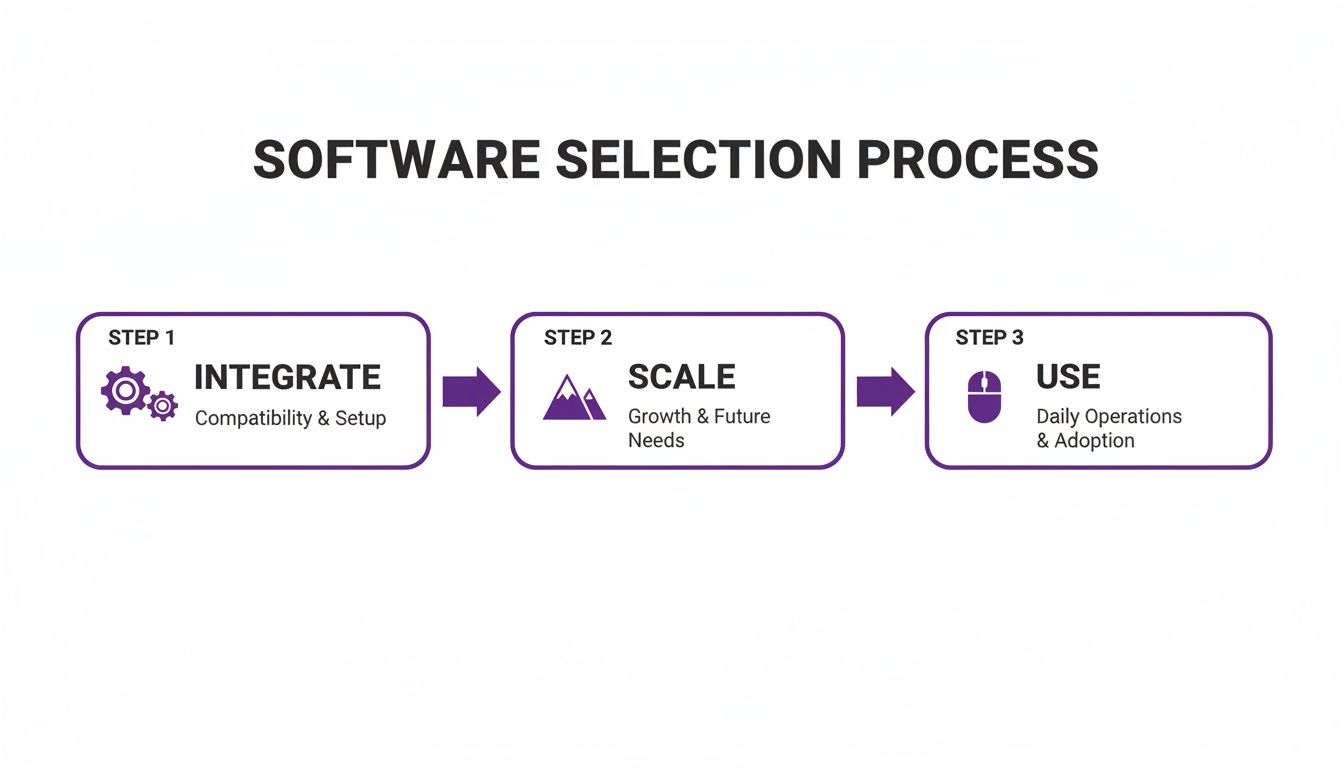
This process shows that great software isn't just about features; it's about how well it fits with your existing tools, grows with your business, and becomes second nature for your team. This focus on operational efficiency is a big reason the global contact center software market is expected to reach an incredible USD 400.19 billion by 2035.
As AI and predictive analytics become more common, getting your callback process right is no longer a luxury—it's essential. To get your team up to speed quickly, creating clear step-by-step guides for product adoption can make a world of difference. And if you're looking for ways to manage the callback queue without hiring in-house, our guide on how to hire a virtual assistant offers some great strategies.
Beyond Software: The Value of a Human Touch
Customer callback software is a fantastic tool for catching leads that might otherwise slip through the cracks. Think of it as a digital safety net, making sure no potential job goes unnoticed. But here's the thing: the software doesn't actually close the deal. It just opens the door. The real magic—turning a curious visitor into a paying customer—happens on the phone.
This is where technology needs to hand the baton to a real person. A software alert is just data. A quick, professional, and friendly phone call is what actually builds trust and gets that appointment on the books. In the end, the quality of that conversation is where jobs are won or lost.

From Automated Alert to Booked Appointment
Relying on software alone leaves the most important step up to your in-house team, who are likely already swamped with other responsibilities. This is precisely where a managed service can completely change the game. Imagine pairing that instant callback alert with a team of trained, remote customer service reps who are ready to pounce on it immediately.
These aren't just people answering phones; they are skilled professionals executing a vital business function with speed and a human touch.
The human element isn't an extra expense—it's the key ingredient that unlocks the full return on your entire callback strategy. A friendly, competent voice can turn a simple callback into a genuinely positive experience for the customer.
Instead of just pinging your team with another notification, a managed service takes care of the whole process. A trained representative gets the alert, immediately calls the lead, and has the expertise to turn that initial interest into a solid appointment, booked directly on your calendar. This approach delivers speed, professionalism, and consistency every single time.
The Service Advantage Over Software Alone
A managed service gives you the best of both worlds, offering powerful benefits that software by itself just can't match. For most business owners, this integrated approach is far more efficient and delivers a much bigger bang for your buck.
- 24/7 Availability: A remote team can handle callbacks after hours and on weekends. You’ll start capturing those emergency jobs your competitors won't even see until Monday morning.
- Guaranteed Professionalism: Every call is answered by a trained expert whose only job is to provide excellent service and book appointments, ensuring your brand always sounds its best.
- Reduced Internal Burden: Your office staff is freed from the constant distraction of watching a callback queue. They can finally focus on their primary duties without interruption.
By adding a dedicated human touch, you transform your callback software from a simple lead-capture tool into an active, revenue-generating engine. To see how this works in the real world, learn more about the role a dedicated virtual receptionist can play in handling these critical customer interactions.
Measuring Your Callback Strategy's Success
So, you’ve set up a new callback system. That's a great first step, but how do you know if it's actually working? Proving its value is what really matters, and to do that, you need to track clear, tangible results that tie directly back to your bottom line. We're talking about moving past hunches and digging into the hard data.
Think of it as a report card for your phone lines. By keeping an eye on a few key performance indicators (KPIs), you can see exactly how callback software is turning those once-missed calls into real, measurable revenue. This isn't just about feeling more organized; it's about building a rock-solid business case for your investment.
The Metrics That Matter Most
When you roll out a callback system, your focus should really zero in on three core metrics. Together, they paint a complete picture of your lead capture and booking process, from the first ring to the final scheduled job.
Call Abandonment Rate: This is simply the percentage of people who hang up before they ever speak to a real person. A high number here is a huge red flag—it means you're literally bleeding leads. Your callback software should make this number plummet as customers now have a much better option than just waiting on hold.
Average Speed to Answer (ASA): This measures how long it takes for a customer to connect with someone, and yes, that includes the time it takes your team to return a callback request. Shaving this down from hours to just a few minutes is one of the biggest wins you can get. Speed is everything in home services, and it directly influences whether a customer books with you or your competitor.
Lead-to-Booking Conversion Rate: This is the big one. It tracks the percentage of qualified inbound calls that actually turn into a scheduled appointment. A solid callback strategy keeps more leads in your pipeline and gives you a chance to talk to them, which directly pushes this conversion rate up and puts more money in your pocket.
By improving these key metrics, you’re not just providing better service—you’re creating a more efficient and profitable lead generation engine. A 5% increase in customer retention can increase profitability by 25%, and a fast, reliable callback is a powerful retention tool.
This table breaks down the most important metrics to track when implementing a callback system and what they mean for your business's bottom line.
Key Performance Indicators for Callback Success
| KPI (Key Performance Indicator) | What It Measures | Why It Matters for Home Services |
|---|---|---|
| Call Abandonment Rate | The percentage of callers who hang up while waiting in the queue. | Every abandoned call is a potential emergency job lost to a competitor. |
| Average Speed to Answer | The average time it takes for a customer to connect with a live person. | Faster response times create a great first impression and stop customers from calling the next company. |
| Lead-to-Booking Rate | The percentage of initial leads that become scheduled appointments. | This is the most direct measure of how effectively your front-end operations are generating revenue. |
Ultimately, tracking these KPIs gives you the proof you need. You'll see fewer callers giving up, faster connections with potential customers, and most importantly, more jobs on the schedule. That's how you know your investment is paying off.
Got Questions About Callback Software? We've Got Answers.
Choosing the right callback solution for your home service business can feel a little daunting. You're probably wondering about cost, how it'll play with your current systems, and whether you should manage it yourself. Let's tackle the most common questions we hear from business owners just like you.
How Much Should I Expect to Pay for Callback Software?
That's the million-dollar question, isn't it? The price for callback software is all over the map. Some systems charge a monthly fee per user, while others bill you based on how many calls you're handling. Simple, bare-bones plans can be pretty cheap, but if you're looking for a powerful system that syncs up perfectly with your CRM, you're looking at a more significant investment.
But here’s the thing most people forget: the software license is just one piece of the puzzle. You also have to factor in the cost of paying your staff to actually make the callbacks. This is why a full-service option can be a game-changer. Instead of a hefty upfront software cost plus ongoing payroll, you get the tech and the trained people bundled into one simple monthly fee. It shifts the entire expense from a capital investment to a predictable operating cost.
Will This Software Work With My Scheduling System?
Absolutely—it has to. Any modern callback platform worth its salt is built to integrate with the tools you already use every day. We're talking about seamless connections with the big names in home service CRMs like ServiceTitan, Jobber, and Housecall Pro. Make this a non-negotiable feature on your checklist.
Think about it: a solid integration means your team can book appointments directly into your main calendar while they're on the phone. This is huge. It completely gets rid of double data entry, slashes the risk of booking errors, and makes your whole process—from first call to a confirmed job—run like a well-oiled machine.
Should I Buy the Software or Just Use a Managed Callback Service?
This really comes down to one thing: your team's bandwidth. If you've got a fully staffed, well-trained office team that can jump on every single callback the second it comes in, then buying the software is a great way to give them a powerful tool.
But let's be realistic. Most teams are already juggling a dozen things at once. If your people are stretched thin, a managed service is your answer. It's a "done-for-you" solution where you get instant access to pros who live and breathe this stuff. They handle everything, ensuring every lead gets a fast, professional response. You get to focus on what you do best—running your business—instead of chasing missed calls.
Stop letting valuable leads slip through the cracks. Phone Staffer provides the trained, professional CSRs you need to turn every missed call into a booked job, 24/7. Learn how our team can fill your calendar.