

Picking the right Field Service Management (FSM) software isn't just a tech decision—it's a business-defining one. You'll quickly notice a split in the road: on one side, you have comprehensive powerhouses like ServiceTitan, built from the ground up for companies with aggressive growth plans. On the other, you have incredibly user-friendly platforms like Jobber, perfect for startups and smaller teams who need to get organized fast.
The best tool for the job really depends on your company's size, your trade, and where you see yourself in the next few years.
How to Choose the Right FSM Software
Finding the perfect FSM software is less about a features checklist and more about finding a system that matches your company's DNA. The wrong choice can bleed money and create daily frustrations, but the right one becomes the engine for your growth. Before you even look at a demo, it's worth thinking about the fundamentals of creating business systems that scale your service business.
This isn't just about efficiency anymore; it's about staying competitive. The global FSM market exploded from $2.75 billion in 2021 and is on track to hit $9.86 billion by 2033. That number tells a story: home service businesses are rapidly digitizing their operations to keep up with customer demands.

Core Evaluation Criteria
Before you get lost in feature-by-feature comparisons, take a step back and look at your own business. Your answers to these questions will narrow the field significantly.
- Business Size and Complexity: Are you a one-person show, or are you coordinating 50 technicians across three counties? The needs are worlds apart.
- Primary Trade: An HVAC company lives and dies by its inventory management and multi-day project tracking. A plumbing business might care more about a seamless flat-rate book integration.
- Growth Trajectory: Is your plan to add two trucks in the next year, or twenty? Your software has to grow with you, not hold you back.
- Budget: Don't just look at the monthly subscription. Factor in setup fees, training costs, and any essential add-ons to understand the true cost of ownership.
Here's the best advice I can give: Map out your biggest daily headaches. Does scheduling take forever? Is invoicing a mess? Focus on the software that solves those problems first. Don't get distracted by shiny features you'll never touch.
FSM Software At a Glance
To get you started, here’s a quick-reference table that frames the big players in the FSM space. Think of this as a high-level guide to help you figure out which platforms even belong on your shortlist.
| Software | Best For | Key Feature Highlight | Typical Price Range |
|---|---|---|---|
| ServiceTitan | Large, scaling businesses seeking an all-in-one enterprise solution. | Advanced reporting, marketing automation, and multi-trade functionality. | Premium (Often starts at $398/mo per tech) |
| Jobber | Startups and small to mid-sized businesses needing simplicity. | Intuitive interface, easy scheduling, and excellent customer communication. | Accessible ($49 – $279/mo) |
| Housecall Pro | Owner-operators and smaller teams focused on core field operations. | Simple dispatching, on-the-spot invoicing, and great mobile app. | Mid-Range ($65 – $399+/mo) |
| FieldEdge | Established commercial and residential service contractors. | Deep QuickBooks integration and robust service agreement management. | Mid-to-High (Custom pricing) |
This table gives you a starting point. Now, we can dig into what really separates these platforms in the day-to-day grind of running a service business.
Digging Deeper: Comparing Core FSM Features and Functionality
A simple feature list on a website can be really misleading. Almost every field service management platform will tell you they have "scheduling" or a "mobile app," but the real story is in how those tools actually work when you're under pressure. Let's move past the checkmarks and get into a real-world comparison of how these core functions solve the day-to-day headaches of running a home service business.
Getting this right is the difference between software that fights you every step of the way and a system that actually makes you money. It’s all about how these features perform when a customer is waiting and a technician is stuck in traffic.
The Nuances of Scheduling and Dispatching
Look, at the end of the day, scheduling is about getting the right person to the right place at the right time. But how you get there varies wildly. Some platforms offer a basic drag-and-drop calendar. That's a huge improvement over a whiteboard, for sure, but it can still feel like a frantic game of Tetris for a busy dispatcher.
The more sophisticated systems bring intelligent automation into the picture, and that’s where the game really changes.
- Jobber & Housecall Pro: Both of these are fantastic when it comes to clean, intuitive drag-and-drop boards. For smaller teams where a dispatcher can visually manage the day, they are lifesavers. You get a crystal-clear view of who’s available and the status of every job.
- ServiceTitan & FieldEdge: These guys take it a step further by weaving in AI-powered route optimization and capacity planning. ServiceTitan can automatically suggest the best tech for a call based on their skills, location, and even past sales numbers. This isn't just about fitting another call in; it’s about strategically squeezing maximum revenue out of every single day.
The difference isn't just about being more efficient; it's about being more strategic. A simple calendar helps you manage the work you have, while an intelligent dispatch board helps you proactively increase your capacity without having to buy more trucks.
Here's the key takeaway: Are you doing reactive or proactive dispatching? A basic system helps you react to calls. An advanced one helps you anticipate demand, slash drive times, and book the most profitable jobs, completely changing how you operate.
How the Mobile App Actually Works in the Field
A technician's mobile app is the central hub for everything they do. If it’s clunky, slow, or dies the second it loses a signal, your techs won't use it, and your entire investment goes down the drain. A great app has to empower your team, not make their jobs harder.
Picture this: your tech is in a basement with zero cell service. Can they still pull up the customer's history, look at your flat-rate price book, and build out a solid estimate?
- ServiceTitan's Mobile 2.0: This is famous for its comprehensive "good-better-best" presentation tool. Techs can build multi-option estimates right on a tablet, complete with photos and descriptions, a feature proven to drive up the average ticket price. Its offline mode is also incredibly solid.
- Jobber's Mobile App: People love this app for its sheer simplicity and speed. It's ridiculously easy for techs to learn. Clocking in, checking job details, sending an invoice, and getting paid takes just a few taps. It's built for speed on straightforward service calls.
- Housecall Pro's App: This one strikes a fantastic balance. It’s easy to use like Jobber's but packs in powerful communication tools that customers really appreciate, like "on-my-way" texts and in-app chat with the office.
The right choice comes down to your business model. If your strategy relies on upselling and detailed on-site consultations, a powerhouse app like ServiceTitan's is a must-have. But if your game is all about speed and efficiency for a high volume of simpler jobs, Jobber's streamlined app is probably a better fit.
Detailed FSM Software Feature Matrix
To really see the differences side-by-side, it helps to break down the specific capabilities of each platform. While a checkmark might say a feature exists, this matrix gives a bit more context on the depth and focus of that feature, helping you align the software's strengths with your company's needs.
| Feature | ServiceTitan | Jobber | Housecall Pro | FieldEdge |
|---|---|---|---|---|
| Scheduling & Dispatch | AI-powered, capacity planning, route optimization, advanced dispatch board. | Simple drag-and-drop, clear calendar views, route planning. | User-friendly drag-and-drop, technician tracking, recurring jobs. | Robust dispatch board, integrated with QuickBooks, performance tracking. |
| Mobile App | Multi-option proposals, offline price book, robust forms, time tracking. | Fast, simple interface, invoicing, payments, job notes, time tracking. | On-my-way texts, in-app chat, easy invoicing, GPS tracking. | Work order management, flat-rate pricing, service history, payment processing. |
| Invoicing & Payments | Integrated financing (e.g., GreenSky), progress invoicing, batch payments. | Online payments, automatic invoice follow-ups, simple quote-to-invoice flow. | Credit card processing, instant payouts, in-app estimates and invoices. | QuickBooks integration (Desktop & Online), flat-rate pricing, time & materials. |
| CRM & Customer Comm. | Full customer history, automated marketing campaigns, call booking integration. | Client hub for self-service, automated reminders & follow-ups. | Automated customer notifications, review management, postcard & email marketing. | Service agreements, customer database, detailed equipment tracking. |
| Reporting & Analytics | Deep KPI dashboards, technician scorecards, marketing ROI tracking. | 20+ standard business reports on finances, work, and clients. | Performance dashboards, job costing reports, basic business insights. | Service agreement profitability, tech performance reports, financial analysis. |
| Integrations | QuickBooks, Viewpoint, marketing platforms, extensive API. | QuickBooks Online, Mailchimp, Zapier, FleetSharp. | QuickBooks Online & Desktop, Zapier, various marketing tools. | QuickBooks Desktop & Online, marketing and supplier integrations. |
This matrix highlights the core philosophy of each platform. ServiceTitan is built for deep operational control and marketing, while Jobber and Housecall Pro prioritize speed and ease of use for small to mid-sized teams. FieldEdge, with its deep QuickBooks ties, is a powerful choice for businesses that live inside that ecosystem.
Managing Customers and Communication
Modern FSM software isn't just about managing jobs anymore; it's about managing the entire customer relationship. Automated communication isn't a bonus feature—it's a core expectation from homeowners today. These tools directly shape your brand's reputation and can drastically cut down on the time your office staff spends on the phone.
Think about every touchpoint in the customer's journey:
- Booking Confirmation: Does the system instantly text and email the customer the moment a job is booked?
- Appointment Reminders: Are automated reminders going out 24 hours ahead of time to prevent no-shows?
- Technician Tracking: Can your customers get an Uber-style map to see exactly where their tech is?
- Post-Job Follow-up: Can you automatically ask for a Google review right after you’ve wowed them with great service?
Platforms like ServiceTitan and Housecall Pro have powerful communication and marketing suites that handle all of this for you. Jobber also shines with its excellent automated notifications. This kind of functionality guarantees a professional, seamless experience from start to finish, building the trust that leads to repeat business and five-star reviews. Skimping on these features means you’re leaving critical customer interactions to chance.
Matching FSM Software to Your Business Profile
When you're comparing field service management software, the goal isn't to find the single "best" platform—it's to find the best fit for your specific business. A system that's perfect for a 50-truck commercial HVAC giant could easily sink a solo plumber who's just starting out. Context is everything.
This means you have to look past the shiny feature lists and really picture how the software would work in your day-to-day operations. Let's walk through a few common business scenarios to see how different platforms solve different problems. You'll probably see a bit of your own company in these examples.
And making the right choice has never been more critical. The field service management software market in the United States, valued at $2.4 billion in 2025, is expected to shoot up to $6.6 billion by 2032. This explosive growth shows just how essential these tools have become.
The Solo Operator Hiring a First Technician
Imagine you're a talented plumber with a great reputation. You’re swamped with work and finally ready to bring on your first technician. Your biggest headaches are communication, keeping the schedule straight, and looking professional without spending a fortune.
For this situation, a platform like Jobber is often the perfect starting point. The startup cost is low, and its interface is so intuitive that you and your new hire can get the hang of it in an afternoon. It nails the essentials: a simple drag-and-drop calendar, easy quote creation, and a mobile app that makes invoicing and getting paid on the spot a breeze.
The key here is simplicity and affordability. You don't need advanced inventory tracking or complicated financial reports yet. What you need is a tool that organizes the chaos, gets cash in the door faster, and helps you communicate like a pro with automated appointment reminders and follow-ups.
This chart shows the core features that every service business, big or small, really needs to have in place.
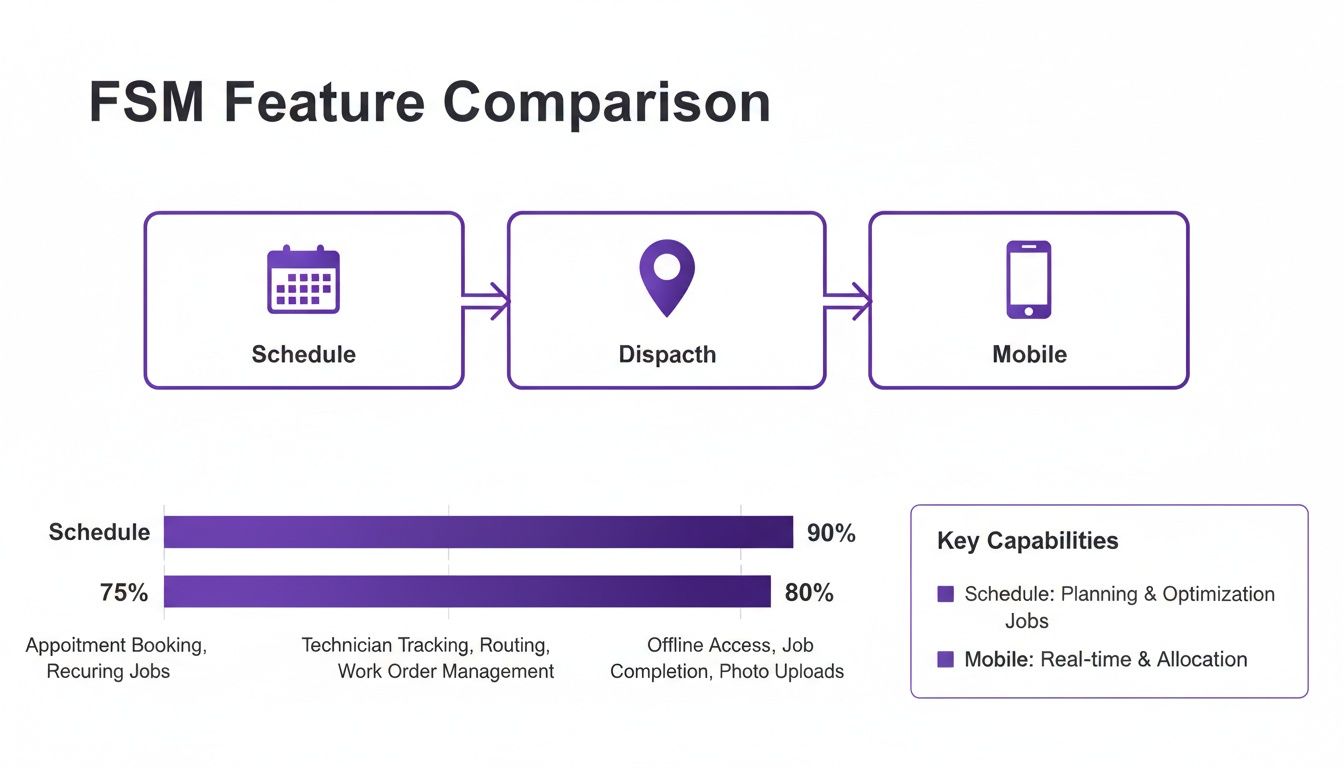
As you can see, foundational tools for scheduling, dispatching, and mobile access are the building blocks of any solid FSM system.
The 10-Truck HVAC Company Scaling for Growth
Now, let's switch gears. Picture a 10-truck HVAC company with aggressive growth goals. The owner is losing sleep over technician efficiency, leaving money on the table, and trying to make decisions based on data instead of just gut feelings.
This is where a powerhouse platform like ServiceTitan starts to make sense, even with its higher price tag. Its real strength is the deep operational control it gives you. The dispatch board doesn't just show who's free; it uses data to suggest sending your best salesperson to a high-value replacement lead. The mobile app isn't just for invoicing—it's a sales machine, letting techs build "good-better-best" proposals right in the customer's home, which dramatically increases the average ticket.
For a business at this stage, the investment pays for itself through:
- KPI Dashboards: You get real-time visibility into technician scorecards, marketing campaign ROI, and the profitability of your service agreements.
- Marketing Automation: The system can automatically reach out to past customers with maintenance reminders or promotions for new equipment.
- Capacity Planning: It helps you see how many jobs you can actually handle, so you can book more work without necessarily adding more trucks.
Specific Trades and Niche Requirements
The right FSM software also depends heavily on your specific trade. A one-size-fits-all solution is rarely the answer.
An appliance repair company, for example, lives and dies by parts management. For them, a platform with a detailed, searchable parts catalog and seamless purchase order tracking is a must-have. A system that aces inventory is way more valuable than one with fancy marketing tools.
On the other hand, a general contractor or remodeler needs robust project management capabilities. They need software that can track multi-day jobs, monitor progress against a budget, and manage various subcontractors. A simple dispatching tool that’s great for quick service calls will fall flat here. Managing these details is a full-time job in itself, which is why many GCs use a virtual assistant for small businesses and general contractors to handle the administrative grind within their chosen software.
Ultimately, this decision comes down to a clear-eyed self-assessment. When you match a platform's core strengths to your business profile, trade-specific needs, and growth plans, you can confidently pick a software partner that will fuel your success instead of holding you back.
Analyzing True Cost and Long-Term ROI
The sticker price on a field service management platform is just the tip of the iceberg. If you want to make a smart financial decision, you have to look past the advertised monthly fee and figure out the Total Cost of Ownership (TCO). This approach is the only way to get a realistic picture of your investment over time and avoid any nasty budget surprises down the road.
A real-deal field service management software comparison has to dig into the pricing models. They vary a ton, and each one has different implications for your cash flow and long-term spending.
Breaking Down FSM Pricing Models
Most software pricing boils down to a few common structures. Getting a handle on them is the first step to uncovering the true cost.
- Per-User, Per-Month Fees: This is the most straightforward model. You pay a set fee for each person on the system, whether it’s a tech in the field or a dispatcher in the office. It's predictable, but the costs can really start to climb as your team grows.
- Tiered Packages: Platforms like Jobber and Housecall Pro often use this model. They'll offer different packages (think Basic, Pro, Enterprise) with more features and user limits as the price goes up. This lets you pay only for what you actually need right now.
- Revenue-Based Percentages: This is less common, but some platforms might take a small slice of the revenue you process through their system. The idea is that the software's cost grows only as your business grows.
The biggest financial mistake you can make is choosing a platform based on the lowest monthly fee alone. A slightly more expensive system with features that make you more efficient can often deliver a much higher return by unlocking new ways to make money.
Uncovering Hidden and Overlooked Costs
Beyond the monthly subscription, a bunch of other costs can inflate your TCO. You absolutely have to ask about these upfront during any software demo or sales call.
Here are some of the usual suspects:
- Implementation and Onboarding Fees: Many of the bigger, enterprise-level platforms charge a one-time fee for setup, moving your data over, and getting your team trained. This can run anywhere from hundreds to thousands of dollars.
- Data Migration Charges: Pulling your customer list, service history, and price book from an old system can get messy and might come with an extra price tag.
- Add-On Modules: You might find that critical features like advanced reporting, marketing tools, or certain integrations aren't in the base package and require their own separate subscriptions.
- Payment Processing Fees: This is standard, but the percentage these platforms take for credit card processing can differ, and that affects your net profit on every single job.
When you're trying to figure out the true cost and ROI, it's worth keeping in mind the common challenges in measuring ROI, as many of those principles apply here, too.
Calculating Your Potential Return on Investment
The real value of FSM software isn’t just about cutting costs—it's about bringing in more revenue. A practical ROI calculation helps you build the business case for the investment, showing exactly how the software pays for itself and then starts making you money.
Think about this real-world scenario:
A premium FSM platform costs an extra $200 per technician each month compared to a basic option. But, its smart dispatching and route optimization features consistently let each tech squeeze in just one extra job per day.
Let's do the math:
- Extra Job Value: Let's say your average job ticket is $300.
- Daily Revenue Increase: One more job per day means $300 more in revenue.
- Monthly Revenue Increase: Over 20 workdays in a month, that's $300 x 20 = $6,000 in new revenue, per technician.
- Net Gain: You spent an extra $200 to bring in an additional $6,000. That’s a massive return.
This simple example shows how a higher-priced tool with the right features isn't an expense—it's a revenue multiplier. Your ROI analysis should focus on tangible gains like getting more out of your techs, increasing your average ticket with upselling tools, and keeping customers around longer with better communication. Looking at it through this financial lens ensures you pick a platform that isn't just affordable, but one that’s truly profitable for your business's future.
How Well Does It Play with Your Other Software?
Your Field Service Management (FSM) software can't be an island. For it to truly run your business, it has to be the central hub that connects all the other tools you use every single day. When your FSM platform talks seamlessly with your other software, you eliminate countless hours of tedious data entry and avoid the costly mistakes that come with it.
Any serious field service management software comparison has to look past the core features and dig into how well each platform integrates. The real goal is to create a smooth, automated pipeline of information, from the very first call a customer makes all the way to the final invoice. If your systems don't connect, you're just creating more work for your team.
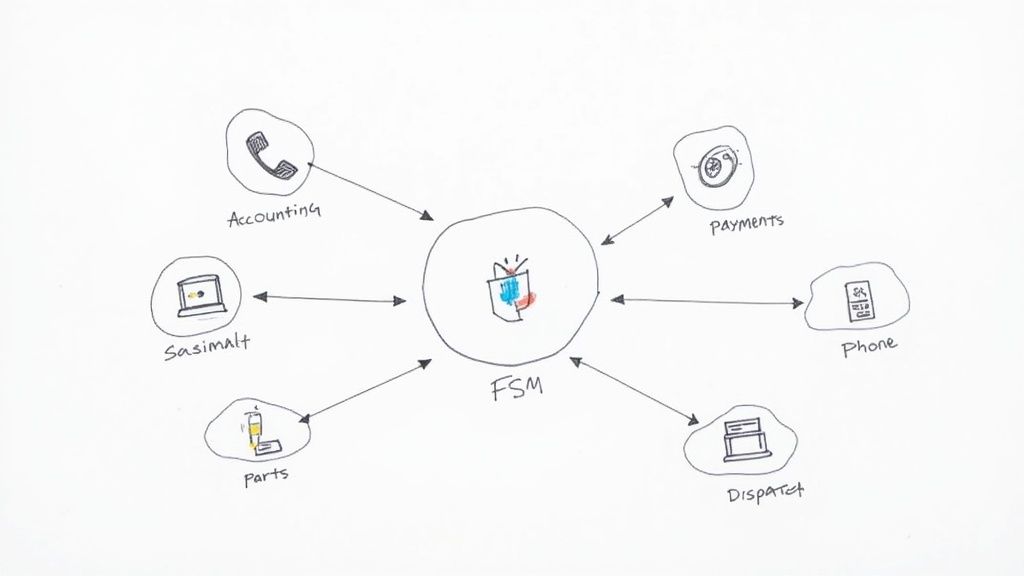
Linking Up with Accounting and Payments
For just about every home service business, the number one, must-have integration is with your accounting software. The ability to sync invoices, payments, and customer records directly into your financial system isn't just a nice-to-have; it's a fundamental requirement.
- QuickBooks is King: The good news is that most of the top FSM platforms, like Jobber, Housecall Pro, and FieldEdge, have solid, deep integrations with both QuickBooks Online and QuickBooks Desktop. FieldEdge, in particular, is well-regarded in the industry for its exceptionally robust connection with the QuickBooks ecosystem.
- Enterprise-Grade Connections: If you're running a larger operation, a platform like ServiceTitan steps up with more advanced accounting integrations, connecting to systems like Viewpoint to handle more complex financial reporting.
Right alongside accounting, payment processor integrations are crucial for healthy cash flow. The best FSM mobile apps let your techs take credit card payments right there in the customer's driveway. That transaction is instantly recorded in the FSM and pushed to your books, cutting out invoicing delays and getting money in your bank account faster.
Connecting Your Lead Funnel to Your Field Team
One of the most powerful, yet often overlooked, integration points is how your FSM software handles new leads. A truly connected system ensures that when a potential customer calls, their info is captured and acted on immediately—not left to die in a notebook or an email inbox.
This is where you can build an incredibly powerful, automated workflow with third-party services. Imagine a new lead calls your business. Instead of that being a manual entry process, the information flows directly into your FSM.
A seamless handoff from lead capture to job booking is the hallmark of a highly efficient operation. When your lead generation and management systems talk to your FSM, you stop losing opportunities and ensure every potential customer gets a fast, professional response.
Services that provide a dedicated home service receptionist can be a game-changer here. A trained professional can answer calls, qualify leads, and enter the job details directly into your FSM platform for you. This one action can set off a whole chain of automated events:
- Instant Job Creation: The new job pops up on your dispatch board in real-time.
- Automated Confirmations: The customer immediately gets a text and email confirming their booking.
- Data Consistency: All the customer's information is entered correctly the first time, preventing headaches down the line.
This level of integration elevates your FSM from just a scheduling tool to the true command center of your entire customer journey. It makes your software investment work harder by ensuring that the most critical first step—capturing and converting a lead—is flawlessly connected to your field operations. As you evaluate different platforms, always ask about their API or Zapier capabilities to see how easily you can plug in these essential front-end services.
Picking a Winner and Getting it Right
You’ve done the hard work of comparing the top field service management software. Now comes the part that can feel just as tough: making the final call and actually getting it up and running. The goal is to turn all that research into a real-world tool that makes you money, not just another monthly bill.
A great way to lock in your decision is with a simple scorecard. Just list your top three choices. Then, score them against your absolute must-haves—things like a killer mobile app for your techs, seamless QuickBooks integration, or the specific reporting features you need to see your numbers clearly. This forces you to get practical and make a choice based on what your business actually needs, day in and day out.
Your Game Plan for a Smooth Rollout
Once you've picked your software, how you introduce it to your team is everything. Rushing the implementation is a surefire way to create chaos, frustrate your team, and end up with a tool nobody uses correctly.
A solid game plan should look something like this:
- Get Your Data In: Work directly with your new software provider to get your customer lists, job histories, and price book imported cleanly from the start. A messy import creates problems for months.
- Train for the Role: Don't lump everyone into one big training session. Your office staff and your field techs use the software in completely different ways, so their training needs to reflect their unique workflows.
- Connect Your Key Tools: Right away, get your FSM talking to your essentials like QuickBooks and your payment processor. You want that financial data flowing accurately from day one.
The single biggest mistake I see companies make is forgetting about team buy-in. You can't just drop new software on them. Frame it as a tool that will make their jobs easier—techs get paid faster, and the office spends less time on mind-numbing data entry.
Making the Final Call with an Eye on the Future
This decision isn't just about solving today's scheduling headaches. It's a strategic move to build a business that can grow without breaking. Think of it as laying the foundation for a more scalable and profitable company.
You're not alone in this. The entire field service industry is moving in this direction. In fact, the market is expected to jump from $4 billion in 2022 to over $10.6 billion by 2030, all because businesses are demanding better efficiency and happier customers. You can read more about these market projections to see where things are headed.
As you get the new system in place, think about what you'll do with all the time you're saving. With scheduling and billing on autopilot, your office team can finally get proactive. This is the perfect time to hiring a virtual assistant to handle customer follow-ups and book maintenance agreements right inside your new FSM software, turning this investment into a true growth engine for your business.
Frequently Asked Questions
Choosing the right FSM software always brings up a ton of questions. Let's tackle some of the most common ones I hear from home service owners trying to make the right call.
How Long Does FSM Implementation Take?
The honest answer? It really depends. If you're a smaller shop and you're picking a user-friendly platform, you could genuinely be up and running in a couple of days. That usually means setting up your basics and importing a clean, simple customer list.
But for larger companies with complex needs, you should budget several weeks. Migrating years of detailed service history, building out custom reports, and getting everyone—from the office team to the techs in the field—properly trained takes time.
Can I Switch FSM Software Later?
Absolutely, but you need to go in with your eyes open. Moving from one system to another isn't a simple copy-paste job; it's a full-blown project, especially when you're dealing with a massive history of jobs and customer data.
The single biggest thing to look for when you're choosing your first FSM is data ownership. Can you easily export all of your data? That’s your escape hatch. It gives you the freedom to switch platforms down the road without losing the lifeblood of your business.
What Is the Most Critical Feature for a Small Business?
Every feature sounds great on a sales page, but for a small home service business, it all comes down to one thing: a rock-solid, easy-to-use mobile app for your technicians. Your techs are your boots on the ground, and that app is their most important tool.
Think about it—if the app is clunky, slow, or confusing, your team will fight you on using it. A great app, on the other hand, makes their jobs easier, which means better job notes, faster invoicing right from the field, and a direct boost to your cash flow. It's the one feature that ties everything together.
Ready to connect your new FSM software to a team that ensures no lead is ever missed? Phone Staffer can hire, train, and place remote CSRs and VAs directly into your business to answer your phones and handle your admin tasks. Learn how we can integrate with your operations at phonestaffer.com.