

Before you even think about hiring a virtual receptionist, you need a crystal-clear picture of what you actually need. Rushing into this is a classic mistake. You end up with someone who’s just a warm body answering the phone, not a strategic partner who can turn calls into paying jobs.
Getting this foundation right means you’ll find a receptionist or service that solves your real problems—like missed leads or chaotic scheduling—from day one.
Pinpointing Your Exact Receptionist Needs
Think of it like this: you wouldn't send a technician to a job without the right tools and a clear work order, right? The same logic applies here. You need to build a detailed "work order" for your receptionist role before you start looking for candidates.
This isn't just about a generic list of duties. It’s about digging into how your business communicates and finding the exact friction points where a skilled professional can make a difference. Taking the time to do this now will save you a world of frustration later.
First, Play Detective with a Call Audit
Before you can define the role, you need data. Real data, not just what you think is happening. Spend one full week tracking every single call that comes into your business. It might feel tedious, but the insights are gold.
Here’s what you’re looking for:
- Call Volume: Are you getting 10 calls a day or 50? Do Mondays feel busier than Fridays? Get the actual numbers.
- Peak Hours: When does the phone ring off the hook? Is it the 8 AM rush, the post-lunch slump, or right before quitting time?
- Call Type: Start categorizing. How many are new leads vs. existing customers needing to schedule? How many are just tire-kickers or vendors?
- Common Questions: Listen for patterns. What are the top 3-5 questions every new caller asks? (e.g., "What's your service area?" "How much for an estimate?")
Let's say your audit reveals that 60% of your calls are new leads, and most of them come in between 9 AM and 11 AM. Boom. You just learned that your top priority is finding someone who excels at lead qualification and is rock-solid available during that morning window. This is how you move from guessing to making a smart, data-backed hiring decision.
This whole process is about auditing your current reality, defining the job based on that reality, and then profiling the perfect person or service to fill it.
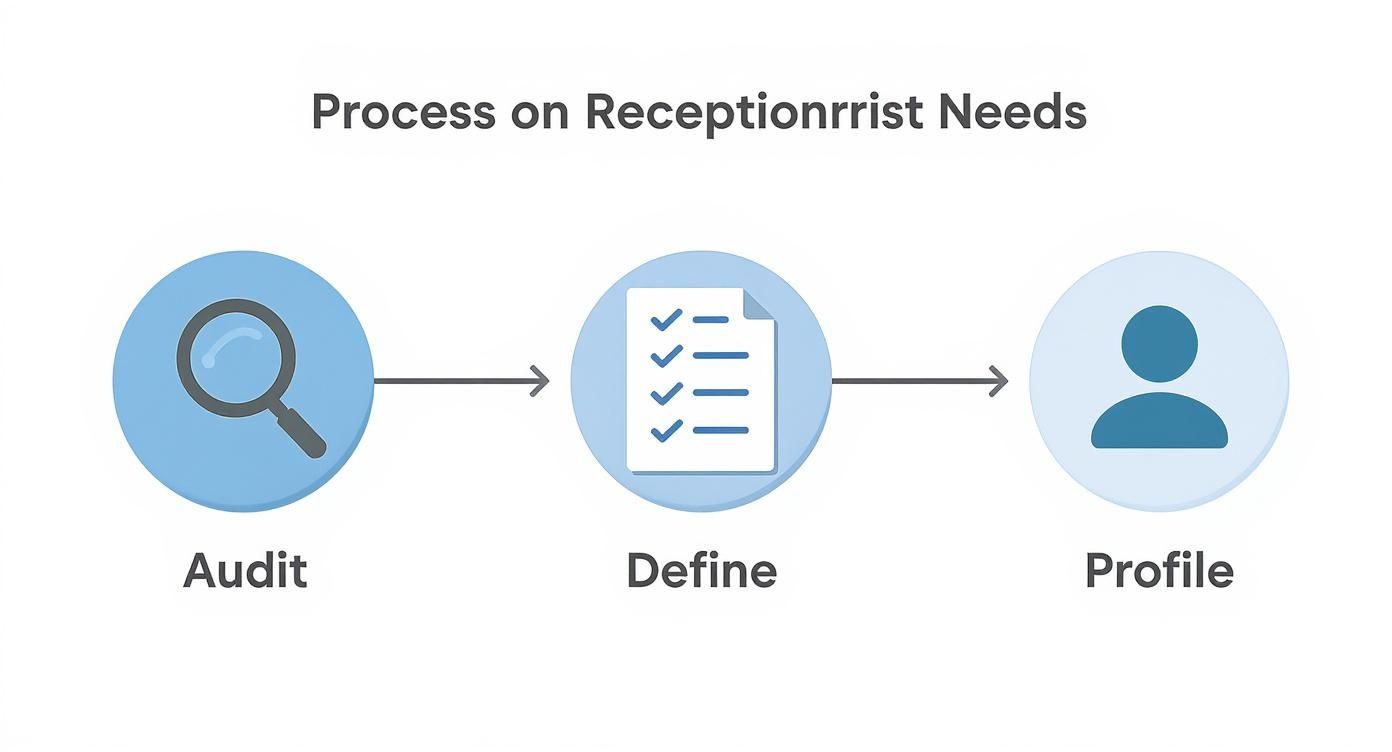
As you can see, each step logically flows into the next. Your audit gives you the raw material to define the role, which in turn lets you build a perfect candidate profile.
Separate the "Must-Haves" from the "Nice-to-Haves"
Now that you have your call data, you can get ruthless with your priorities. Not all tasks are created equal. Separating your core needs from the bonus tasks is essential for writing a clear job description and, frankly, for managing your budget.
Core duties are the absolute, non-negotiable functions that will solve your biggest headaches. For most home service pros, these are:
- Answering every call with a professional, friendly voice.
- Asking the right questions to qualify a new lead.
- Booking solid appointments directly into your scheduling software.
- Capturing and relaying messages without anything getting lost in translation.
Non-essential duties are the "nice-to-haves." These could be things like making outbound calls to follow up on old quotes, sending text appointment reminders, or helping with basic data entry. You can always add these responsibilities down the road once your receptionist has mastered the core stuff. Don't overwhelm them from the start.
To help you get organized, use a checklist to map out exactly what you need.
Virtual Receptionist Role Assessment Checklist
This simple table will help you translate your audit findings into a concrete set of requirements. Be honest about your priorities—it will make your search much more focused.
| Task Category | Specific Action | Priority (High/Medium/Low) | Required Tools |
|---|---|---|---|
| Inbound Call Handling | Answering calls within 3 rings | High | VoIP Phone System |
| Lead Qualification | Following a 5-question script to identify qualified leads | High | CRM, Call Script |
| Appointment Setting | Booking jobs directly into the calendar | High | Housecall Pro or Jobber |
| Message Taking | Emailing detailed messages to the owner/tech | Medium | Email Client |
| Outbound Follow-Up | Calling unconverted leads from the previous week | Low | CRM, Phone System |
| Data Entry | Updating customer contact information in the CRM | Low | CRM |
By filling this out, you’re not just listing tasks; you’re creating a blueprint for success for your new hire.
It's no surprise that the virtual receptionist market is exploding—it’s projected to hit USD 44.23 billion by 2034. More than 40% of small businesses in the U.S. are already on board because they see the value. You can read more about these market trends and how they’re helping businesses like yours grow.
Key Takeaway: The goal isn't to find a jack-of-all-trades who can do everything. It's to find a specialist who can master the few critical tasks that will directly boost your lead conversion and make your customers happier. Solve your biggest bottleneck first.
Finding and Vetting Top Candidates
Okay, you've done the hard work of defining what you need. Now comes the big decision: do you hire an individual freelancer or partner with a specialized virtual receptionist service?
This is a critical fork in the road, and there’s no single right answer. One path gives you a dedicated team member, while the other provides a plug-and-play solution. Your choice really boils down to how much control you want, your budget, and how you see this role fitting into your business long-term.
Getting this right from the start saves a massive amount of headache later.
Freelancer vs. Service Agency
Hiring a freelancer through a platform like Upwork means you get one dedicated person. They'll learn the ins and outs of your company, your tone, and your customers. That personal touch can be golden. The flip side? You're the manager. You handle all the training, scheduling, and you're left scrambling for coverage if they get sick or take a vacation.
A virtual receptionist service, on the other hand, gives you access to a whole team of trained professionals. This setup offers incredible flexibility and reliability—you’re never without coverage, and they can absorb a sudden flood of calls without breaking a sweat. The trade-off is that you might lose some of that personal touch, since different people could be answering your calls.
To make it clearer, here's a direct comparison of the two models.
Freelancer vs Service Agency Comparison
Deciding between a dedicated freelancer and a full-service agency depends on your priorities. Are you looking for a highly personalized extension of your team, or do you need guaranteed coverage and scalability above all else? This table breaks down the key differences to help you figure out the best fit for your business.
| Factor | Individual Freelancer | Virtual Receptionist Service |
|---|---|---|
| Cost Structure | Typically hourly rate ($15-$40/hr) | Monthly plans based on minutes or calls |
| Management | You are the direct manager | Managed by the service agency |
| Scalability | Limited; depends on one person's capacity | High; can easily handle call volume changes |
| Coverage | No built-in backup for time off or illness | Guaranteed coverage during operating hours |
| Personalization | High; one person deeply learns your business | Lower; calls handled by a team |
| Onboarding | You must create and execute all training | Handled by the service; less work for you |
Ultimately, if you have the time to manage and train someone to become a core part of your team, a freelancer is a great option. If you need a reliable, hands-off solution that guarantees your phones are always answered professionally, a service is likely the better way to go.
Crafting a Job Post That Attracts Talent
If you’ve decided a freelancer is the way to go, your next move is to write a job post that stands out. Don't just list duties. Use what you learned from your call audit to tell a story about the role and its importance.
A top-tier job post does a few things really well:
- It has a compelling title. "Receptionist Needed" is boring. "Lead-Converting Virtual Receptionist for a Growing Plumbing Business" gets the right people excited.
- It communicates the mission. Explain why this job matters. Try something like, "You will be the first impression of our company and the key to turning callers into happy, scheduled customers."
- It lists "must-have" skills specifically. Mention the exact CRM or scheduling software you use. If they have experience with it, that’s a huge win.
- It paints a picture of a typical day. Give them a feel for the rhythm of the job, including the number of calls to expect and when your busiest hours are.
Pro Tip: I always include a small, specific instruction in my job posts, like asking applicants to start their response with the word "Ready." It’s a dead-simple trick to immediately filter out anyone who doesn't sweat the details—a non-negotiable skill for this role.
How to Screen and Shortlist Candidates
Once the applications start pouring in, you need a quick and dirty system for weeding out the mismatches. Virtual receptionists are a popular choice for small businesses because they can reduce administrative workload by up to 35%. That popularity means you'll get a lot of applicants, but you only need a handful of great ones. You can find more data on how virtual receptionists boost efficiency for SMEs.
Keep an eye out for these immediate red flags in their applications:
- Generic, copy-paste proposals. If they don't mention your company name or the home service industry, they're just spamming applications. Delete.
- No relevant experience. Experience in another trade business (HVAC, electrical, etc.) is a massive advantage. They'll already get the lingo and the customer mindset.
- Sloppy grammar and spelling. The person representing your brand on the phone needs to be a clear, professional communicator. Typos are a bad sign.
Your initial screening shouldn't take all day. Scan for those red flags, look for genuine enthusiasm, and pull out the applications that show they actually read your post. Your goal here is to build a strong shortlist of three to five candidates to move on to the interview stage.
Running an Effective Interview Process
https://www.youtube.com/embed/UFnJzDur-P4
Once you've whittled down your list of candidates, it's time for the real test. A resume tells you what someone has done, but a smart interview process shows you what they can do. This is your chance to see who can actually be the voice of your brand when the phone is ringing off the hook.
Forget tired questions like "what's your biggest weakness?" We're going to focus on situational questions that mimic the daily grind of a home service business. The goal here isn't to stump them; it's to see how they think on their feet and handle the real problems your customers face every day.
Going Beyond the Resume with Scenario-Based Questions
Anyone can claim to have "great communication skills" on paper. Your job is to make them prove it. The best way to do that is to throw a few realistic scenarios their way.
Here are a few prompts I've seen work wonders, tailored specifically for a home service environment:
- The Panic Call: "A customer is calling in a full-blown panic. A pipe just burst and is flooding their basement, but your plumbing crew is booked solid for the next four hours. How do you handle that call? What do you say to calm them down while still trying to capture their business?"
- The Price Shopper: "Someone calls and their first question is, 'How much to install a new water heater?' They're obviously getting quotes from everyone in town. What's your approach to building value before you give them a number?"
- The Unhappy Customer: "An existing customer is on the line, and they're not happy. They say our tech left a mess and they're demanding a discount. Walk me through exactly how you'd manage that conversation."
Their answers tell you so much more than a resume ever could. You're not just listening for a "right" answer. You're gauging their tone, their empathy, and their ability to solve a problem. Do they protect the customer experience while also looking out for the business?
Putting Skills to the Test with Practical Exercises
Talking a good game is one thing; actually doing the job is another. A practical skills test is absolutely non-negotiable when hiring for this role. This is where you separate the polished talkers from the people who can actually perform under pressure.
It doesn't have to be complicated. A simple two-part test works great:
- A Mock Phone Call: Role-play one of the scenarios from above. You be the frantic customer. Let them show you how they'd handle it live on the phone. This is a fantastic way to assess their phone etiquette, professionalism, and ability to stay cool.
- A Software Task: Give them a quick, simple task in your scheduling software. Ask them to book a fake appointment for "John Doe" and add a few specific notes. This confirms they have the technical chops and pay attention to the little details.
Key Takeaway: Treat the interview like an audition, not an interrogation. You want to see candidates in action. Your hiring decision should be based on clear evidence of their skills, not just a list of claims on a resume.
With AI becoming more common, real human skills like empathy and quick thinking are more valuable than ever. In 2024, the virtual receptionist market hit $3.85 billion, and it's expected to climb to $9 billion by 2033. A lot of that growth is driven by AI handling simple tasks, which means the complex, emotional calls are precisely where a skilled human shines.
As you dial in your process, pay attention to your "time to hire." Using structured interviews and clear scoring helps you make faster, more confident decisions so you don't lose the best people to your competition. For a deeper dive, check out this guide on mastering time to hire metrics. By mixing behavioral questions with hands-on tests, you build a system that gives you real confidence in who you bring on board.
Getting the Agreement Right
You’ve found a fantastic candidate. They nailed the interview and seem like the perfect person to be the voice of your business. The next step is making it official, and that means moving beyond a verbal agreement to a solid, written contract.
This isn't just about legal protection; it's about starting the relationship off on the right foot. A clear agreement prevents a world of headaches later by making sure everyone is on the same page about responsibilities, performance, and, of course, getting paid.
Breaking Down the Pricing
When it comes to paying a virtual receptionist, you have a few options. The best fit for your home service business really depends on who you’re hiring (a freelancer or a full-on agency) and what your call volume looks like month to month.
Let's look at the most common ways this is structured:
- Hourly Rate: This is standard for freelancers. You’re paying for their time, which typically falls somewhere between $15 and $40 per hour. This works well if you need them for more than just calls, like helping out with other admin tasks.
- Per-Call or Per-Minute Plans: Agencies love this model. You essentially buy a bucket of minutes or a set number of calls for the month. It’s a great way to keep a tight rein on costs, especially if your call volume is fairly predictable.
- Monthly Retainer: A simple flat fee paid each month for an agreed-upon scope of work. This gives you budget predictability and gives your receptionist a stable income. Win-win.
Pull out that call data you collected earlier. If your phones ring like crazy one week and are dead silent the next, a flexible per-minute plan might save you money. But if you need someone locked in for specific hours every single day, an hourly rate or retainer is probably the smarter move.
Must-Have Clauses for Your Service Level Agreement
The Service Level Agreement, or SLA, is the real meat of your contract. Think of it less as a legal document and more as the playbook for how you'll work together. It spells out exactly what you expect and what they're committing to deliver.
Before you dive in, it’s a good idea to understand the essential elements of a contract to make sure your agreement is built on a solid foundation.
My Two Cents: Treat your agreement as the ultimate source of truth. If it's not in the contract, it's open to interpretation, and that's where disagreements start. Be painfully specific upfront.
Here are the clauses you absolutely can't skip:
- Scope of Work: Don't just write "phone support." Get granular. List out every single task: "Answering all inbound customer calls," "Qualifying new leads using the 3-step script," and "Booking qualified appointments directly into the Jobber calendar."
- Hours of Operation: Spell out the exact days and times they need to be available. Are they covering 8 AM to 5 PM Monday through Friday? What happens on national holidays? Put it in writing.
- Confidentiality and Data Security: This is a big one. They'll be handling your customers' personal information. A non-disclosure agreement (NDA) is non-negotiable to protect your client data and your internal processes.
- Performance Metrics: How will you know they're doing a great job? Define the key performance indicators (KPIs) that matter. This could be answering calls within three rings, achieving a certain lead capture rate, or maintaining a high booking accuracy.
- Termination Policy: Hopefully, you'll never need it, but you need to define how either of you can end the partnership. Specify the notice period required (a 30-day notice is pretty standard) and how the final payment will be handled.
Putting in this effort now sets the stage for a professional relationship built on total clarity.
Getting Your New Receptionist Up and Running
So you’ve hired a great virtual receptionist. Fantastic! But the real work begins now. Just throwing them into the deep end without a life raft is a recipe for disaster. Even the best hire will flounder without a clear, structured onboarding process, which usually leads to bungled calls and lost leads.
Setting them up for success from day one isn't just a nice-to-have. It’s the only way to turn that new hire into a confident, competent voice for your brand. A solid onboarding plan empowers them with the tools and knowledge to handle any customer interaction with the same care you would.
Create Your "Company Bible"
The first and most important tool you'll build is what I call a "Company Bible." This is a living, breathing document that holds everything your new receptionist needs to know about your business. It becomes their single source of truth, their go-to resource for answering questions and representing your brand perfectly.
Think of it as the ultimate cheat sheet for your business. It needs to be clear, easy to scan, and totally comprehensive. Never assume something is "obvious."
Your Company Bible absolutely must include:
- Your Tone of Voice: Are you the friendly, conversational neighbor, or the formal, straight-to-the-point pro? Give them real examples of phrases to use and, just as importantly, phrases to avoid.
- Service Details: Break down every single service you offer. Include basic pricing, how long it takes, and exactly what the customer gets. No fluff.
- Frequently Asked Questions (FAQs): Go back to your call audit data. What are the top 10-15 questions every new customer asks? Write down the perfect, pre-approved answers.
- Team Roster: Who's who in your zoo? List key team members, what they do, and exactly how and when to contact them (e.g., "For scheduling emergencies, text Dave. For billing questions, email Sarah.").
A well-built Company Bible is the single best way to slash training time and prevent mistakes. It gives your receptionist the power to find answers on their own, which builds their confidence and frees you from answering the same questions over and over.
Develop Practical Call Scripts and Guides
Look, nobody wants their receptionist to sound like a robot reading from a script. But for common situations, having a framework is essential for maintaining quality and consistency. These aren't meant to be read word-for-word; they're guides to help navigate the most important conversations.
You don't need a script for everything. Just focus on the most frequent and highest-stakes interactions.
For a home service business, you’ll want to script out these key moments:
- New Lead Call: This is all about qualifying the lead. The script should guide them to capture the essentials: name, address, phone number, the service they need, and how they heard about you.
- Booking an Appointment: Lay out the exact steps for checking the calendar, offering available slots, locking in the appointment, and sending the confirmation email or text.
- Handling an Unhappy Customer: This one is critical. The script should be built around empathy, active listening, and de-escalation. Give them the exact steps for documenting the complaint and who to pass it to immediately.
These scripts are your guardrails. They ensure every crucial call is handled with professionalism. As your receptionist gets more comfortable, they’ll naturally make the language their own while still hitting all the important points you’ve laid out.
Grant Secure Access to Your Tools
Once they have the foundational knowledge, it’s time to get them plugged into your systems. Your virtual receptionist needs access to your core tools to do their job, but you have to be smart about security. You're handing over the keys to the kingdom, so do it carefully.
The golden rule is "least privilege" access. Give them only what they absolutely need to do their job, and nothing more.
Here’s your technical onboarding checklist:
- Phone System: Get them a user profile in your VoIP system (Nextiva or RingCentral, for example) so they can make and receive calls that show up as your business number.
- Shared Calendar: In Google Calendar or your scheduling software, grant them "edit" or "make changes to events" access, not "owner" or "make changes and manage sharing" access.
- CRM: If you use a CRM like Jobber or Housecall Pro, create a new user role with permissions limited to viewing and editing customer contact info and appointment notes. Block access to financial reports and company-wide settings.
This measured approach gives them the tools they need to be effective without putting your sensitive business data at risk.
Structure Training and Ongoing Coaching
Onboarding isn't a one-and-done event. It’s a process. The first week should be pretty intensive, packed with role-playing your call scripts and getting them fully comfortable with your software.
After that initial blitz, shift into a coaching rhythm. For the first month, schedule a quick 15-minute check-in at the start or end of each week. Use that time to listen to a few call recordings together, review any tricky situations they ran into, and offer constructive feedback.
This continuous support loop is what will transform your good hire into an indispensable, long-term part of your team.
How to Know If Your Receptionist Is Actually Making You Money
Alright, so you’ve got your new virtual receptionist up and running. The phone is getting answered, which is a huge relief. But let's be honest—you didn't hire someone just to stop the bleeding from missed calls. The real win is turning those answered calls into booked jobs and actual revenue.
So, how do you know if it's working?
This isn't about micromanaging or being a hawk. It’s about having a clear, simple way to see what’s effective and what needs a little tweaking. By keeping an eye on a few key numbers, you can turn this new role from a line-item expense into one of your biggest money-makers.
Figure Out What Numbers Really Matter
In a home service business, you can get lost in a sea of data. Forget all the vanity metrics and focus on the handful of Key Performance Indicators (KPIs) that directly impact your bank account. These are the numbers that tell you if your investment is truly paying off.
You don't need fancy, expensive software for this. Your VoIP phone system and CRM likely have basic reporting that will do the trick. Heck, a simple shared spreadsheet is often all you need to get started.
Here are the only KPIs you really need to watch:
- Lead Capture Rate: Out of all the new potential customers who call, what percentage actually get entered into your system as a qualified lead? This is ground zero for your entire sales process.
- Booking Conversion Rate: Of all the leads they capture, how many get an appointment on the calendar? This number is a direct reflection of your receptionist's skill in turning a "maybe" into a solid booking.
- Average Call Answer Time: How long does it take for a real person to pick up? Every ring is a chance for a customer to hang up and call your competitor. You want this to be under 10 seconds, consistently.
- Call Abandonment Rate: What percentage of people hang up before anyone answers? If this number is high, something is broken in your system—either with call routing or staffing.
These four metrics give you a fantastic, no-fluff snapshot of how things are going on the front lines. It’s an objective way to see what's happening without getting bogged down in unnecessary details.
Put Together a Simple Tracking System
You can build a dead-simple performance dashboard in a Google Sheet that’ll take you maybe five minutes a week to update. Seriously, that’s it. Just create columns for each of your four KPIs and a new row for each week. This gives you a bird's-eye view of trends over time.
At the end of every week, just pull a quick report from your phone system to see total inbound calls and the average answer time. Then, pop open your CRM or calendar to count up the new leads and booked appointments. Plug in the numbers, and you're done.
Key Insight: The whole point of tracking this stuff isn't to create charts; it's to start conversations. If the booking rate suddenly drops one week, you can have a productive chat about what might be going on. Maybe a competitor is running a crazy special, or maybe one of the questions in the script is tripping people up.
Run Productive Weekly Check-Ins
Data is worthless if you don't talk about it. Put a recurring 15-minute check-in on the calendar with your receptionist every single week. This is non-negotiable. Think of it less as a performance review and more as a collaborative coaching session.
Here’s a simple agenda to make these check-ins super effective:
- Look at the Numbers Together: Pull up that KPI spreadsheet. High-five the wins and then point to any number that seems off. Ask, "What do you think happened here?"
- Listen to a Couple of Calls: Find one great call and one that was a bit of a struggle. Talk about what made the great call work so well, and brainstorm how to handle the tougher situations next time.
- Ask for Their Intel: Your receptionist is on the front lines, hearing directly from your customers. Ask them questions like, "What are people constantly asking about?" or "Is there anything in our process that seems to confuse callers?"
This steady rhythm of feedback and collaboration is what drives real improvement. It shows your receptionist you're invested in their success, which makes them far more invested in yours. This is how you build a true partnership that brings in more business, week after week.
Common Questions About Hiring a Virtual Receptionist
When you're thinking about bringing a virtual receptionist on board, a few questions always seem to pop up. Let's tackle them head-on so you can feel confident you're making the right move for your business.
What's This Going to Cost Me?
This is the big one, and the honest answer is: it depends. You're looking at two main paths. You could hire a freelance receptionist, who might charge anywhere from $15 to $40 per hour. This can work well if your call volume is unpredictable.
The other route is a specialized agency. They typically offer monthly plans that are either based on the number of calls they handle for you or the total minutes used. These plans can start around $150 a month and go up to $1,000 or more for high-volume businesses. Your budget and how many calls you expect to get will really guide which option makes the most sense.
What Tools and Tech Do I Need to Get Started?
You don't need a massive tech stack, but a few key pieces are non-negotiable for a smooth operation.
At a bare minimum, you'll need:
- Call Forwarding: A way to get your business calls to your new receptionist. A VoIP phone system is usually the most flexible and popular choice here.
- A Shared Calendar: Something like Google Calendar is perfect. It’s the only way they can see your availability and book jobs directly without constant back-and-forth.
- A Communication Channel: You need a simple way to chat throughout the day. This could be a dedicated Slack channel, email, or even a text thread for quick updates.
I'd also strongly recommend a good Customer Relationship Management (CRM) tool. It keeps all your customer history in one place, which is invaluable for your receptionist to provide top-notch service.
Can They Actually Handle My Industry's Specific Questions?
Yes, but only if you set them up for success. You can't just throw them in the deep end and expect them to know the difference between a leaky faucet and a burst pipe.
The secret is solid training. This means creating a detailed "Company Bible" or a robust FAQ document. It should cover everything: your services, your pricing structure, and the answers to the most common technical questions your customers ask. A good receptionist is a quick study and, with the right resources, will sound like they've been part of your team for years.
Ready to stop missing calls and start booking more jobs? The experts at Phone Staffer can hire, train, and place a professional CSR directly into your business, ensuring every lead is captured and every customer feels valued. Learn more about our remote staffing solutions.