
In the fast-paced world of home services, from plumbing to HVAC to landscaping, the difference between thriving and just surviving often comes down to efficiency. You're constantly managing job schedules, dispatching technicians, handling customer inquiries, and chasing payments. It’s a relentless cycle that leaves little room for strategic growth. What if you could reclaim hours every day, eliminate costly errors, and provide a consistently stellar customer experience? This is where workflow automation steps in.
By automating repetitive, manual tasks, you can free up your team to focus on what truly matters: high-quality service and business expansion. The core workflow automation benefits extend far beyond just saving time; they create a more resilient and profitable operation. While workflow automation targets specific sequences of tasks, it's a key component of a larger strategy. To gain a broader understanding of the comprehensive advantages, delve deeper into Business Process Automation Benefits.
This article explores the eight most impactful benefits that can transform your home service company. We will move beyond theory and provide practical examples and actionable steps for implementation, turning operational chaos into a streamlined, scalable, and profitable machine.
1. Increased Productivity and Efficiency
One of the most significant workflow automation benefits is the immediate and measurable boost in productivity. By automating repetitive, rule-based tasks that consume valuable staff hours, home service companies can free their teams to concentrate on activities that require critical thinking, creativity, and direct customer interaction. This shift doesn't just speed up processes; it reallocates your most valuable resource, your people, to high-impact work.
Instead of manually entering customer data, dispatching technicians, or sending appointment reminders, automated systems handle these duties instantly and accurately. This reduces the administrative load, minimizes the risk of human error, and allows tasks to be completed around the clock. The result is a more agile operation that can handle a higher volume of work without a corresponding increase in headcount or employee burnout.

Real-World Impact of Automation
The gains in efficiency are not theoretical. Companies across various sectors have seen dramatic improvements:
- Zapier: The automation platform reports that its customers save an average of 10 hours per week, time that can be reinvested into strategic growth initiatives.
- Siemens: The global powerhouse automated its invoice processing system, drastically reducing the time required from several days to just a few minutes per invoice.
- Amazon: By implementing sophisticated warehouse automation, Amazon increased its order fulfillment speed by over 50%, fundamentally changing e-commerce logistics.
These examples highlight how automation transforms operational capacity, a key advantage for any growing home service business.
How to Get Started
To begin leveraging automation for greater efficiency, follow these practical steps:
- Identify Bottlenecks: Start by pinpointing the most time-consuming and repetitive tasks in your daily operations. Look for processes like data entry, scheduling, or follow-up communications that are frequent and prone to error.
- Prioritize Simple Wins: Focus on high-frequency, low-complexity tasks first. Automating appointment confirmations or invoice reminders provides a quick return on investment and builds momentum.
- Measure Your ROI: Track the time your team spent on a task before automation and compare it to the time spent after. This data clearly demonstrates the value and helps justify further investment.
Businesses can further enhance their operational efficiency by integrating Customer Relationship Management (CRM) solutions, which automate many aspects of customer interaction and data management.
2. Reduced Human Error and Improved Accuracy
Beyond speed, another core workflow automation benefit is the dramatic reduction in human error. Even the most diligent employees can make mistakes, especially when performing repetitive tasks like data entry, invoicing, or scheduling. These small errors can cascade into significant problems, leading to incorrect job details, billing disputes, and frustrated customers.
Automated systems execute tasks based on pre-defined rules with consistent precision, time after time. By removing manual touchpoints from critical processes, home service companies can ensure a higher standard of accuracy. This leads to higher quality outputs, fewer costly mistakes, and improved compliance, safeguarding both your reputation and your bottom line.

Real-World Impact of Automation
The impact of automation on accuracy is well-documented across industries, offering powerful lessons for home service businesses:
- McKinsey: A study found that automating financial reconciliation processes can reduce error rates by as much as 85%, preventing costly accounting mistakes.
- Cleveland Clinic: By automating patient data entry, the renowned hospital reduced medication errors by 40%, highlighting how automation enhances safety and precision in critical fields.
- PayPal: The payment giant utilizes automated fraud detection systems that operate with 99.5% accuracy, demonstrating the reliability of machines in high-stakes, rule-based tasks.
These examples show that implementing automation is a direct investment in the quality and reliability of your service delivery.
How to Get Started
To minimize errors in your operations, implement automation with a focus on quality control:
- Implement Validation Checkpoints: Build checks into your automated workflows at critical stages. For example, an automation can flag a work order if the customer's address is incomplete or falls outside your service area.
- Thoroughly Test Before Launch: Before fully deploying a new automation, run extensive tests with various scenarios to identify and fix potential issues. This ensures the system behaves as expected under real-world conditions.
- Maintain Human Oversight: For high-stakes decisions, like large-scale purchasing or complex scheduling conflicts, use automation to gather and present data, but keep a human in the loop for final approval.
3. Cost Reduction and ROI
Beyond productivity gains, one of the most compelling workflow automation benefits is the direct and substantial reduction in operational costs. Automation delivers significant savings by minimizing manual labor hours, eliminating costly errors that require rework, and optimizing the use of your resources. This financial impact is not just a one-time gain; it creates a cycle of compounding returns.
By automating tasks like invoicing, payroll, and supply chain management, home service companies can drastically cut down on the administrative overhead that inflates expenses. The reduction in human error alone prevents financial losses from incorrect billing, missed appointments, or compliance mistakes. This leads to a strong and often rapid return on investment (ROI), making automation a financially sound strategic decision.
The following data chart highlights the significant financial advantages, including typical labor cost savings and the impressive average ROI that businesses can achieve.
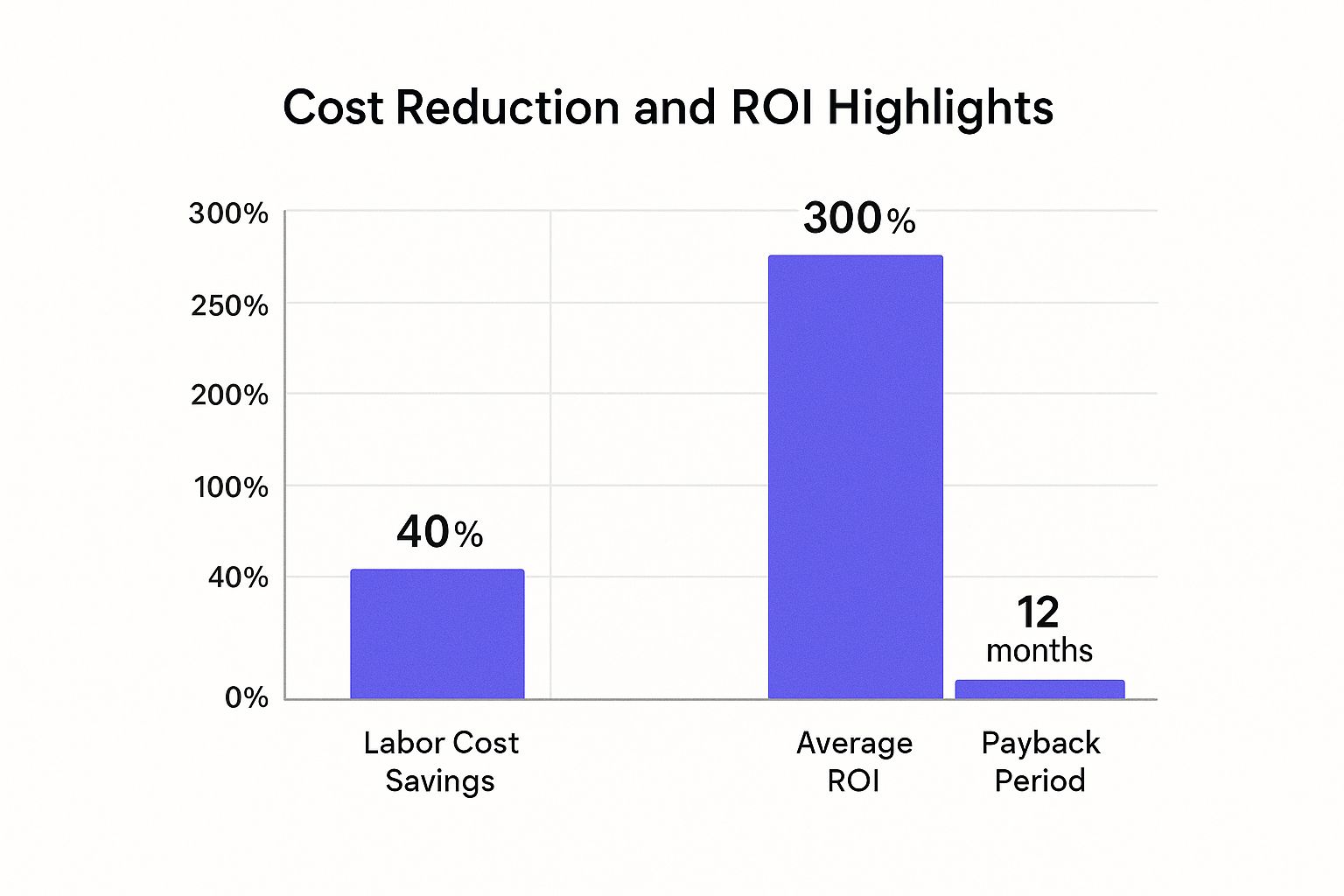
This visual representation underscores the rapid payback period and significant long-term financial returns that make automation a powerful investment for growth.
Real-World Impact of Automation
The financial benefits of automation are well-documented across industries, demonstrating its power to transform a company's bottom line:
- Forrester Research: A landmark study found that workflow automation can deliver an average ROI of 300% within three years, showcasing its long-term value.
- Walmart: By automating key supply chain processes, the retail giant saved over $2 billion annually, proving the scalability of automation's financial impact.
- IBM: The technology leader reported saving $100 million by automating its internal HR processes, freeing up capital for strategic initiatives.
These examples illustrate how automation directly translates into tangible financial gains, a critical advantage for any home service business aiming for sustainable profitability.
How to Get Started
To begin realizing cost savings through automation, focus on these actionable steps:
- Calculate Total Cost of Ownership (TCO): Before investing, account for all costs, including software licensing, implementation fees, and ongoing maintenance, to create a clear financial picture.
- Track Direct and Indirect Savings: Measure direct savings from reduced labor and indirect savings from fewer errors and faster project cycles to fully understand the financial impact.
- Prioritize High-Impact Automations: Start with processes where the potential for cost reduction is highest, such as automated invoicing or inventory management, to secure quick wins.
- Factor in Productivity Gains: When calculating ROI, include the value of the increased output and efficiency your team achieves. This provides a more holistic view of the investment's true worth.
4. Enhanced Employee Satisfaction and Engagement
A key, yet often overlooked, workflow automation benefit is its profound impact on employee morale and engagement. By automating the monotonous, repetitive tasks that cause burnout and disengagement, you empower your team to focus on more meaningful work. This includes complex problem-solving, strategic planning, and building genuine relationships with customers, which are tasks that require human intellect and empathy.
This strategic shift from tedious administrative duties to high-value activities enhances job satisfaction. When employees feel their skills are being utilized for impactful work rather than mundane data entry or scheduling, their sense of purpose and contribution grows. The result is a more motivated, innovative, and loyal workforce that actively drives the business forward.
Real-World Impact of Automation
Improvements in employee morale are well-documented and lead to tangible business outcomes like better retention and performance:
- Slack: The communication platform found that 90% of workers feel automation has improved their job satisfaction by freeing them from drudgery.
- Unilever: After automating parts of its HR onboarding process, the consumer goods giant saw employee satisfaction scores increase by 30%.
- Manufacturing Case Study: A company that automated its quality control documentation process successfully reduced employee turnover by 25% within a year.
These examples show that investing in automation is also an investment in your people, creating a more positive and productive work environment.
How to Get Started
To boost team satisfaction through automation, adopt a collaborative and transparent approach:
- Involve Your Team: Ask your technicians and office staff which tasks they find most repetitive or frustrating. Involving them in identifying automation opportunities ensures you solve real problems and fosters buy-in.
- Communicate the "Why": Clearly explain that automation is a tool to enhance their roles, not replace them. Frame it as a way to free them for more important and interesting work.
- Provide Upskilling Opportunities: Use the time saved by automation to invest in training and professional development. This prepares your team for higher-value responsibilities and shows you are committed to their growth.
- Measure and Celebrate: Track the time saved and publicly celebrate these efficiency wins. Redirect that saved time toward team-building or skill-development workshops.
5. Improved Scalability and Business Growth
One of the most strategic workflow automation benefits is the ability to scale your operations without a proportional increase in costs or resources. Automation creates a robust framework that can handle a growing volume of work, from customer inquiries to job scheduling, with consistent efficiency. This allows home service companies to expand their service areas, take on more clients, and increase revenue without being constrained by manual processes.
As your business grows, automated systems manage the increased complexity seamlessly. Instead of hiring more administrative staff to handle a surge in appointments or invoices, your automated workflows simply process more transactions. This creates a highly scalable model, ensuring that your quality of service and operational efficiency remain high, even during periods of rapid expansion, making automation a critical component for sustainable growth.
Real-World Impact of Automation
The power of automation to fuel scalability is evident across industries, offering a clear model for home service businesses:
- Shopify: The e-commerce giant’s automated order processing allows merchants to grow from ten orders to ten thousand without system failure, showcasing true operational scalability.
- Airbnb: By automating host-guest communications and booking confirmations, Airbnb scaled its platform to support millions of listings worldwide while maintaining a consistent user experience.
- Netflix: The streaming service automated its content delivery and infrastructure management, enabling it to scale and serve over 230 million subscribers globally with minimal downtime.
These examples prove that a well-designed automation strategy is the backbone of exponential growth.
How to Get Started
To build a scalable operation with automation, focus on creating a flexible and robust foundation:
- Design for Growth: When creating your first automations, think about future needs. Build workflows that are modular and can be easily adapted or expanded as your business evolves.
- Choose Scalable Tools: Opt for cloud-based automation platforms that can automatically adjust to handle increased demand. This prevents performance issues during peak seasons.
- Test Under Load: Before fully relying on a new automated process, simulate high-volume scenarios. Test your scheduling or dispatching workflows to ensure they can handle peak demand without bottlenecks.
6. Better Compliance and Audit Trails
A crucial workflow automation benefit for home service companies is the ability to enforce regulatory compliance and maintain meticulous records. By embedding compliance rules and standard operating procedures directly into automated workflows, businesses ensure that every action consistently adheres to industry standards, safety protocols, and internal policies. This systematic approach minimizes the risk of human error in critical areas like safety checks, permit filings, or handling customer data.
Automated systems create a digital footprint for every step in a process, generating a comprehensive and unalterable audit trail. Instead of manually tracking paperwork or piecing together records, you have an instant, detailed log of who did what and when. This simplifies internal reviews, makes preparing for audits less stressful, and provides concrete evidence of due diligence, protecting your business from potential liabilities and fines.
Real-World Impact of Automation
The power of automation in compliance is evident across regulated industries, a lesson home service businesses can readily apply:
- HSBC: The global bank automated its anti-money laundering checks, leading to a remarkable 70% reduction in compliance violations and significantly strengthening its risk management framework.
- Johnson & Johnson: This multinational corporation leverages automated workflows to manage FDA compliance documentation, ensuring accuracy and readiness for regulatory scrutiny.
- PwC: By automating tax compliance processes for its clients, the professional services firm cut filing errors by an astonishing 95%, showcasing the precision of automated systems.
These examples demonstrate how automation transforms compliance from a manual burden into a reliable, integrated function.
How to Get Started
To use automation for enhanced compliance and auditing, focus on these strategic steps:
- Map Regulatory Needs: Before building any workflow, clearly document all relevant industry regulations, safety standards, and internal policies that must be followed.
- Embed Compliance Checkpoints: Design your automated processes with mandatory checkpoints at critical stages, such as verifying licenses before dispatch or confirming safety protocols are complete before closing a job.
- Implement Access Controls: Use role-based permissions within your automation software to ensure only authorized personnel can approve or modify sensitive steps in a workflow.
- Automate Reporting: Configure your system to automatically generate compliance reports on a regular schedule, saving administrative time and keeping stakeholders informed.
7. Faster Decision-Making and Response Times
One of the most critical workflow automation benefits is the ability to dramatically accelerate decision-making and customer response. In the fast-paced home service industry, speed is a competitive advantage. Automation removes the delays inherent in manual processes, such as waiting for approvals, searching for information, or passing tasks between team members. By ensuring data flows instantly to the right person or system, your business becomes more agile and responsive.
Automated workflows process information in real-time and trigger immediate notifications, eliminating bottlenecks that slow down your entire operation. This allows your team to address urgent customer needs, approve quotes, or dispatch technicians in minutes rather than hours. The result is a more dynamic business that can capitalize on time-sensitive opportunities and deliver a superior customer experience that sets you apart from competitors.
Real-World Impact of Automation
The acceleration driven by automation delivers tangible business outcomes across industries:
- Capital One: By automating its loan approval workflow, the financial giant reduced the decision time from nearly two weeks to under 24 hours, fundamentally changing its customer experience.
- Domino's Pizza: The company’s automated order processing system was a key factor in improving average delivery times by 15 minutes, boosting customer satisfaction and loyalty.
- Amazon: Automated inventory replenishment systems enable Amazon to reduce stockout durations by an estimated 80%, ensuring products are available when customers need them.
These examples show how removing manual delays directly translates to faster service, a crucial advantage for any home service company.
How to Get Started
To leverage automation for faster responses, implement these strategic steps:
- Identify Decision Bottlenecks: Analyze your current workflows to find where delays most often occur. Pinpoint processes like quote approvals, parts ordering, or high-priority service escalations.
- Set Clear Response SLAs: Establish Service Level Agreements (SLAs) for critical tasks and use automation to monitor them. Implement automated escalations that notify a manager if a response time is not met.
- Implement Real-Time Dashboards: Use dashboards to provide a live overview of your workflow status. This visibility allows managers to spot potential delays and intervene proactively.
- Balance Speed with Oversight: While speed is important, ensure quality by maintaining human oversight for complex or high-stakes decisions. Use automation to gather and present information, but leave the final strategic call to a person.
8. Enhanced Data Insights and Analytics
Beyond simply completing tasks, one of the most powerful workflow automation benefits is its ability to generate rich, high-quality data. Every automated process creates a digital footprint, capturing precise information on performance, bottlenecks, and outcomes that is nearly impossible to track manually. This data transforms your operations from a series of tasks into a source of competitive intelligence.
Instead of relying on guesswork or anecdotal evidence, you gain access to concrete metrics about your business. You can see exactly how long it takes to schedule a job, how many follow-ups are needed to secure a payment, or which marketing channels generate the most profitable clients. This allows for data-driven decision-making, continuous improvement, and even predictive analytics to anticipate future business needs.

Real-World Impact of Automation
The strategic value of automation data is proven across industries, as highlighted by process mining leaders like Celonis and UiPath:
- UPS: By leveraging data from its automated route optimization system, UPS saves an estimated 10 million gallons of fuel annually and reduces its carbon footprint.
- Spotify: The music streaming giant analyzes data from its automated recommendation workflows to fine-tune algorithms, enhancing user experience and engagement.
- GE: General Electric uses data from automated manufacturing processes to predict equipment failures before they happen, minimizing downtime and maintenance costs.
These examples show how automation-generated data provides the insights needed to optimize resources and drive strategic growth.
How to Get Started
To turn your automated workflows into an intelligence engine, follow these practical steps:
- Define Key Metrics: Before you automate, determine what you want to measure. Define Key Performance Indicators (KPIs) like job completion time, customer response rate, or lead conversion efficiency.
- Build Visual Dashboards: Use business intelligence tools to create real-time dashboards that visualize your workflow data. This makes it easy to spot trends and identify performance issues at a glance.
- Integrate Your Systems: Connect your automation platform with other business systems like your CRM or ERP. This creates a holistic view of your operations and unlocks deeper insights into the customer journey.
Workflow Automation Benefits Comparison
| Aspect | Increased Productivity and Efficiency | Reduced Human Error and Improved Accuracy | Cost Reduction and ROI | Enhanced Employee Satisfaction and Engagement | Improved Scalability and Business Growth | Better Compliance and Audit Trails | Faster Decision-Making and Response Times | Enhanced Data Insights and Analytics |
|---|---|---|---|---|---|---|---|---|
| Implementation Complexity 🔄 | Moderate; requires process standardization and setup time | High; demands careful testing and validation before deployment | Moderate to High; upfront investment and possible IT support | Moderate; includes change management and training | High; design must ensure scalability and periodic optimizations | High; encoding compliance and constant updates required | Moderate; needs clear escalation rules and conditional logic | High; requires analytics expertise and data integration |
| Resource Requirements ⚡ | Automation tools, process analysis, initial human input | Skilled testers, monitoring personnel, error management | Automation platforms, IT resources, ongoing subscriptions | Employee training, communication resources | Scalable infrastructure, cloud-based platforms | Compliance experts, storage for audit data | Real-time monitoring tools, SLA management | BI tools, dashboards, analytics experts |
| Expected Outcomes 📊 | 20-30% productivity increase; faster task completion | Up to 90% reduction in errors; improved data quality | 25-50% labor cost savings; ROI typically in 6-18 months | Higher job satisfaction and retention (15-20% retention boost) | 3-5x faster scaling; handle volume spikes without extra hires | Reduced regulatory fines; simplified audits | 50-80% process cycle reduction; 20-30% better customer satisfaction | Data-driven continuous improvement; predictive analytics |
| Ideal Use Cases 💡 | Routine repetitive tasks like data entry, email routing, approvals | Healthcare, finance, compliance reporting, inventory management | Operations with high manual labor and repetitive tasks | Work environments with high burnout or repetitive workloads | Organizations experiencing rapid growth or volume spikes | Highly regulated industries (finance, healthcare, legal) | Time-sensitive decision processes, customer service, approvals | Operations requiring deep insights, forecasting, and reporting |
| Key Advantages ⭐ | Consistent output, 24/7 operation, reduced burnout | Greater accuracy, audit trails, compliance, fewer costly mistakes | Significant cost savings, scalability without linear cost growth | Improved morale and engagement, skill development opportunities | Maintains performance during growth; competitive advantage | Enforces rules consistently, accelerates audits | Faster decisions, better responsiveness, competitive edge | Enables strategic planning and real-time performance monitoring |
Your Next Step: From Automation Insight to Business Impact
Navigating the landscape of modern home services requires more than just skilled technicians and quality work; it demands operational excellence. Throughout this guide, we've explored the transformative power of workflow automation, moving beyond abstract concepts to deliver a clear blueprint for tangible business improvement. We've seen how automating routine tasks doesn't just save a few minutes here and there. It fundamentally reshapes your business's capacity for growth, accuracy, and profitability.
The core workflow automation benefits we’ve detailed are not isolated advantages. They are interconnected gears in a well-oiled machine. Enhanced employee satisfaction directly fuels greater productivity, while reduced human error strengthens your cost-reduction efforts. Faster response times lead to better customer experiences, which in turn supports scalability. The path to achieving these outcomes isn’t an overnight overhaul but a series of strategic, incremental changes.
Turning Knowledge into Actionable Strategy
The journey from understanding to implementation is the most critical step. Don't let the sheer number of possibilities lead to inaction. The key is to start with a single, high-impact pain point and build momentum.
To get started, consider these immediate next steps:
- Identify Your Biggest Bottleneck: Where does work get stuck? Is it in scheduling new jobs, following up on quotes, or collecting payments? Pinpoint the one process that, if improved, would have the most significant positive ripple effect across your operations.
- Map the Current Process: Before you can automate, you must understand. Sketch out the existing workflow from start to finish. Who does what? How long does each step take? This simple exercise often reveals surprising inefficiencies and clear opportunities for automation.
- Start Small and Test: You don't need a complex, enterprise-level system from day one. Begin with a simple, powerful tool. For many home service businesses, this could be automating the initial lead response or sending automated appointment reminders. Measure the results, gather feedback from your team, and then expand.
Ultimately, embracing automation is about empowering your team to focus on what humans do best: building relationships, solving complex problems, and delivering exceptional service. By delegating the repetitive, rule-based tasks to technology, you unlock your team's true potential and create a more resilient, scalable, and profitable business. The future of your home service company depends not on working harder, but on working smarter. The tools and strategies are here; the next move is yours.
Ready to capture every lead and supercharge your customer service without hiring in-house? Phone Staffer provides highly-trained, remote CSRs who integrate seamlessly with your automation tools, ensuring your phones are always answered and leads are contacted instantly. Schedule a consultation today to see how we can help you turn automation insights into real-world revenue.