

Before we dive into the how, let's get one thing straight. The smartest way to approach customer service automation isn't about cutting costs or replacing people. It's a strategic move. Think of it as an investment in a better customer experience and a more effective team. The real goal is to pinpoint those tedious, repetitive tasks and let technology handle them with speed and precision, around the clock.
Why Automating Customer Service Is a Strategic Move

Too many businesses get stuck seeing automation as just an efficiency play. And sure, it makes things faster, but that's only scratching the surface. The real win is weaving automation into your core growth strategy. Let's be honest, today's customers expect instant answers and 24/7 support—a demand that's simply impossible to meet with human agents alone.
Trying to ignore this reality is expensive. When your support team is buried, response times lag, customers get frustrated, and you start losing both loyalty and revenue. If your best people spend all day answering "When is my appointment?" or "What are your hours?" they have zero bandwidth for the complex problems that actually build strong customer relationships.
The Financial Case for Automation
The numbers behind poor service are staggering. In the U.S. alone, bad customer experiences cost companies an estimated $75 billion every year. Despite that massive figure, only about 25% of call centers have actually brought AI automation into their workflow. This gap is a huge opportunity for any business ready to get ahead. You can dig deeper into these customer service trends to see just how much of an edge this can give you.
But this isn't just about plugging a hole in your budget; it’s about creating new value. Automation completely redefines the role of your customer service team—for the better.
By handing off routine questions to automation, your human agents are freed up. They stop being reactive problem-solvers and become proactive relationship builders, ready to apply their skills to the high-stakes issues that demand a human touch.
Meeting Modern Customer Expectations
People today are used to doing things themselves. More often than not, they'd rather find an answer on their own than pick up the phone. Good automation leans directly into this preference.
- Instant, 24/7 Support: Tools like chatbots or an interactive knowledge base can provide immediate answers to common questions, no matter the time of day.
- Consistency and Accuracy: Automation delivers the same correct information every single time, which builds trust and makes your brand feel more reliable.
- Empowered Self-Service: When you give customers the tools to solve their own problems, they feel capable and satisfied.
Imagine you run a home service company. A customer realizes at 10 PM that they need to reschedule their appointment. With automation, they can do it instantly through a text message, long after your office is closed for the night. That level of convenience isn't a nice-to-have anymore; it's what people expect.
Building a business case for automation means looking past the initial investment. You have to see the long-term strategic upside: a more robust, scalable, and customer-focused operation that lets your most important asset—your people—do their most important work. This guide will walk you through building that exact system.
Pinpointing Your Best Automation Opportunities

Before you even think about shopping for software, the smartest first move is to figure out exactly where automation will make the biggest difference. Jumping in without a plan is a recipe for wasted time and money. A truly effective automation strategy starts with a clear-eyed look at your current operations.
Think of it as building an "automation roadmap." You need to know precisely what to automate and, more importantly, why. This ensures your investment solves real, everyday problems from the get-go.
The best place to start digging is your existing support ticket data. This information is a goldmine for uncovering the most common, mind-numbingly repetitive questions that eat up your team's day. These high-volume, low-complexity tasks are the low-hanging fruit of automation.
Diving into Your Support Data
Your mission here is to find the patterns. Sift through your helpdesk software, emails, and even your call logs from the last few months. What questions pop up over and over again?
For most home service businesses, they probably sound very familiar:
- "When is my technician arriving?"
- "Can I reschedule my appointment for next Tuesday?"
- "What are your hours on Saturday?"
- "Do you service the Springfield area?"
Every single one of these is a perfect candidate for an automated response. They require a simple, factual answer that a well-programmed chatbot or an automated SMS system can deliver instantly. This frees up your human agents to handle the jobs that actually require a human touch.
Think of it this way: if a task doesn't require empathy, critical thinking, or complex problem-solving, it’s a prime target for automation. The goal is to offload the predictable so your team can master the exceptional.
This same logic applies to outbound communication. For instance, many companies find success using automated systems for tasks traditionally handled by a lead generation call center. Things like appointment reminders or initial follow-ups can warm up leads before a person ever needs to step in.
Mapping the Customer Journey for Friction Points
Once you've got a handle on your most frequent tickets, it's time to zoom out and look at the entire customer journey. Where do people get stuck or frustrated? Mapping this journey from start to finish helps you spot those friction points where a little automated help can make a huge difference.
Let's walk through the lifecycle of a customer interaction with a typical home service company:
- Initial Inquiry: A potential customer lands on your website after hours. An automated chat can answer their basic questions and, crucially, capture their info so your team can follow up first thing in the morning.
- Booking: The moment an appointment is booked, an automated system should fire off a confirmation email and a text message reminder 24 hours before the service.
- Day of Service: The customer gets an automated text: "Your technician, John, is on the way and will arrive in approximately 30 minutes!" This one small touch dramatically cuts down on those "where are you?" calls.
- Post-Service: An automated email follows up, asking for a review and providing a direct link to your payment portal. Easy for them, efficient for you.
Each of these steps smooths over a common friction point and boosts the customer experience—all without requiring any manual effort from your staff. For example, a simple automated appointment reminder can slash no-shows by as much as 25%, which directly protects your revenue.
By digging into both your ticket data and your customer journey, you can build a clear, prioritized list of automation opportunities. Start with the wins that are most frequent and easiest to implement. This approach gets you results fast, builds momentum, and proves the value of your strategy right away. Your team will thank you for it, and your customers will love the speed and convenience.
Choosing Your Customer Service Automation Tools
Once you’ve mapped out your best opportunities for automation, it’s time to pick your toolkit. The market is flooded with options, from simple chatbot builders you can set up in an afternoon to sophisticated AI platforms that can feel like hiring a whole new team. The trick is to find what fits your business—your budget, your team's technical comfort, and your specific customer challenges.
It’s easy to get dazzled by a long list of features, but that’s a trap. A small ecommerce shop and a large home service franchise have completely different needs. What works wonders for one could be an expensive headache for the other.
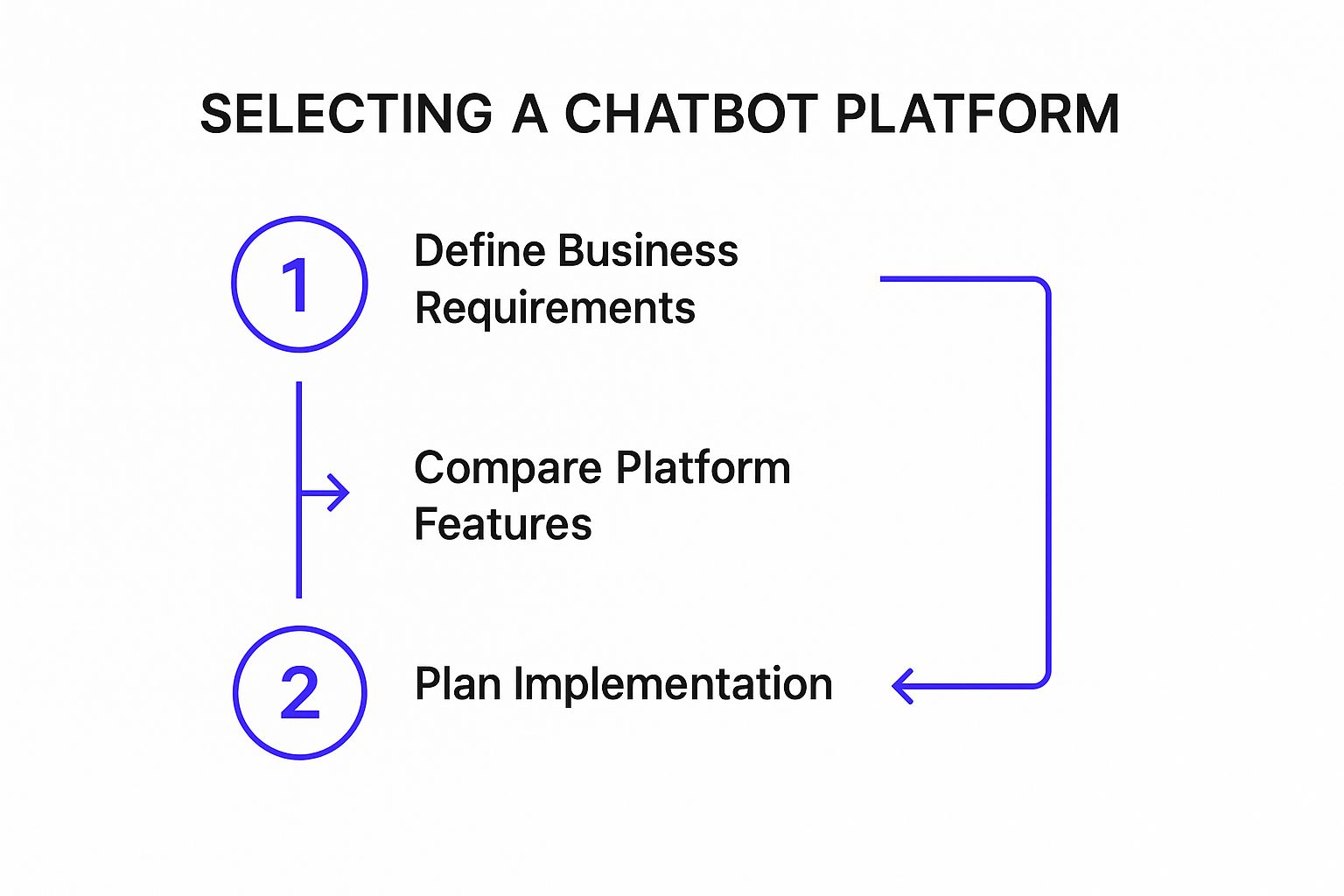
This process isn't just a suggestion; it's a road map. By defining your needs first, then comparing tools, and finally planning the rollout, you stay focused on solving real problems instead of chasing shiny objects.
Core Features to Evaluate
When you start digging into different platforms, zero in on the features that actually move the needle for your business. Don’t get bogged down comparing bells and whistles you’ll never use.
Here are the non-negotiables to look for:
- Integration Capabilities: Does the tool play well with your existing tech? For a home service company, this means connecting directly to your CRM, scheduling software, and booking platform. If it can’t, you'll just end up creating more manual work and disconnected data, which defeats the entire purpose of automation.
- Scalability: Can this tool grow with you? A solution that handles 50 customer questions a day might buckle when that number hits 500. You need a platform that can scale up without requiring a massive price jump or slowing to a crawl.
- Ease of Use: Honestly, how tech-savvy is your team? Some tools have wonderfully intuitive drag-and-drop builders perfect for someone who isn't a developer. Others require real coding skills. Be realistic about the time and talent you can dedicate to managing it.
- Analytics and Reporting: You can't improve what you can't measure. A good tool gives you clear, actionable data. You need to see metrics like containment rate (how many problems the bot solves on its own) and escalation rate to know if your automation is actually helping or just frustrating customers.
This shift isn't just a niche trend. Projections show that by 2025, AI could power up to 95% of all customer interactions. And with 80% of customer service organizations expected to adopt generative AI tools by then, it’s clear this is the new standard. If you want to dive deeper, these AI customer service statistics paint a vivid picture of where the industry is heading.
Matching the Tool to Your Business
Let's make this practical. Imagine a couple of real-world scenarios for a home service business.
Key Takeaway: There's no single "best" tool. The right tool is the one that perfectly aligns with your company's size, your customers' expectations, and your team's technical comfort level.
Think about an independent plumbing contractor. Their biggest headaches are missing after-hours calls and repeatedly answering the same basic questions about service areas or pricing. For them, a simple chatbot on their website that pings their phone or email with new leads is a perfect fit. It’s a low-cost solution with a huge return.
Now, let's picture a multi-location HVAC franchise. Their needs are far more complex. They need a system that integrates with a central CRM, manages appointment scheduling across multiple territories, and maybe even offers support in different languages. They should be looking for a platform with robust ticketing features and deep analytics to track performance at each franchise location.
To help you get a clearer picture, I've put together a table that breaks down the common tool types.
Automation Tool Comparison for Different Business Needs
This table compares different kinds of customer service automation tools to help you see where your business fits. It highlights the ideal scenarios, must-have features, and typical budget for each, making it easier to narrow down your options.
| Tool Type | Ideal For | Key Features | Budget Level |
|---|---|---|---|
| Simple Chatbots | Solo operators, small businesses | Website lead capture, FAQ answers, basic integrations | Low |
| Helpdesk with Automation | Growing businesses, small teams | Automated ticket routing, knowledge base, CRM integration | Medium |
| Advanced AI Platforms | Large franchises, multi-location businesses | AI-powered conversations, multi-channel support, advanced analytics | High |
Choosing your automation stack is a major decision, but it doesn't have to be overwhelming. When you start by defining your needs based on real support data and your customer journey, you can evaluate your options with confidence. Always prioritize strong integrations, scalability, and genuine ease of use to find a tool that solves today’s problems and sets you up for future growth.
Building Your First Automation Workflows
Alright, you've got your strategy and your tools picked out. Now for the fun part: bringing your first automation to life. This is where theory meets reality, and you start building the workflows that will actually interact with your customers.
The trick is to start small. Don't try to boil the ocean. Pick one high-impact, low-complexity task to get your feet wet. For most businesses I've worked with, this is almost always the classic "Where is my order?" or "When is my appointment?" type of question.
Your first workflow isn't about building a perfect, all-knowing AI. It’s about creating a focused, reliable solution for one specific problem. Nail this, and you’ll build momentum and gather invaluable insights for more ambitious projects down the road.
Scripting Conversations That Feel Helpful
Your first big task is to script a conversation that actually feels helpful, not like you're talking to a brick wall. The whole point is a smooth, efficient exchange that gets the customer an answer without any fuss. You have to put yourself in their shoes and map out the conversation flow.
Let's stick with the order status example. A customer types, "Where's my stuff?" Your bot's immediate reply shouldn't be a cold, demanding, "Please provide your order number."
Think warmer. Think guidance.
Bad: "Please provide your order number."
Good: "I can definitely help you with your order status! To pull up the details, could you please share your order number? It usually starts with 'SO' and can be found in your confirmation email."
See the difference? It’s a small change, but it's huge. The good example confirms you can help, tells the customer exactly what you need, and even helps them find it. This simple tweak prevents frustration and keeps things moving.
Designing a Clear Escalation Path
This is, without a doubt, the most critical piece of any automation. You absolutely must know when the bot should give up. No automation can handle every curveball, and forcing it to try is a surefire way to infuriate customers. A clear, seamless escalation path to a human is non-negotiable.
So, what happens when the bot hits a wall? For instance, a customer types in a bad order number twice.
- Acknowledge the Problem: First, the bot needs to recognize it's stuck. Something like, "Hmm, that order number doesn't seem to be in our system. Let's get a human to take a look for you."
- Offer a Seamless Handoff: Don't make them hunt for help. Immediately offer to connect them. "Would you like me to connect you with one of our support agents right now?"
- Preserve the Context: This is the make-or-break moment. The chat history must transfer to the human agent. The first thing the agent says should never be, "How can I help you?" It should be, "Hi, I see you were looking for your order status but the number wasn't working. I can help with that."
Key Takeaway: A successful automation is often defined by how gracefully it fails. The handoff from bot to human has to be so smooth that the customer never has to repeat themselves. This is how you avoid the dreaded "automation loop" that drives people away for good.
Structuring Your Content for Automation Success
Your automation tools—especially chatbots and knowledge base crawlers—are only as smart as the information you feed them. They can't answer questions if the answers are buried in a messy, disorganized wall of text.
Getting your internal content ready for a bot is a foundational step.
To make your content "bot-friendly," follow a few simple rules:
- Use Clear, Question-Based Headings: Don't have one giant "FAQs" page. Break it down with specific headers like "How Do I Track My Order?" or "What Is Your Return Policy?"
- Write Short, Direct Answers: Right under each heading, provide a concise, one-paragraph answer. This structure makes it incredibly easy for a bot to find and serve up the exact piece of information a customer needs.
- Create Dedicated Articles for Processes: For common but multi-step tasks, like initiating a return, give it its own dedicated, step-by-step article. The bot can then just point the customer directly to that resource.
Think of your knowledge base as the brain for your entire automation system. The more organized and clearly written it is, the faster and more accurately your tools can find information and resolve customer issues on the first try.
Preparing Your Team for an Automated Future
Rolling out new technology is only half the battle. Honestly, it's often the easier half. The real challenge—and where most initiatives stumble—is with your people. When you bring in automation, you're fundamentally changing your team's day-to-day reality. Getting this human side of the transition right is what separates a successful automation project from a very expensive failure.
Let's be direct: your team's biggest fear is that a robot is coming for their job. You have to get out ahead of this, and fast. The key is to frame automation as an assistant, not a replacement. It's a tool built to take over the mind-numbing, repetitive tasks that no one really enjoys anyway.
This isn't just about putting a positive spin on things. It's the truth. Automation is there to handle the low-hanging fruit—the "What's my order status?" queries—so your team can dig into the complex, emotionally-charged issues where human intelligence really shines.
Reskilling for a New Reality
Once you've addressed the "why," you need to get practical with training. Your agents can't just be thrown into the deep end; they need to feel confident with the new tools from day one. This can't be a single, rushed webinar. Think of it as an ongoing upskilling program.
Your training should be laser-focused on a few key areas:
- Tool Mastery: Agents need to know the new platform inside and out. This means knowing how to monitor bot conversations, where to find key information, and how to jump into a conversation when a customer needs a human touch.
- Handling Bot Escalations: This is a make-or-break moment in the customer journey. You need a rock-solid process for when a bot hands off a conversation. Your team must be trained to seamlessly pick up the context so the customer never feels the frustration of having to repeat themselves.
- Overseeing Automated Interactions: Your team's role shifts to one of oversight. Teach them how to audit bot conversations and spot where the system is getting stuck or giving bad advice. This feedback loop is pure gold for improving your automated workflows.
The goal here is to transform your agents from frontline responders into strategic problem-solvers and automation managers. They become the essential human oversight that guarantees a great customer experience, stepping in at precisely the right moment.
The Evolving Role of the Customer Service Agent
With automation fielding the simple stuff, the job of a customer service agent becomes infinitely more interesting. The focus shifts from speed and volume to quality and genuine connection. It's less about metrics and more about making a difference.
Think about it. Instead of answering "What are your business hours?" 50 times a day, an agent can now dedicate that same time to one frustrated customer with a tangled, multi-part problem. This is where uniquely human skills like empathy, critical thinking, and creative problem-solving become your team’s most valuable assets. This is the essence of how to automate customer service the right way.
Investing in these advanced skills isn't optional; it's a core part of the strategy. At the end of the day, your technology is only as effective as the team managing it. By preparing your people for this shift, you're not just ensuring your investment pays off in efficiency—you're building a smarter, more engaged, and more capable workforce.
How to Measure and Refine Your Automation Strategy
So, you’ve flipped the switch on your new automation workflows. It’s easy to feel like the hard work is done, but in reality, you’ve just reached the starting line. The real magic of automated customer service happens when you start a continuous cycle of measuring, learning, and refining.
Without solid data, you're essentially flying blind. You won't know if your shiny new bot is actually helping people or just becoming a new source of frustration. Think of it like a new hire; on day one, they know the basics, but they need ongoing feedback to grow into a star performer. Your metrics are that feedback.
Key Metrics That Actually Matter
Forget vanity metrics like total bot conversations. To get a real sense of performance, you need to look at the numbers that tell you about the quality of the experience. A few core metrics will give you a surprisingly clear picture.
Here's what I always recommend tracking first:
- Containment Rate: What percentage of conversations does your bot handle from start to finish without needing to escalate to a human? A high containment rate is a great sign your bot is nailing the repetitive stuff it was built for.
- Escalation Rate: This is the other side of the containment coin. It tells you how often a conversation gets handed over to a human agent. A high escalation rate isn't always a disaster, but it can be a smoke signal that a workflow is confusing or a knowledge base article is missing the mark.
- Customer Satisfaction (CSAT): After a bot-only chat, always ask a simple question like, "Did you get the help you needed?" This direct feedback is gold. A low score is an immediate red flag telling you something is broken in the customer's eyes.
- First-Response Time: Automation should be lightning-fast. This metric tracks how quickly your system gives that first reply. Even though bots are naturally quick, a lag here could point to technical hiccups with your platform.
Turning Numbers into Action
Collecting data is the easy part. The real skill is knowing what to do with it. Your goal is to spot specific opportunities for improvement and create a feedback loop that makes your automation smarter with every interaction.
For instance, don't just stare at a high overall escalation rate. Dig into the details. Is there one specific question that trips up your bot over and over again? If you see that 25% of all escalations are about your "return policy," you've just found your top priority. That might mean you need to rewrite the help article with simpler language or completely redesign the chatbot flow for that topic.
A high escalation rate for a specific topic isn't a failure—it's a gift. It’s your customers pointing directly at a weak spot and telling you exactly where to focus your energy for the biggest impact.
This data-first approach is what separates good support from great support. The rise of AI in customer service is creating massive wins in both efficiency and satisfaction. In fact, by 2025, AI is expected to power 95% of all customer interactions, saving businesses an incredible 2.5 billion hours each year. This isn't just a business trend; 81% of customers say they prefer to try self-service before reaching out to an agent. You can dig deeper into these AI customer service trends and their impact.
Build a Continuous Improvement Loop
Tuning your automation strategy isn't a one-and-done project. It’s a habit you need to build into your team's regular routine.
Make it a point to sit down with your customer service team every month and review the automation analytics. Your agents are on the front lines; they hear what works and what doesn't directly from customers. Their insights are invaluable for making sure your improvements are grounded in reality, not just abstract data.
By consistently measuring, analyzing, and tweaking, you turn your automation from a static tool into a dynamic system that learns and evolves. This is how you unlock its true potential and ensure your automated support gets a little bit better, every single day.
Common Questions About Automating Customer Service
Jumping into customer service automation always sparks a few questions. It makes sense—you're trying to improve your customer experience, not create a robotic one, and it's smart to be cautious. Let's tackle some of the most common concerns I hear from business owners so you can move forward with confidence.
One of the biggest fears? That automation will feel cold and impersonal. But when you do it right, the opposite is true. Good automation is brilliant at handling the simple, repetitive questions with lightning speed, which customers actually love. This frees up your team to dedicate their brainpower and empathy to the tricky, high-stakes problems where a human touch is essential.
The secret is a well-crafted brand voice for your bot and, most importantly, an obvious, seamless way for customers to reach a person. Get those right, and the experience stays human exactly when it needs to.
This hybrid approach really is the best of both worlds.
Where Should I Start Automating?
The smartest place to start is by letting your own data be your guide. Dig into your support ticket history and call logs. What are the simple, high-volume questions that pop up over and over again, eating up your team's time?
Those are your golden opportunities. You're looking for quick wins, like:
- "When is my appointment?"
- "What are your business hours?"
- "How do I reset my password?"
Automating these kinds of queries gives customers instant answers and immediately lightens the load on your agents. It’s a fantastic way to prove the value of the system right out of the gate.
What Is the Biggest Mistake to Avoid?
I've seen it happen too many times: the single biggest mistake you can make is not providing a clear, easy escape hatch to a human. Nothing infuriates a customer faster than getting trapped in a loop with a bot that doesn't understand them. It’s a surefire way to erode trust and lose their business for good.
Any successful automation strategy must include an obvious "talk to a person" option. The handoff from bot to human needs to be smooth, without forcing the customer to repeat everything they just typed. A system that can fail gracefully is a system that's built to succeed.
Ready to stop losing leads and start booking more appointments? Phone Staffer can help. We provide done-for-you cold calling and fully-trained remote CSRs to ensure your phones are always answered and your leads are converted. Learn more about how we can help your home service business grow.