

Thinking about how to manage remote employees has shifted. It's no longer just a temporary solution born out of necessity. For savvy home service businesses, it’s a core strategic move that opens up a world of possibilities for growth, efficiency, and building a truly customer-centric team.
Why Your Next Hire Should Be Remote
It's time to stop seeing remote work as a compromise and start seeing it for what it is: a powerful tool for scaling your home service business. This goes far beyond just saving a few bucks on office space. We're talking about fundamentally building a more resilient and efficient operation.
The numbers back this up. Roughly 4 in 10 US jobs now offer some form of remote work, and these roles consistently pull in a whopping 60% of all job applications. If you're interested in the data, you can dig into more remote work statistics and trends to see just how profound this shift has been. It’s not a fad; it’s the new reality of hiring.
Build a More Agile and Focused Operation
Picture this: a skilled remote Customer Service Representative (CSR) or Virtual Assistant (VA) dedicated entirely to your phones and scheduling. That constantly ringing phone, a source of chaos in most shops, suddenly becomes a well-oiled machine for booking jobs and dispatching your techs.
When a surprise storm hits and your phones blow up with emergency calls, a focused remote team member can manage that surge without breaking a sweat. They can also ensure every single customer follow-up call actually gets made, on time, every time. Good luck achieving that level of focus in a busy, distracting physical office.
By handing off these critical admin tasks to a remote specialist, you and your in-house team are freed up to focus on what really drives revenue: delivering outstanding service in the field. This separation of duties is the secret sauce to scaling your business without losing your mind.
Real-World Scenarios and Benefits
I’ve seen this work wonders firsthand. Take a plumbing company I know that brought on a remote VA just to handle their estimate follow-ups. Before, quotes were constantly falling through the cracks because the office staff was just too swamped. The new VA built a simple, systematic follow-up process and boosted their job conversion rate by 15% in just three months.
Or how about an HVAC business that was losing after-hours calls to their competition? They hired a remote CSR to cover evenings and weekends. Overnight, they stopped missing out on lucrative emergency repair jobs and built a reputation for being the go-to company that always answers the phone.
These aren't just hypotheticals. This is what happens when you effectively manage remote employees. You build a more resilient and profitable business by gaining the ability to:
- Access a massive talent pool: You're no longer stuck hiring from the 20-mile radius around your shop.
- Improve customer response times: A dedicated remote pro provides faster, more focused support.
- Boost operational efficiency: Finally systematize all those admin tasks like scheduling, follow-ups, and data entry that slow you down.
- Scale with ease: Add team members as you grow without ever worrying about finding more office space.
How to Hire the Right Remote Talent
Finding the right people for a remote team is a completely different game than hiring for an in-house role. You're not just looking for a specific skill set. You're hunting for a rare mix of reliability, proactive communication, and the kind of self-discipline that lets someone excel without a manager watching over their shoulder.
This process really starts long before you even think about interviews. If you want to succeed with a remote team, it all begins with the job description.
Crafting a Job Description That Attracts the Best
Your job post is your very first filter. It needs to speak directly to the kind of person you want to hire.
Don't just list out duties. For a home service business, you need to call out the specific challenges and rewards of the role. Talk about the importance of genuine empathy on customer calls. Mention the need to get comfortable with your scheduling software, fast. Using words like "autonomy" and "problem-solving" will catch the eye of professionals who are ready to own their role from day one.
A few things to make sure you include:
- Be clear about tech needs: Be upfront about requiring a quiet workspace and reliable, high-speed internet. If they need to know their way around a specific CRM or phone system, say so.
- Emphasize the right traits: Use phrases like “detail-oriented,” “proactive communicator,” and “self-motivated.” In a remote role, these aren't just fluffy buzzwords; they are non-negotiable requirements for success.
- Give a glimpse of your culture: Briefly mention how you keep your remote team engaged. Do you have daily video huddles? A dedicated Slack channel for celebrating wins? This shows you're serious about making them feel like part of the team.
A generic job description will only bring you generic candidates. A detailed, thoughtful post that gives a real sense of the job and your company is what attracts the high-caliber people you're actually looking for.
Smart Interview Questions for Remote Roles
Your standard interview questions just won't cut it here. You have to dig deeper to see if a candidate truly has what it takes to work from home effectively. The goal is to find proof of past behavior that points to future success in an independent setting.
So, move beyond the tired old "tell me about a time you solved a problem." Get specific about the realities of working remotely for a busy service company.
For example, a great remote team member instinctively knows how to communicate. They don't need to be told when to send a quick chat message versus when an issue needs a detailed email or an urgent video call. This decision-making is a critical skill.
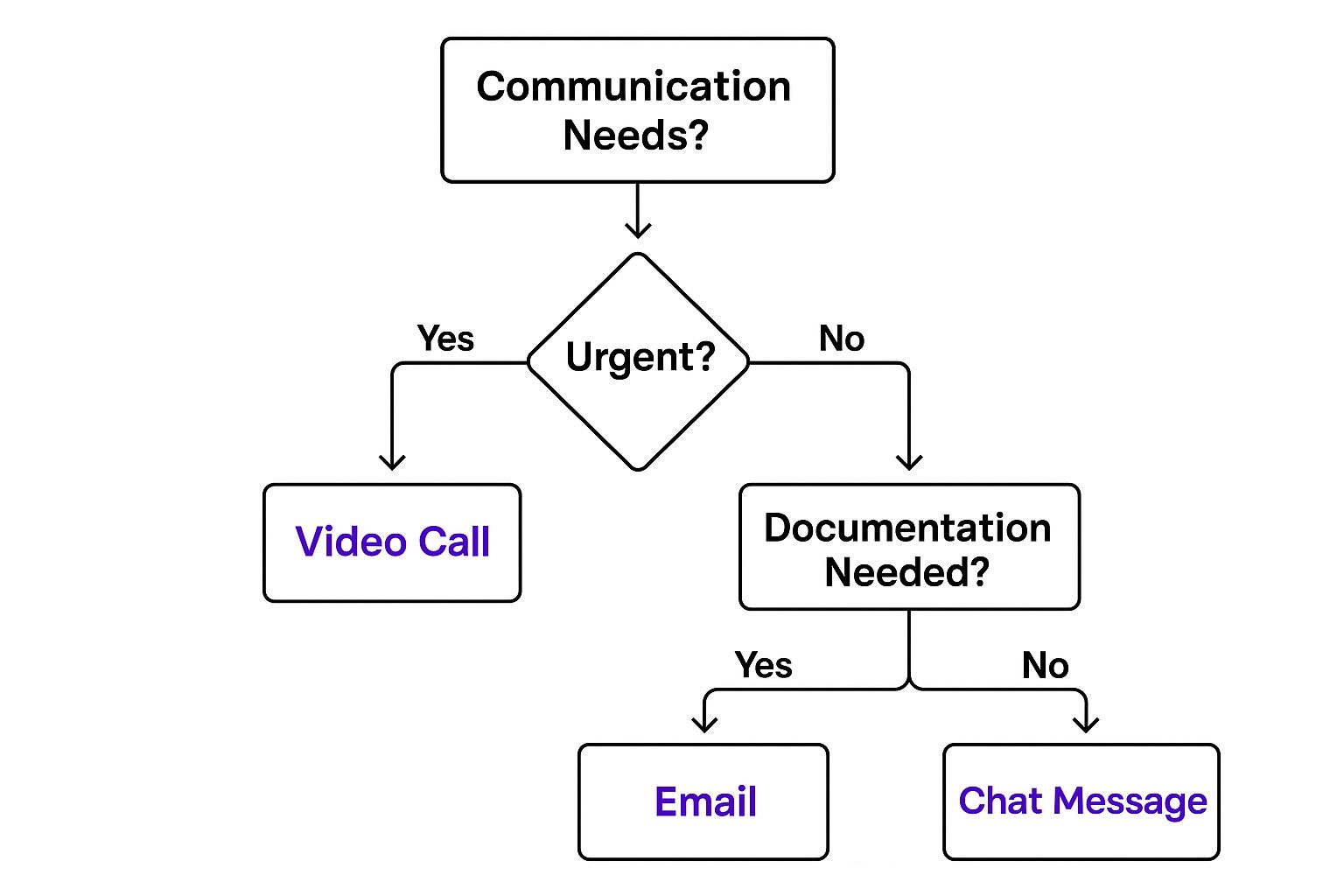
Here are a few questions I’ve found that get to the heart of these remote work skills:
- "Describe your current or ideal home office setup. How do you plan to handle distractions during work hours?" This tells you how much thought they've put into creating a professional, productive environment for themselves.
- "Walk me through how you'd manage a day with back-to-back customer calls and an urgent message from a technician stuck on a job. How do you prioritize what to handle first?" This tests their judgment and ability to multitask under pressure—without you right there to guide them.
- "Tell me about a time you had to learn a new piece of software on your own with minimal training. What was your process?" This uncovers their resourcefulness and ability to learn independently, which is absolutely essential for anyone on a remote team.
When you focus your hiring process on these specific attributes, you're no longer just trying to fill a seat. You're making a strategic investment in a self-sufficient, valuable member of your team.
Putting Your Remote Operations on Paper: Your Playbook for Success

A top-tier remote team isn't built on hope and good intentions—it’s built on clear, documented systems. When you don't have a shared office space, your digital documentation becomes the central hub for everything. I can't stress this enough: creating a detailed remote operations playbook is the most critical step you can take to make remote hires work for your business.
Think of this playbook as your company's single source of truth. It's a living, breathing guide that lays out exactly what a remote CSR or VA needs to do their job well, from their first day to their fifth year. This document is what empowers them to handle tricky situations with confidence, instead of pinging you or a manager for every little thing.
Make the First Impression Count with Solid Onboarding
The way you onboard a new remote hire sets the stage for their entire tenure with your company. A well-thought-out, welcoming process helps them feel like part of the team right away, fighting off the isolation that can easily creep in with remote work. Good onboarding is less about paperwork and more about genuine integration.
Here’s what that looks like for a new remote CSR:
- A "First Week" Checklist: Give them a clear roadmap. Day one is for tech setup. Day two is for initial training modules. By day three, they should have scheduled virtual meet-and-greets with dispatchers and service managers.
- Tech Stack Walkthroughs: Don't just hand them a list of software and expect them to get it. Record simple, step-by-step video tutorials for your key tools—the VoIP phone system, your CRM like Jobber or ServiceTitan, and any scheduling platforms you use.
- A Human Connection: Assign a "work buddy" from the team for those casual, "Is this a dumb question?" moments. Also, be sure to schedule a proper virtual welcome for them during a weekly team meeting.
Crafting Your Digital Operations Manual
This manual is the real meat of your playbook. It’s the ultimate "how-to" guide for every single function of your virtual front office. Clear documentation is what drives consistency and eliminates the guesswork that can plague remote teams.
A well-documented process is the ultimate form of delegation. It allows your team to operate with autonomy because they have a clear reference for "how we do things here," which builds confidence and reduces errors.
Start by documenting the most frequent and critical workflows. Put yourself in the shoes of a CSR during a busy spring morning. What do they need at their fingertips?
Your manual absolutely must include:
- Go-To Call Scripts: Provide proven scripts for common situations, from booking a new HVAC tune-up to handling a price shopper or calming down an upset customer.
- Technician Dispatching Rules: Map out the exact steps for assigning a job in your system, how to communicate all the necessary details to the tech, and the proper way to send updates to the customer.
- Clear Escalation Paths: Define who to contact and how (e.g., a quick Slack message vs. an urgent phone call) for different problems. A system outage requires a different response than a complex customer complaint or a technician having an issue in the field.
With a playbook this thorough, you're not just giving your remote team the tools to get by—you're setting them up to excel. The result is a seamless experience for both your customers and your techs in the field.
Fostering Connection and a Strong Team Culture
In a typical office, your team builds its own culture. It happens naturally during those quick chats by the coffee machine or over shared lunches. But when your team is remote, that organic connection just isn't there. You have to build it on purpose.
Without a conscious effort from you, a remote CSR or VA can start to feel like an isolated island. They might feel more like a hired gun than a real part of the team, and that feeling is a silent killer for both morale and productivity. The key is to create a communication plan that's structured enough to be reliable but genuine enough to feel human.
This isn't about watching their every move. It's about creating predictable touchpoints that build real relationships and keep communication flowing. This is how you make sure your team feels supported and connected to the bigger picture of what your company is trying to achieve.
Create Your Communication Rhythm
Managing a remote team well comes down to a smart mix of communication types. I like to think of it as a weekly schedule of different kinds of conversations, each with its own clear purpose. Mixing it up keeps things interesting and makes sure everyone gets what they need.
Here’s a simple but incredibly effective rhythm you can put into place right away:
- Quick Daily Check-ins: Kick off each morning in a dedicated Slack or Teams channel. A simple "good morning" and a one-sentence goal for the day is all it takes. This literally takes seconds but creates a powerful sense of shared focus.
- Weekly Video Huddles: Get everyone on a 30-minute video call every Monday morning. Use this time to celebrate last week's wins and set the priorities for the week ahead. This should feel like a team alignment session, not just a status report for the boss.
- Meaningful One-on-Ones: Carve out time for bi-weekly or monthly one-on-one video calls with each person. This is their time. It’s a safe space to talk about their challenges, ask about growth, and give you honest feedback without an audience.
The point of these check-ins isn't to micromanage. It's to open the door for communication, spot and remove roadblocks, and make sure every single person feels like a core part of the team, not just a name on a screen.
Intentionally Build Camaraderie from a Distance
Scheduled meetings are important, but the strongest remote teams are built on the small, consistent things you do to create personal connections. This is the glue that holds everyone together, especially when things get busy or stressful.
Think about all those little casual moments that happen in a physical office. Now, get creative and find ways to bring that same energy to your virtual workspace. For a home service CSR who might be dealing with anxious customers all day, these small, positive interactions with their own team are pure gold.
Here are a few ideas that have worked wonders for us:
- Start a "Wins & Kudos" Channel: Set up a specific chat channel just for celebrating good news. This could be anything from a great customer review or a tech giving a shout-out to a CSR for perfect dispatch notes, to someone hitting a booking goal.
- Acknowledge Anniversaries and Milestones: Don't let a work anniversary or a birthday slip by. A public acknowledgment in the team chat and a small gift card shows you see them as people, not just employees.
- Host Optional "Virtual Coffee Breaks": Schedule a 15-minute, no-work-talk-allowed video call once a week. It’s just a space for people to hang out and chat, which is absolutely vital for building the personal bonds that make a team resilient.
Taking these steps shows you're invested in your team's well-being. By intentionally building this kind of culture, you're not just managing remote employees; you're building a loyal, connected, and far more effective team.
How to Measure Performance and Drive Productivity
When you bring on remote team members, it’s tempting to try and duplicate how you’d supervise them in the office. This is a classic mistake. It almost always leads to micromanagement, which absolutely tanks morale and breeds distrust.
The secret isn't tracking clicks or hours logged—it's shifting your focus to what actually moves the needle for your home service business.
Trust is your foundation, but data is your roadmap. When you give your remote CSRs and VAs clear goals and show them exactly how their performance is being measured, productivity naturally follows. They get the freedom to manage their own time and methods, as long as they deliver the results that grow your business.
Focus on the KPIs That Really Matter
Your CRM and phone system are sitting on a goldmine of data. Forget about monitoring keystrokes and start digging into the metrics that have a direct impact on your revenue. These are the numbers that tell the true story of how effective your virtual front office is.
Here are the KPIs I always recommend tracking for remote CSRs:
- Booking Conversion Rate: This is the big one. Out of all the inbound calls, what percentage actually turn into booked jobs? This is the clearest measure of a CSR's effectiveness.
- First-Call Resolution (FCR): Can your CSR solve the customer's problem or answer their question on the very first call? A high FCR is a sign of an efficient, knowledgeable team member who respects the customer's time (and your own).
- Customer Satisfaction (CSAT) Scores: After the call ends, are customers actually happy? Simple post-call surveys give you direct, unfiltered feedback on their experience.
- Estimate Follow-Up Rate: This is where so much money is left on the table. Is your team consistently following up on every single quote you’ve sent out? This metric is non-negotiable for closing more business.
When you zero in on these outcome-based KPIs, your performance reviews stop being subjective, awkward conversations. They become productive, data-driven coaching sessions. The dialogue changes from, "So, were you busy?" to "Okay, our booking rate is at X%. How can we work together to get it to Y%?"
Turn Data into Productive Conversations
This data-first approach is better for everyone. It gives you an objective way to measure success, which is frankly a relief for high-performing remote employees who are eager to prove their value. The research backs this up, too. One study found remote workers are productive for 51 more minutes per day on average than their in-office counterparts. You can learn more about these remote work trends and their impact and see how clear monitoring plays a key role.
Having this data also makes quality assurance a whole lot simpler. When you review call recordings, you can use a structured scorecard to grade the interaction against criteria tied directly to your KPIs. This gives your CSRs concrete, actionable feedback they can actually use to get better.
To get started, we've put together a guide on creating a call center quality monitoring form that will help you align your QA process with your business goals.
Ultimately, when your team has clear targets and understands exactly how success is defined, they stop being people who just answer phones. They become engaged, proactive owners of their roles, all focused on growing your company.
Answering Your Lingering Questions About Remote Teams
Even with a great plan in place, it's natural to have some nagging "what-if" questions. Let's be honest, these aren't just hypotheticals—they're the real-world friction points that can trip you up when you're managing a remote team for the first time.
I've been there. So, let's talk through the most common concerns I hear from other home service business owners and give you some practical answers to help you move forward.
"How Do I Keep My Company Data Secure?"
This is always the first question, and for good reason. Your customer and company data is invaluable, and protecting it is non-negotiable. The best defense is a layered one.
First off, your foundation should be reputable, cloud-based software. Modern CRMs, scheduling platforms, and phone systems have their own powerful, built-in security. Choosing the right tools does a lot of the heavy lifting right from the start.
Next, you need a clear and simple security policy for your team. This isn't just paperwork; it's a critical part of your operations. It must require:
- Using strong, unique passwords for every single login.
- Connecting through a VPN (Virtual Private Network) to access anything on your company network.
- Regular training on how to spot and immediately report phishing scams or other security red flags.
The Principle of Least Privilege is your secret weapon here. Simply put, a remote CSR should only have access to the exact information they need to book a job and talk to a customer—and nothing else. This one rule dramatically shrinks your risk.
Finally, you need to decide on hardware. All work should be done on either a company-provided computer or a personal device that you've confirmed has up-to-date antivirus software and meets your security standards.
"What's the Best Way to Handle Payroll for Someone in Another State?"
Out-of-state payroll sounds complicated, but it's a solved problem. The path you take really just depends on one thing: are they a contractor or an employee?
If you bring them on as a 1099 independent contractor, the process is incredibly straightforward. You just pay their invoices. At the end of the year, you'll issue a 1099-NEC form for their tax records. That's it.
If you hire them as a W-2 employee, you're on the hook for state-specific payroll taxes, unemployment insurance, and other local rules. This is where you absolutely should not try to DIY it.
Using a dedicated payroll service like Gusto or a Professional Employer Organization (PEO) is the smart move. These platforms are built specifically to handle the complexities of multi-state tax withholding and compliance, making the process almost as easy as paying someone who lives down the street.
"How Can I Build Trust and Not Feel Like I Have to Micromanage?"
That urge to check in constantly comes from a place of uncertainty, not a lack of trust. The solution isn't more supervision; it's better systems and a focus on what actually matters: results.
Building trust with a remote employee is an active process, and it all comes down to one big shift in your mindset.
You have to move from managing "time in the chair" to measuring "results achieved."
Start by setting those crystal-clear expectations and the Key Performance Indicators (KPIs) we talked about earlier. Give them a detailed operations playbook and the right tools. Once they have what they need to succeed, you have to get out of their way and let them do the job.
Instead of sending constant "what are you up to?" pings, use your scheduled check-ins to discuss their progress toward goals. Ask them, "What's getting in your way, and how can I help?" Use shared dashboards so everyone can see performance metrics transparently.
When your team knows exactly what success looks like and feels your consistent support, trust builds organically. The need to micromanage just melts away.
Ready to stop worrying about unanswered calls and missed opportunities? Phone Staffer can place a professionally trained, remote CSR into your business to ensure every lead is captured and your customers get the world-class service they deserve.
Learn how Phone Staffer can build your remote front office team.