

Let's get straight to the point: A virtual assistant for customer service is the secret weapon your home service company needs to capture every single lead and keep your clients happy. It’s a flexible, scalable, and genuinely affordable way to handle calls, book jobs, and manage inquiries. The result? You stop losing money just because you were busy on a job site.
Why Your Home Service Business Needs a VA for Customer Care
We all know the painful truth—every missed call is a missed opportunity. If you're a home service business owner, you live this reality every day. You're balancing on a ladder or troubleshooting a plumbing issue, and your phone buzzes with a new lead. By the time you can finally call back, they’ve already moved on to your competitor. It’s a frustrating cycle.
This is exactly where a dedicated virtual assistant (VA) for customer service completely changes the game.
Picture an HVAC company in the middle of a brutal summer heatwave. The phones are ringing non-stop with homeowners desperate for emergency repairs. Without someone to manage that flood of calls, most go to voicemail, potential clients get frustrated, and you lose thousands in potential revenue.
A VA becomes your frontline, making sure every call gets answered professionally and promptly. They aren't just an answering service; they become a true extension of your brand, providing the kind of reliable communication that builds trust and, most importantly, books jobs.
The Immediate Impact on Your Operations
Bringing a VA on board isn't just about answering the phone. It's about getting your time back and making your entire business run smoother. This one move can directly boost your bottom line from the very first day by making you more efficient and keeping customers happy.
Here’s what that looks like in practice:
- You'll never miss a lead again. Your VA is there to catch every phone call, email, and website form submission.
- Booking gets way faster. They can jump right into your calendar to schedule appointments, consultations, or emergency calls on the spot.
- Your customer experience gets a major upgrade. Clients get immediate, professional attention, which makes them feel valued and confident they chose the right company.
The data backs this up. The shift toward using VAs has had a clear and measurable impact on key service metrics.
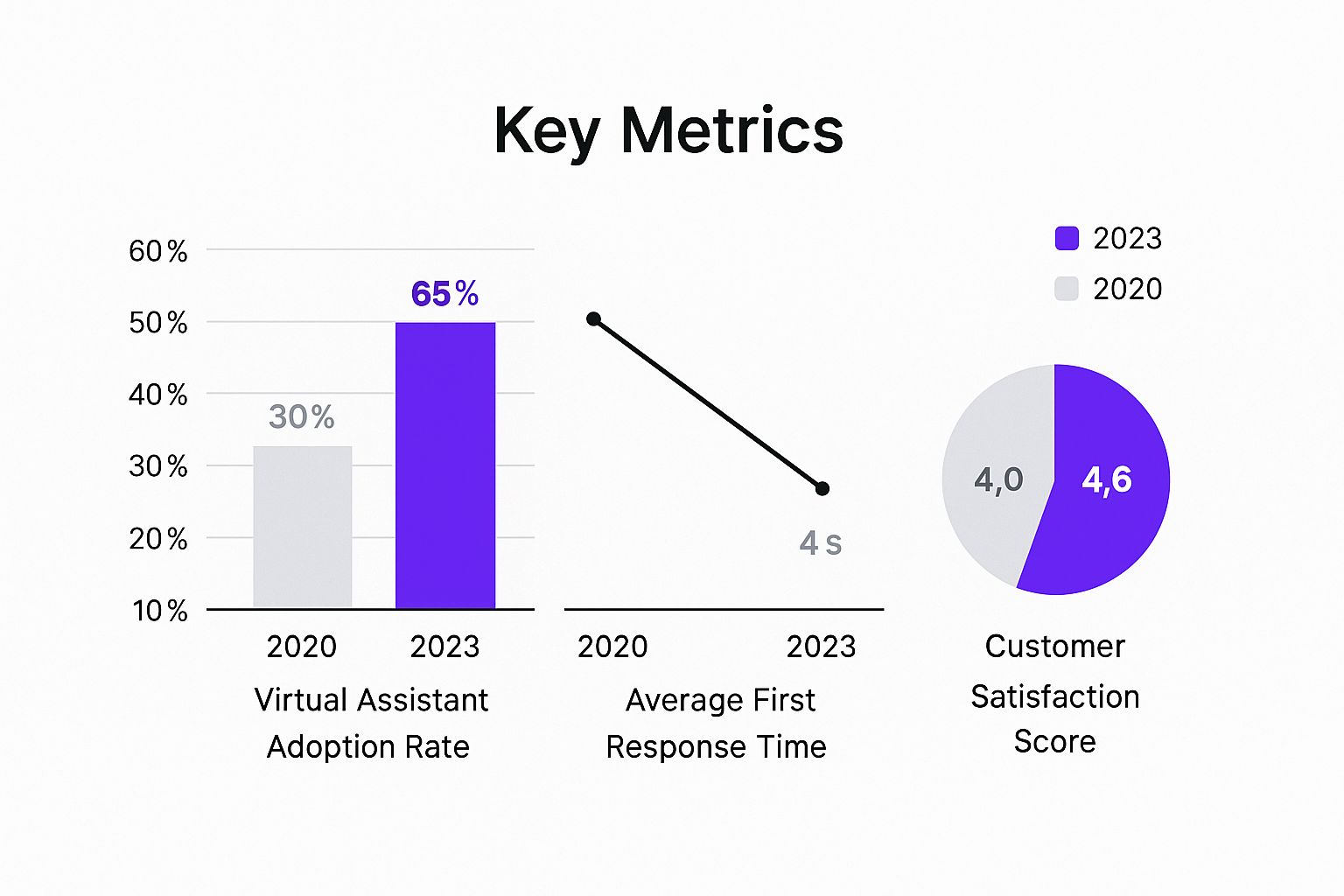
As you can see, the more businesses rely on VAs, the faster their response times get and the higher their customer satisfaction scores climb.
The real magic of virtual assistant customer service is that it turns your biggest operational headache—managing customer communication—into your greatest asset for growth. You're not just hiring help; you're buying back your focus.
Comparing In-House vs Virtual Assistant Customer Service
Deciding between hiring someone to work in your office and bringing on a remote VA is a major decision. It’s not just about cost; it’s about flexibility, scalability, and what makes the most sense for a dynamic home service business.
Here's a straightforward comparison to help you weigh the options.
| Factor | In-House Representative | Virtual Assistant |
|---|---|---|
| Salary & Benefits | Full-time salary, plus benefits (health insurance, retirement), and payroll taxes. Significantly higher fixed cost. | Hourly rate with no overhead. You only pay for the hours worked, making it a flexible operating expense. |
| Overhead Costs | Requires office space, a computer, a phone system, and other physical equipment. | Zero overhead. The VA uses their own equipment and works from their own space. |
| Availability | Typically standard 9-5 business hours, with potential for costly overtime. | Can be hired for specific hours, including evenings and weekends, to provide extended coverage. |
| Recruitment & Training | Long and often expensive process. Onboarding requires significant time from you or a manager. | Recruitment is often handled by a specialized agency. VAs are pre-vetted and trained in customer service. |
| Scalability | Difficult to scale up or down quickly. Hiring and firing are complex processes. | Extremely flexible. You can easily add more hours or another VA during your busy season. |
Ultimately, while an in-house person offers a physical presence, a VA provides a level of financial and operational flexibility that's hard to beat, especially for a growing home service company.
The move toward remote support is only getting stronger. Some projections show that AI-powered systems could handle up to 95% of all customer interactions by 2025. This trend is fueled by huge efficiency gains—these tools are already cutting issue resolution times by up to 50% and improving first response times by an average of 37%. You can explore more of these powerful virtual assistant statistics to see how they're reshaping modern business.
How to Find and Hire the Right Customer Service VA

Finding the right virtual assistant for your customer service isn't just about filling a seat; you're hiring the voice of your brand. So, where do you even start? Your search will likely take you down one of two paths: using a specialized VA agency or hiring an independent contractor directly.
VA marketplaces and dedicated placement agencies like Upwork give you access to a pool of talent that's already been vetted. The biggest win here is speed. They do a lot of the initial legwork for you, which can save a ton of time.
Going the independent route, on the other hand, can feel more like building a true, long-term partnership. It definitely takes more effort on your end to find and screen candidates, but you get total control over the process and can often forge a much stronger working relationship.
Crafting a Job Post That Attracts Experts
To get the right people applying, your job description has to be incredibly specific. Generic posts will only bring you generic candidates. For a home service business, this means using language that signals you're a serious player in the industry.
Ditch the vague "customer service experience" line. Instead, get specific with phrases that speak directly to seasoned pros:
- "Experience with home service dispatching"
- "Familiarity with CRMs like ServiceTitan or Jobber"
- "Skilled in managing appointment calendars for field technicians"
- "Proven ability to handle inbound calls for a trade business (plumbing, HVAC, electrical)"
This kind of detail works as a natural filter. The people who understand these terms are the ones you want to talk to, and it shows them you know exactly what you need. For a deeper dive, you can explore our guide on https://phonestaffer.com/blog/small-business-virtual-assistant-services to really nail down the type of support you're after.
Your job post shouldn't just be a list of tasks. It needs to paint a vivid picture of the role, making the perfect candidate think, "Hey, that's me. I can do that."
Vetting for More Than Just Skills
Once the applications start coming in, the real work begins. A resume shows you what someone has done, but it can’t tell you how they think on their feet or handle a pressure-cooker situation. This is where you need to lean heavily on situational questions during the interview.
Forget the generic "Tell me about a time you handled a difficult customer." Let’s get real with scenarios they'll actually face working for your company.
Here are some powerful situational questions I've seen work wonders:
- The Scheduling Conflict: "A client calls to confirm their 2 PM plumbing appointment, but you see our system shows it was accidentally double-booked with another job. Walk me through exactly how you would handle that call, step by step."
- The Angry Customer: "A homeowner is furious because our technician is late and missed the 4-hour arrival window we promised. What are your immediate first steps to de-escalate things and find a solution?"
- The Technical Question: "A caller asks for a quote on a 'sump pump installation,' a term you've never heard before. What's your process for responding to them while getting the information you need for a tech?"
There isn't a single "correct" answer here. What you're listening for is their thought process. Do they sound calm? Empathetic? Resourceful? The right virtual assistant customer service professional will show you they can think critically and represent your business well, making them an incredible long-term asset.
Crafting an Onboarding and Training Program That Actually Works

Finding a great virtual assistant is a fantastic start, but it's really just the first step. The truth is, even the most talented VA is only as good as the training you give them. If you just throw them into the deep end, you're setting them—and your business—up for failure. A structured, thoughtful onboarding program, on the other hand, empowers them to start contributing confidently from day one.
The absolute foundation of a solid training plan is what I call a "Company Playbook." This isn't just another boring manual. Think of it as the single source of truth for your entire operation—a living document your VA can turn to for anything and everything. It's how you ensure they handle every call and every question exactly the way you would.
The Heart of Your Training: The Company Playbook
Your playbook needs to be the go-to guide that eliminates guesswork. It’s the brain of your business that you're making accessible to your new team member. This is especially vital when you’re empowering your small business virtual assistant services to handle customer interactions.
So, what goes into a killer playbook?
- Service & Price List: Don't just list services. Detail everything: standard pricing, common upsells or add-ons, and any active promotions or seasonal discounts.
- Brand Voice Guide: How do you want to sound? Are you the serious, trusted expert or the friendly, neighborhood pro? Give them sample greetings, scripts, and sign-offs to model.
- Top 20 FAQs: Sit down and list the 20 most common questions you get from customers. Write out the perfect answer for each one. This alone will save you hours.
- Escalation Protocol: What’s a true emergency? If a customer calls about a burst pipe or a gas leak, what is the exact, step-by-step process your VA must follow? Who do they call? This needs to be crystal clear.
Putting in this work upfront is a game-changer. It drastically cuts down on the "quick questions" that can interrupt your day, letting you focus on running the business.
Bridge the Gap with Real-World Practice
Reading a playbook is one thing. Remembering the right answer when a stressed-out customer is on the line is something else entirely. This is where role-playing becomes your most powerful training tool. It takes the theory and makes it real.
Run your new VA through the scenarios they'll face every single day.
The real test of your training isn't a quiz—it's how your VA handles that first difficult customer. Role-playing ensures they pass that test with you, not with a paying client.
For example, pretend you're a frantic homeowner whose air conditioning just died on a 100-degree day. See how they handle the pressure. Walk them through a call from an unhappy customer questioning an invoice. These practice runs build the muscle memory they need to perform flawlessly when the calls are real.
A well-trained VA doesn't just answer phones; they build trust and protect your revenue. It's a level of efficiency and polish that modern tools are amplifying. In fact, a recent study showed that 70% of global CEOs see generative AI as a major force that will change how their companies operate in the next three years.
Finally, set them up with the right tools. Securely grant them access to your CRM, scheduling platform, and VoIP phone system. Use software that lets you create role-based permissions, giving them what they need to do their job without exposing sensitive company data.
You've found a fantastic virtual assistant. That's a huge win, but it's only the first step. The real magic happens when you bring them into the fold and make them an indispensable part of your team.
This isn’t about just forwarding calls to a disembodied voice. It's about building a rock-solid workflow that gives your VA the tools and know-how to run the front office like a pro, even while you’re balancing on a roof or crawling under a house.
Think of this as where the rubber meets the road—where all your training and planning come to life. Your objective is to build a system where your VA can operate confidently and make smart decisions without needing to text you for permission every five minutes. The foundation for all of this? Your technology.
Arming Your VA With the Right Digital Tools
You don't need to spend a fortune on a complex suite of enterprise software. In my experience, a few well-chosen tools are all it takes to create a powerful command center for your virtual assistant customer service professional to handle everything from calls to scheduling.
You wouldn’t send a plumber to a job without a wrench, right? The same logic applies here. Your VA needs a digital toolkit to get the job done right.
To get started, here's a look at the essential tech stack I recommend for any home service business bringing on a remote customer service VA. These categories cover the core functions they'll be handling day in and day out.
| Tool Category | Purpose | Example Tools |
|---|---|---|
| VoIP Phone System | Allows you to forward your main business line, track calls, and maintain a professional business number, no matter where your VA is located. | OpenPhone, Grasshopper |
| Shared Inbox | Creates a central hub for all customer emails, preventing messages from getting lost and ensuring anyone on the team can see the communication history. | Google Workspace, Front |
| Task Management | A digital to-do list for assigning follow-ups, estimate requests, and other admin tasks with total clarity on who is doing what, and when. | Asana, Trello, Shared Calendar |
With these pieces in place, you create a central system for all your customer communications, accessible to both you and your VA from anywhere.
The right tech stack doesn't just connect you to your VA; it connects your entire customer service process into one cohesive, manageable system.
Clear Processes: The Glue That Holds It All Together
Okay, so you've got the tools. That's half the battle. The other half is process. This is where your Standard Operating Procedures (SOPs) come in. SOPs are your secret weapon—they're the specific, step-by-step instructions that tell your VA exactly how to handle any situation that comes their way. They turn your big-picture Company Playbook into daily, actionable tasks.
Let's walk through a real-world scenario.
Imagine you run a roofing company and a huge hailstorm just rolled through town. Your phone is ringing off the hook. You’re swamped managing crews and doing damage assessments. Without clear instructions, a new VA would be completely overwhelmed. But with great SOPs, they become a lead-generating machine.
Here's how that plays out:
-
A new lead calls in. The VA doesn't just say, "He'll call you back." They use a script you created to qualify the lead, asking smart questions like, "What kind of damage did your roof sustain?" and "Has your insurance adjuster been out to the property yet?"
-
They log every detail. The VA immediately enters the homeowner's name, address, damage description, and insurance status into a shared system (like a Google Sheet or your CRM), maybe even tagging it as "Urgent – Hail Damage."
-
The estimate gets booked on the spot. Using your shared calendar, the VA sees you have an opening tomorrow at 2 PM. They book the estimate right then and there, sending a calendar invite and a confirmation email to the homeowner.
In this example, the VA isn't just a glorified answering service. They are actively managing your sales pipeline and teeing up profitable jobs, which frees you up to focus on the work that actually makes you money. That’s the real goal here: turning administrative chaos into a smooth, efficient operation.
Measuring VA Performance for Long-Term Success

Bringing a virtual assistant on board is a fantastic first step, but it’s certainly not a "set it and forget it" solution. The real magic happens when you treat this as an ongoing partnership—one that needs to be managed, measured, and nurtured to truly pay off.
This means you need to look past the simple fact that someone is answering the phone. The focus should be on how effectively they're contributing to your company's growth. For a home service business, generic metrics just won't do. You need to dial in on the Key Performance Indicators (KPIs) that directly fatten your wallet.
Key Metrics for a Home Service VA
Forget vanity metrics like call duration or the number of emails sent. Those don't tell you much. Instead, let's concentrate on the outcomes that actually generate revenue and keep customers happy. These are the numbers that prove your investment is working.
From my experience, it’s best to track a handful of core metrics:
- Call Answer Rate: What’s the percentage of calls being answered live versus those that get kicked to voicemail? You should be aiming for 95% or higher. Every missed call is a potential lead lost to a competitor.
- Appointment Booking Conversion: This one is huge. Of all the qualified leads your VA talks to, how many actually get scheduled for an estimate or service? This is the most direct measure of their impact on your sales pipeline.
- First-Contact Resolution (FCR): Can the VA handle a customer's issue or request in a single call, or do they constantly have to say, "I'll have someone call you back"? A high FCR means you're not getting pulled away from your work to put out small fires.
Tracking these specific data points gives you an objective look at your VA's performance and instantly shows you where a little coaching could make a big difference.
Building a Strong Remote Relationship
Trust me on this: micromanaging a remote team member never works. It just breeds resentment. The goal is to build a relationship based on trust and clear communication, making your VA feel like a genuine part of the team, not just a hired gun.
One of the best ways I’ve found to do this is with quick, daily huddles.
These aren't long, drawn-out meetings. We’re talking about a 10-minute check-in over Slack or a quick phone call each morning. It’s just enough time to sync up on priorities, tackle any immediate questions, and build that crucial rapport. This simple habit can make a world of difference.
The secret to unlocking a VA's full potential is making them feel genuinely valued, not just managed. When they are invested in your success, they transition from a contractor to a true business partner.
This partnership is becoming even more essential as technology evolves. By 2025, the use of virtual assistants is set to explode, largely thanks to AI advancements. In fact, 79% of support agents already feel that having an AI "copilot" helps them deliver better service. You can read more about these trends and how AI is shaping customer support on usepylon.com.
Ultimately, managing your virtual assistant customer service professional is all about creating a positive and productive remote dynamic. Set clear goals, track the right numbers, and communicate consistently. Do that, and you'll turn a great hire into an indispensable long-term asset. If you need a blueprint for this, see how small business virtual assistant services can be structured for success.
Got Questions About Hiring a Customer Service VA? Let's Dig In.
The thought of handing over your customer calls to someone miles away can feel like a big step. It's totally normal to have a few nagging questions before you dive in. After all, these are your customers we're talking about.
Let's tackle the most common concerns I hear from home service owners just like you. My goal is to give you straight, practical answers so you can make the right call for your business.
"How Can a VA Possibly Understand My Trade?"
This is probably the number one question, and it's a good one. How can someone who's never re-wired a panel or snaked a drain talk intelligently to your customers about it?
The secret isn't hiring a journeyman electrician to answer your phones. It’s about creating a rock-solid training process. A professional VA is a communication expert, and they're incredibly quick studies. Your job is to give them the curriculum.
Start with that "Company Playbook" we talked about. Fill it with your service list, common job lingo (and what it means in plain English), and your pricing structure. Then, you make it real with role-playing. Walk them through an emergency call for a burst pipe. Have them practice explaining the warranty on a new furnace installation.
A good VA is a fast learner, but a great business owner provides a fantastic playbook. You're not hiring a plumber; you're hiring a communication pro who you'll train on the plumbing-specific details they need to know.
"Is It Safe to Give a VA Access to My Business Systems?"
Security is non-negotiable. Giving a remote team member keys to your kingdom requires a smart, structured approach—not just blind faith. Luckily, the software you already use is built for this.
Modern CRMs and scheduling platforms have role-based permissions. This is your best friend. You can give your VA access to only what they need—like the calendar and customer contact records—without ever letting them near sensitive company financials or admin settings.
Always use a secure password manager to share credentials (never email them!), and make sure your independent contractor agreement has a strong confidentiality clause. With these simple guardrails in place, you can bring a VA into your workflow safely and securely.
"What's the Real, All-In Cost of a Customer Service VA?"
This is where the math really starts to make sense. While the hourly rate for a VA can vary, it’s almost always significantly more cost-effective than hiring a full-time, in-house employee. The savings go way beyond their paycheck.
Think about all the costs you don't have to pay with a VA:
- Payroll taxes
- Health insurance and benefits packages
- Workers' compensation
- Office space, a desk, a computer, another phone line…
Most VAs work on a flexible hourly rate or a monthly retainer. This means you can scale up their hours during the spring HVAC rush and scale back down in the slower months. You only pay for the support you actually use.
Even with all the talk about automation, people still want to talk to people. In fact, research shows that 64% of consumers are more likely to trust AI-powered services if they have human-like qualities like empathy. You can read more about how human-like traits impact customer trust on usepylon.com. This just hammers home the value of a well-trained VA who provides that essential human connection.
Ready to stop missing calls and start booking more jobs? Phone Staffer can hire, train, and place an expert remote CSR directly into your home service business.
Book a discovery call to see how we can help you grow