
Let's face it: if you run an HVAC, plumbing, or electrical company, a generic office phone system just doesn't cut it. This guide digs into a real-world business phone system comparison built for teams that are always on the move. We're skipping the fluffy features to focus on solving the problems you actually deal with, like dispatching techs, handling after-hours emergencies, and keeping customers in the loop.
Why Service Companies Need a Specialized Phone System
For a home service business, a missed call is more than just a missed conversation—it’s a lost job and a crack in your reputation. The old-school phone sitting on a desk wasn't designed for a business where your crew is scattered across town. Your communication system has to be the central hub that connects technicians in the field, dispatchers in the office, and the customers waiting for help.
This is where modern Voice over Internet Protocol (VoIP) systems come in. They turn any smartphone into a full-fledged business line, making sure your team is connected no matter where they are. This kind of flexibility is a game-changer for juggling schedules, sending out job updates, and dealing with last-minute client requests. The numbers back this up: the global business phone system market is expected to skyrocket to $32.02 billion by 2034, all because companies like yours need adaptable, cloud-based tools. You can read the full research about business phone system market growth to see where things are headed.
Connecting Your Field and Office Teams
The right phone system acts as a bridge between your techs on the road and your team back at the office. Here are a few non-negotiable features you should be looking for:
- A Solid Mobile App: Lets technicians call and text customers from your main business number, keeping their personal lines private.
- Smart Call Routing: Automatically forwards emergency calls after hours directly to the on-call tech’s cell. No more missed middle-of-the-night jobs.
- Team Messaging: Perfect for quick dispatch updates or internal questions, cutting down on time-wasting phone tag.
A phone system for a service business isn't just a communication tool. It’s the central nervous system of your entire operation, directly impacting your scheduling, customer happiness, and bottom line.
Of course, even the best system is only as good as the people using it. Making sure your staff is properly trained is key. Investing a little time in solid practices, like the ones in these call center training tips, ensures your team can use every feature to its full potential and deliver knockout service.
What Really Matters in a Phone System for Your Home Service Business
Before we start comparing different phone systems side-by-side, we need to get clear on what actually matters for a home service company. It’s easy to get lost in feature lists that sound great but do nothing for your bottom line. We’re going to cut through that noise.
The right phone system for a service business isn't just about making and taking calls. It’s about connecting your office team, your techs in the field, and your customers into one smooth operation. This means we have to judge these systems based on how well they solve the real-world problems you face every single day.
A Mobile App That Actually Works in the Field
Let's be honest: your business lives on the road. If your technicians can't communicate effectively from a customer's driveway, the system is a failure. A solid mobile app isn't just a nice-to-have feature; it's the absolute core of the entire system.
A great app lets your techs call and text from your main business number, so they don't have to give out their personal cell numbers. But it should go further. They need to be able to update a job's status, message dispatch instantly, and pull up a customer's history right from their phone. Anything less is just a glorified dialer that creates more problems than it solves.
Smart Call Routing That Never Misses a Lead
When a customer calls with a flooded basement, they need help now. They don't want to navigate a confusing menu or land in a voicemail box. This is where intelligent call routing proves its worth, separating the contenders from the pretenders.
A good system needs to be smart enough to handle calls automatically based on your rules. Look for things like:
- Time-Based Routing: Can it automatically send calls to your on-call tech or an after-hours answering service once the office closes?
- Skills-Based Routing: If a customer has an "HVAC emergency," can the system send that call directly to your lead HVAC tech instead of a plumber?
- Custom IVR Menus: Let customers quickly choose what they need—like scheduling a new job or checking an appointment time—without tying up your dispatcher.
The whole point of call routing is to get the right customer to the right person on the first try. A system that can’t do this consistently will cost you leads and create headaches.
Two-Way SMS to Keep Customers in the Loop
People read their text messages. In fact, SMS open rates are a staggering 98%, which makes it a golden opportunity for keeping your customers happy. A phone system with built-in, two-way texting is a game-changer for reducing no-shows and improving customer experience.
Your system should let you send automated appointment reminders, "we're on our way" alerts (even better if there's a tracking link), and follow-ups asking for a review. This kind of communication shows you respect your customer's time and builds a ton of trust before your tech even rings the doorbell.
Call Recording and Analytics You Can Actually Use
Finally, you need a reliable way to record and review calls. This isn't about spying on your team; it's about training, quality control, and protecting your business.
Call recordings give you real-life examples to use when coaching your CSRs on how to handle tough customers or book more jobs. They also create a clear record of what was said, which can be a lifesaver when a customer disputes the scope of a job or a quote. This turns your phone system from a necessary expense into a tool that actively helps you improve your business.
A Head-to-Head Look at Today's Top Business Phone Systems
Picking the right communication system for your service business is a huge deal. It’s not just about answering calls; it’s about connecting your office team with your techs in the field and making sure no customer falls through the cracks. This isn’t just a list of features. We’re going to dig into how the big players—RingCentral, Nextiva, and OpenPhone—actually perform in real-world scenarios for companies with crews on the move. We’ll be looking at what really counts: call management, mobile tools for your technicians, and how well they play with the other software you already use.
The chart below really drives home the difference between clunky old on-premise phone systems and the newer cloud-based options. You can see the story in the numbers: cost, features, and reliability all point in one direction.
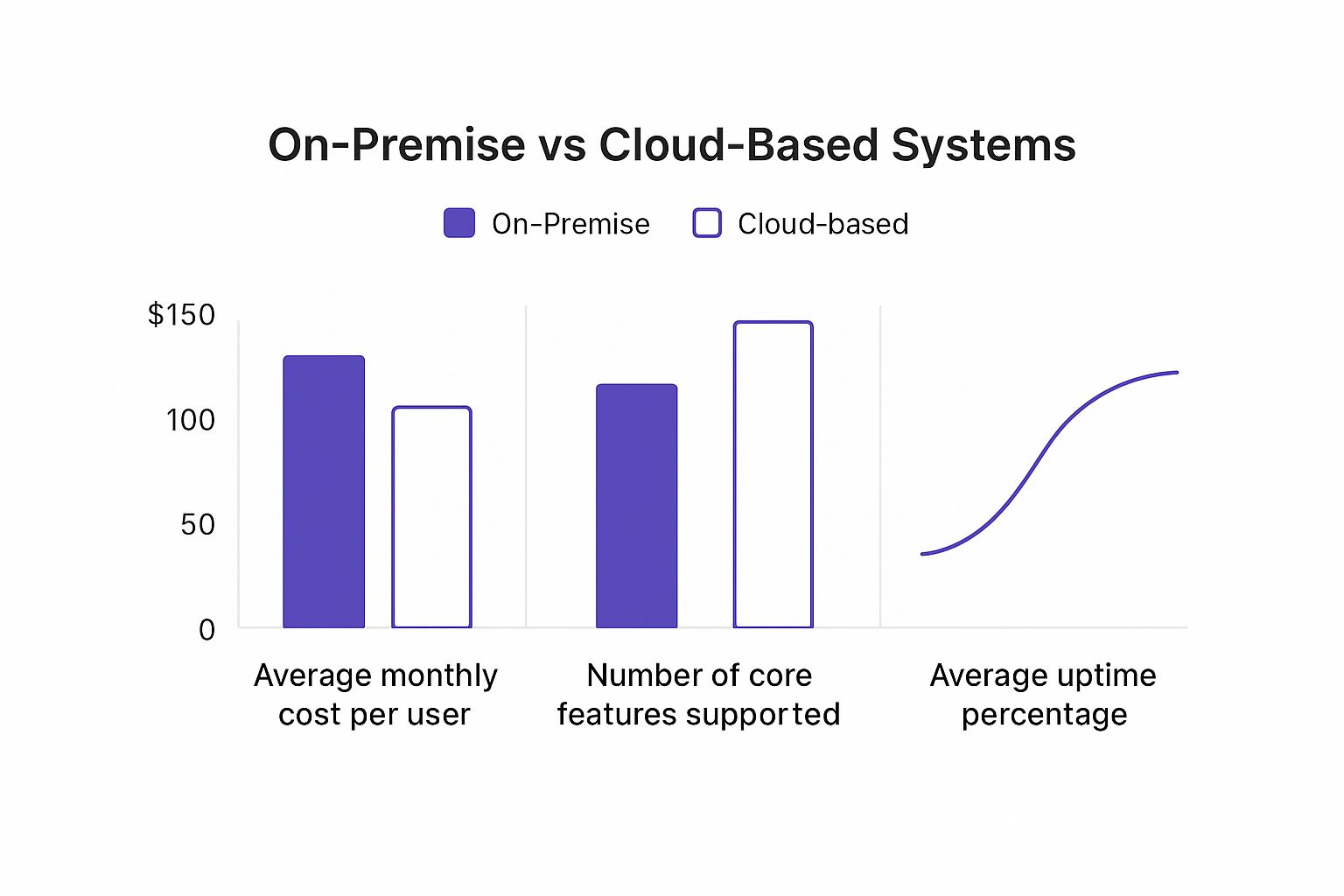
It’s pretty clear that cloud systems just make more sense for most home service companies these days, offering way more bang for your buck without the headaches of old hardware.
RingCentral: The All-In-One Command Center
RingCentral isn’t just a phone system; it’s a full-blown communications platform. It wraps up voice, video, team chat, and texting into one powerful application. This "all-in-one" approach is a godsend for larger or fast-growing service companies that need one central place to manage everything. Think of it as the Swiss Army knife for your business communications.
If you run a company with separate divisions, say for plumbing and HVAC, RingCentral's smart call routing is a game-changer. You can set up an automated attendant that guides customers ("Press 1 for plumbing, Press 2 for HVAC") and sends their call to the right team or even the specific tech who's on call. That kind of organization is what stops you from losing leads and frustrating customers.
But all that power comes with a bit of a learning curve. Making a basic call is easy, but if you want to really tap into its deep analytics or call monitoring tools, be prepared to spend some time learning the ropes. For a wider view of what's out there, a good small business phone systems comparison can put these differences into perspective.
What sets it apart? RingCentral’s strength is its sheer depth. It’s built for service businesses that want to manage multiple teams and complex workflows from a single, unified dashboard packed with data.
One thing to watch out for is texting. RingCentral plans have monthly SMS limits for each user, and a busy team sending out appointment reminders and "on my way" texts can burn through that allowance fast. If you’re not careful, you could get hit with surprise overage fees.
Nextiva: The Customer-Focused Workhorse
Nextiva is a fantastic, well-rounded cloud phone system that really puts a premium on being easy to use and having great customer support. While it has plenty of powerful tools, its interface just feels cleaner and less intimidating than some of its competitors. It's the perfect choice for a business that wants robust features without needing to send the whole team to a training seminar.
The platform nails the fundamentals of call handling. Its desktop and mobile apps make it dead simple to manage calls, check voicemails, and message your team. Setting up things like call forwarding or adding a new team member's extension is a breeze. For a mid-sized electrical company, Nextiva has all the core tools you need to keep operations running smoothly day in and day out.
The move to cloud-based systems has been a seismic shift. VoIP phone systems have completely changed how businesses communicate, and their adoption has skyrocketed. In fact, about 31% of all businesses are now on VoIP, and that usage jumped by a staggering 212% during the pandemic as everyone scrambled for better remote work tools.
What sets it apart? Nextiva finds that sweet spot between powerful features and genuine ease of use, all backed by rock-solid customer service. It’s a reliable workhorse for teams who need a system that just works, no fuss.
Where Nextiva might not measure up for some is its integrations. Compared to others that connect to hundreds of third-party apps, Nextiva’s list is shorter. If your business lives and dies by a specific field service management (FSM) software or a niche CRM, you'll definitely want to double-check that it can connect before you sign up.
OpenPhone: The Mobile-First Innovator
OpenPhone was built from the ground up for the modern, mobile-first small business. It ditches the overwhelming complexity of old-school enterprise systems and focuses on what agile crews need most: shared phone numbers, killer SMS features, and a ridiculously simple interface. This makes it an amazing fit for smaller plumbing shops, solo electricians, or any service business where the office is wherever you happen to be.
Its killer feature is the shared number. Your whole team can call and text from a single business line. The dispatcher in the office and the tech in the field can both use the same number at the same time, and every conversation is organized in one shared inbox. This is a total game-changer for coordinating jobs and making sure every customer gets a consistent experience.
Picture a two-person HVAC crew. The owner can handle the initial inquiry with a customer via text, and the technician can see that entire conversation history before they even pull up to the house. That shared context gets rid of all the "he said, she said" confusion that can make small operations look unprofessional.
What sets it apart? OpenPhone's simplicity and incredible shared number feature make it the go-to for small, nimble service teams that basically live on their smartphones and communicate with customers heavily through text.
The trade-off for that beautiful simplicity is a lack of some of the high-end features you'll find on bigger platforms. OpenPhone doesn't do video conferencing, and its reporting is pretty basic. It’s also a "softphone-only" system, meaning you can't plug in a physical desk phone. If your business needs detailed call reports, video meetings, or traditional office hardware, you'll have to look elsewhere.
Feature and Pricing Comparison of Top Business Phone Systems
Sometimes, seeing it all laid out side-by-side makes the decision clearer. Here’s a breakdown of how our three contenders stack up on the points that matter most to a home service business.
| Provider | Core Feature Highlight | Starting Price (Per User/Month) | Best For | Integration Capability |
|---|---|---|---|---|
| RingCentral | All-in-one platform with advanced call routing, video, and team messaging. | ~$20 (with annual billing) | Larger, multi-department service companies needing a unified command center. | Extensive, with hundreds of pre-built integrations for CRMs and other business tools. |
| Nextiva | User-friendly interface with strong call management and excellent customer support. | ~$15 (with annual billing) | Mid-sized businesses that need a reliable, easy-to-use system without a steep learning curve. | Limited but growing, covering major platforms like Salesforce and HubSpot. |
| OpenPhone | Shared phone numbers for team collaboration and powerful, unlimited SMS. | ~$15 (with annual billing) | Small, mobile-first teams and solo operators who prioritize texting and simplicity. | Good, with a focus on modern tools like Slack, Zapier, and HubSpot. |
At the end of the day, the right choice in this business phone system comparison comes down to your company's size, your daily workflow, and what you value most. RingCentral brings scalable power, Nextiva offers balanced reliability, and OpenPhone delivers pure mobile simplicity. Match their strengths to your needs, and you'll find a system that doesn't just solve problems—it helps you grow.
Putting Phone Systems to the Test in the Real World

A features list is one thing, but it doesn't tell you how a phone system will hold up under pressure. The real test is how it handles the chaotic, day-to-day situations your service company actually faces. This is where features on a page turn into either profits or major problems.
Let's get past the spec sheets and drop these systems into a few high-stakes scenarios. Seeing how each tool performs in context will paint a much clearer picture of which one truly fits how you work.
Scenario 1: The After-Hours Plumbing Emergency
Picture this: it’s 2 a.m., and a homeowner is frantically calling about a burst pipe flooding their basement. This is a high-value emergency job you absolutely can't afford to miss. Your office is dark, and your dispatcher is fast asleep.
In this moment, a system with a smart auto-attendant (IVR) and intelligent call routing becomes your most valuable player.
-
A system like RingCentral: Its multi-level auto-attendant picks up instantly. The customer hears, "For a new emergency, press 1." The moment they do, the system's time-based rules kick in, bypassing the main office line and sending the call straight to the on-call plumber's cell phone. The job is secured in minutes.
-
A more basic setup: This system would likely just dump the call into a standard office voicemail. By the time your team checks messages at 8 a.m., that desperate customer has already called three of your competitors, and the job is long gone.
The Takeaway: If you offer 24/7 emergency services, the ability to automatically route critical calls after hours isn't a nice-to-have. It’s a core function that protects thousands of dollars in potential revenue.
Scenario 2: Dispatching a 15-Technician HVAC Team
Now, let's think about a busy Monday morning. You’ve got 15 HVAC techs out in the field and a new installation job just got the green light. You need to assign it, get the address to the right person, and share customer notes—all without a dozen back-and-forth phone calls.
This is where a solid mobile app and built-in team messaging really shine. A system that keeps field communication clean is what separates an efficient day from a chaotic one.
-
A system like Nextiva or RingCentral: The dispatcher hops on the desktop app and creates a dedicated group chat for the job. They add the technicians, drop in the work order PDF, and pin the address. Every tech gets an instant notification on their phone, can ask questions right in the chat, and update their status in real-time. No confusion.
-
A system like OpenPhone: While it’s great for texting with customers from a shared number, coordinating a large internal team can get clunky. You might find yourself relying on messy group texts, which fall apart when you need to share files or track tasks for a complex job.
It’s also worth noting how important strong mobile apps are for your office staff. They're essential for mastering remote customer support and giving your team the flexibility to work from anywhere.
Scenario 3: Scaling a Growing Electrical Business
Your electrical company is taking off. You started as a one-person show, but now you have a team of five and plans to hire more. You need a phone system that can grow with you, not one that demands a huge upfront investment or locks you into features you won't use for years.
This is all about scalable pricing and flexible feature tiers. You want a provider that makes it dead simple to add a new user and a new line without a ton of paperwork or ridiculous fees.
-
A system like OpenPhone: With its simple per-user, per-month pricing, adding a new electrician takes just a few clicks. The cost scales predictably. Plus, its straightforward feature set means a five-person team isn't overpaying for enterprise-level tools they don't need.
-
An older, contract-based system: This kind of provider might force you into a long-term contract and make you buy user licenses in blocks of 10. If you're a team of six, you're stuck paying for four empty seats. That's cash that could be going toward tools, marketing, or another truck.
Understanding the Total Cost of Ownership
When you're comparing business phone systems, the monthly per-user price jumps out first. But that sticker price? It's often just the tip of the iceberg. To really understand what you'll be spending, you need to look at the Total Cost of Ownership (TCO), which covers every single direct and indirect expense that can crop up.
A low monthly fee is tempting, but it can easily hide other mandatory charges. Honestly, overlooking these hidden costs is one of the biggest budgeting mistakes a home service business can make. A system that looks like a bargain at first might end up being the most expensive option in the long run.
Beyond the Per-User Fee
Think of the monthly subscription as your starting point, not the finish line. To build a realistic budget, you have to dig into all the potential extra costs that aren't splashed across the pricing page. It really comes down to asking the right questions before you sign on the dotted line.
Here are the key areas I always tell people to press providers on:
- Hardware Costs: Are your techs and office staff going to use physical desk phones, or can everyone run the system from an app on their computers and smartphones? A single desk phone can cost anywhere from $50 to over $300.
- One-Time Setup Fees: Some providers hit you with a fee just to get your account configured and running. This can be a surprise chunk of change right at the start.
- Number Porting and Acquisition: Will they charge you to bring your existing business number over? What if you want to add new local or toll-free numbers for different marketing campaigns?
The Price of Premium Features
This is a big one. Many of the features that are truly valuable for a service company—like call analytics or specific CRM integrations—are often locked away in higher-priced plans or sold as pricey add-ons. A basic plan might not include call recording or detailed reports, forcing you into an upgrade that balloons your monthly bill.
The real cost of a phone system isn't just the monthly fee. It's what you pay for the specific tools your service business actually needs to run smoothly and grow.
We're seeing this more and more as cloud-based phone systems take over. The market is clearly shifting away from on-site hardware, with managed IP PBX projected to pull in around $80 billion in revenue by 2025. You can dig into more business phone system statistics to see how this trend is playing out. For you, this means more powerful features are available, but you have to be smart about which ones you pay for to keep your total cost in check.
How to Choose the Right Phone System for Your Business
Alright, you've seen the comparisons and weighed the features. Now comes the hard part: making the final call. The truth is, there's no single "best" phone system for every single service company out there. What works for a ten-truck plumbing outfit might be total overkill for a two-person electrical team. The right choice really boils down to your team's size, how you actually operate day-to-day, and where you plan to be in a few years.
Instead of just giving you a generic recommendation, let's look at this from a practical standpoint. I'll walk you through a few common scenarios. See which one sounds most like your business—it'll point you toward the system that's built to solve your specific headaches.
Situational Recommendations for Your Service Business
Your business model is the best roadmap you have for this decision. Are you juggling multiple crews and departments, or are you a tight-knit, mobile-first team? Each setup requires a completely different set of communication tools.
Think about which of these profiles fits your company best:
-
You need an all-in-one platform for a large, complex team: If you're managing different divisions (like HVAC and plumbing) under one roof and need everything—video meetings, sophisticated call routing, team chat—all in one package, a powerhouse like RingCentral is probably your best bet. Its features are deep enough to keep even the most complicated operations organized from a single dashboard.
-
You're a mobile-first crew that lives on text messages: For smaller, nimble teams that do most of their work from their smartphones and rely heavily on texting with customers, a system like OpenPhone is a serious contender. Its shared number functionality is a game-changer for coordinating jobs and keeping client conversations consistent, all without getting bogged down in complexity.
-
Seamless software integration is your #1 priority: When your entire operation runs on a specific field service management (FSM) or CRM platform, your phone system absolutely must play nice with it. No exceptions. Start your search by looking at providers known for their extensive app marketplaces to make sure your new phone system will plug right into the tools you already depend on.
The real goal here is to match the phone system’s core strengths to your operational reality. A system that’s brilliant for mobile texting is a terrible fit for a company running a dedicated call center, just as a complex enterprise platform is a waste of money for a two-person crew.
Your Final Decision-Making Checklist
Before you sign on the dotted line, run through this quick gut check. Answering these questions will help you feel confident that you’ve covered all the angles and are picking a system that truly aligns with your budget, workflow, and future ambitions.
- Scalability: Can this system grow with you? Think about adding more technicians or office staff down the road. Will it be easy and affordable?
- Mobility: Does the mobile app actually have everything your field team needs to do their job, or is it a watered-down version of the desktop app?
- Total Cost: Have you looked past the per-user monthly fee? Be sure you've accounted for any setup fees, phone number porting costs, or add-ons.
- Integration: Will it connect smoothly with the critical software you use every single day? Test it if you can.
Frequently Asked Questions
Choosing a new phone system for your service business can bring up a lot of questions. We get it. You're busy running your company, not studying telecommunications. Here are some straightforward answers to the questions we hear most often.
Can I Keep My Current Business Phone Number?
Yes, absolutely. You won't lose the number your customers have been calling for years. The process is called number porting, and every legitimate provider handles it for you.
Basically, you authorize your new provider to transfer (or "port") your number from your old carrier. It can take a few weeks, but it's a behind-the-scenes process that ensures a smooth transition without losing your established business identity.
Pro Tip: Porting your number is a standard procedure, but don't leave it to the last minute. Kick off the porting process as soon as you sign up with your new provider to avoid any gap in service.
What Equipment Do My Technicians Need in the Field?
This is one of the best parts of modern phone systems. Your techs in the field only need one thing: their smartphone.
Every modern VoIP provider has a mobile app that essentially turns your technician's cell phone into a full-fledged business line. They can make and take calls from the main company number, text customers with updates, and communicate with the office, all without giving out their personal cell number. No more clunky hardware in the truck.
For the office, your dispatchers or CSRs can use a headset with their computer (often called a "softphone") or a physical VoIP desk phone if you prefer that traditional feel.
How Hard Is It to Switch from a Landline?
It’s much easier than you probably think. Moving from an old-school landline to a VoIP system is almost entirely a digital process. After picking a provider, you'll log into an online portal to set up your call flows, business hours, and voicemail—no technical wizardry required.
The only real "waiting game" is the number porting process we talked about earlier, but your new provider does all the heavy lifting on that front.
Ready to stop missing calls and start booking more jobs? Phone Staffer can hire, train, and place expert CSRs and VAs into your business to ensure your phones get answered and your leads get converted. Learn more about how Phone Staffer can help.